MacDrive 98 conquers Mac-PC barrier

MacDrive 98 configures PCs to read files on Macintosh disks and even use certain compatible ones, without any network acrobatics.

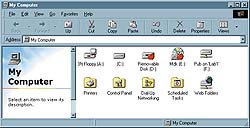
What you can do is load your Windows system with files created in, say, Microsoft Excel on a Mac and saved on a Mac disk. You can also read the disk contents, though you might not be able to do anything to them.I saved a Microsoft Word file on a Mac floppy from a Mac computer and then opened it using Word on a PC. After making changes, I saved the file and took it back successfully to the original Mac.When I tried putting a Mac-formatted CD-ROM into the PC drive, at first I could not see the contents. Then I discovered it was necessary to go into the MacDrive menu and enable CD reading, then reboot. Don't believe the manual, which says you can put a Mac disk into any drive and it will work. The manual also cutely suggests that you review it again if you run into problems. The company would have been smarter to advise users that CD-ROMs are an exception.Once the program was configured to use the CD-ROM drive, my PC did read Mac CDs. I could even run movies and other files off a CD, although I was not able to use its program.MacDrive 98 impressed me most in its ability to read an Iomega Zip disk full of Mac graphics and art files. Ordinarily my computer could never have done such a thing, but they opened just as if they were on a PC-formatted disk. MacDrive 98 generated a preview, and I opened the files using my imaging software.Mac disks appear on the PC screen as little Apple icons, so you can tell at a glance which disks are fully readable and which are good only for transferring files.MacDrive 98 is small'it takes up less than 2M'and installs from one disk. It does not work with low-density Mac floppies of 400K and 800K capacity because of their physical characteristics.For mixed PC-Mac environments, MacDrive 98 is a needed tool. It's generally faster than an integrated network, and if you have yet to set one up, it might eliminate the need altogether.

By John Breeden II

GCN Staff

MacDrive 98 configures PCs to read files on Macintosh disks and even use certain compatible ones, without any network acrobatics.

Administrators have always needed considerable skill to configure a mixed network of PCs and Macs that can share files.


The physical location of the computers matters, as does the cable length between systems. Getting the diametrically opposed operating systems to chat is also a chore.

Apple Computer Inc. made the first strides in this area by putting special software in its systems to read PC-formatted disks. Some powerful Apple computers can run full versions of Microsoft Windows 98 underneath Mac OS, though the resource requirements are high.

Inserting a Mac disk into a PC drive, however, has been about as efficacious as inserting a slice of bologna.

I doubt that MacDrive 98 will eliminate troubleshooting on mixed networks, but it does supply the missing link for sharing files.

MacDrive 98 does not do as much as a PowerPC Mac; you cannot run Mac programs on PCs with it.


MacDrive 98 takes up less than 2M and installs from one disk. It lets PCs read Mac-formatted disks and CD-ROMs'after users change menu options and reboot.


Fluent language


BOX SCORE''''''

MacDrive 98

Mac-to-PC disk translator


Media4 Productions Inc.;

West Des Moines, Iowa;

tel. 515-225-7409

www.media4.com

Price: $65 for Web download


+Reads Mac files on PCs

+Works with various disk types

+Tiny size

'Can't read low-density Mac floppies

Real-life requirements:

Win9x or NT, 2M of free storage, floppy drive or Web access for installation


NEXT STORY: Horn, GAO plot security agenda

X
This website uses cookies to enhance user experience and to analyze performance and traffic on our website. We also share information about your use of our site with our social media, advertising and analytics partners. Learn More / Do Not Sell My Personal Information
Accept Cookies
X
Cookie Preferences Cookie List

Do Not Sell My Personal Information

When you visit our website, we store cookies on your browser to collect information. The information collected might relate to you, your preferences or your device, and is mostly used to make the site work as you expect it to and to provide a more personalized web experience. However, you can choose not to allow certain types of cookies, which may impact your experience of the site and the services we are able to offer. Click on the different category headings to find out more and change our default settings according to your preference. You cannot opt-out of our First Party Strictly Necessary Cookies as they are deployed in order to ensure the proper functioning of our website (such as prompting the cookie banner and remembering your settings, to log into your account, to redirect you when you log out, etc.). For more information about the First and Third Party Cookies used please follow this link.

Allow All Cookies

Manage Consent Preferences

Strictly Necessary Cookies - Always Active

We do not allow you to opt-out of our certain cookies, as they are necessary to ensure the proper functioning of our website (such as prompting our cookie banner and remembering your privacy choices) and/or to monitor site performance. These cookies are not used in a way that constitutes a “sale” of your data under the CCPA. You can set your browser to block or alert you about these cookies, but some parts of the site will not work as intended if you do so. You can usually find these settings in the Options or Preferences menu of your browser. Visit www.allaboutcookies.org to learn more.

Sale of Personal Data, Targeting & Social Media Cookies

Under the California Consumer Privacy Act, you have the right to opt-out of the sale of your personal information to third parties. These cookies collect information for analytics and to personalize your experience with targeted ads. You may exercise your right to opt out of the sale of personal information by using this toggle switch. If you opt out we will not be able to offer you personalised ads and will not hand over your personal information to any third parties. Additionally, you may contact our legal department for further clarification about your rights as a California consumer by using this Exercise My Rights link

If you have enabled privacy controls on your browser (such as a plugin), we have to take that as a valid request to opt-out. Therefore we would not be able to track your activity through the web. This may affect our ability to personalize ads according to your preferences.

Targeting cookies may be set through our site by our advertising partners. They may be used by those companies to build a profile of your interests and show you relevant adverts on other sites. They do not store directly personal information, but are based on uniquely identifying your browser and internet device. If you do not allow these cookies, you will experience less targeted advertising.

Social media cookies are set by a range of social media services that we have added to the site to enable you to share our content with your friends and networks. They are capable of tracking your browser across other sites and building up a profile of your interests. This may impact the content and messages you see on other websites you visit. If you do not allow these cookies you may not be able to use or see these sharing tools.

If you want to opt out of all of our lead reports and lists, please submit a privacy request at our Do Not Sell page.

Save Settings
Cookie Preferences Cookie List

Cookie List

A cookie is a small piece of data (text file) that a website – when visited by a user – asks your browser to store on your device in order to remember information about you, such as your language preference or login information. Those cookies are set by us and called first-party cookies. We also use third-party cookies – which are cookies from a domain different than the domain of the website you are visiting – for our advertising and marketing efforts. More specifically, we use cookies and other tracking technologies for the following purposes:

Strictly Necessary Cookies

We do not allow you to opt-out of our certain cookies, as they are necessary to ensure the proper functioning of our website (such as prompting our cookie banner and remembering your privacy choices) and/or to monitor site performance. These cookies are not used in a way that constitutes a “sale” of your data under the CCPA. You can set your browser to block or alert you about these cookies, but some parts of the site will not work as intended if you do so. You can usually find these settings in the Options or Preferences menu of your browser. Visit www.allaboutcookies.org to learn more.

Functional Cookies

We do not allow you to opt-out of our certain cookies, as they are necessary to ensure the proper functioning of our website (such as prompting our cookie banner and remembering your privacy choices) and/or to monitor site performance. These cookies are not used in a way that constitutes a “sale” of your data under the CCPA. You can set your browser to block or alert you about these cookies, but some parts of the site will not work as intended if you do so. You can usually find these settings in the Options or Preferences menu of your browser. Visit www.allaboutcookies.org to learn more.

Performance Cookies

We do not allow you to opt-out of our certain cookies, as they are necessary to ensure the proper functioning of our website (such as prompting our cookie banner and remembering your privacy choices) and/or to monitor site performance. These cookies are not used in a way that constitutes a “sale” of your data under the CCPA. You can set your browser to block or alert you about these cookies, but some parts of the site will not work as intended if you do so. You can usually find these settings in the Options or Preferences menu of your browser. Visit www.allaboutcookies.org to learn more.

Sale of Personal Data

We also use cookies to personalize your experience on our websites, including by determining the most relevant content and advertisements to show you, and to monitor site traffic and performance, so that we may improve our websites and your experience. You may opt out of our use of such cookies (and the associated “sale” of your Personal Information) by using this toggle switch. You will still see some advertising, regardless of your selection. Because we do not track you across different devices, browsers and GEMG properties, your selection will take effect only on this browser, this device and this website.

Social Media Cookies

We also use cookies to personalize your experience on our websites, including by determining the most relevant content and advertisements to show you, and to monitor site traffic and performance, so that we may improve our websites and your experience. You may opt out of our use of such cookies (and the associated “sale” of your Personal Information) by using this toggle switch. You will still see some advertising, regardless of your selection. Because we do not track you across different devices, browsers and GEMG properties, your selection will take effect only on this browser, this device and this website.

Targeting Cookies

We also use cookies to personalize your experience on our websites, including by determining the most relevant content and advertisements to show you, and to monitor site traffic and performance, so that we may improve our websites and your experience. You may opt out of our use of such cookies (and the associated “sale” of your Personal Information) by using this toggle switch. You will still see some advertising, regardless of your selection. Because we do not track you across different devices, browsers and GEMG properties, your selection will take effect only on this browser, this device and this website.