
ScreenPro monitor utility helps make bigger better

Bigger is better, at least for monitors. The jumbo ones are easier to read, can fit bigger images on a screen and let you work in several applications at once.

By John Breeden IIGCN StaffBigger is better, at least for monitors. The jumbo ones are easier to read, can fit bigger images on a screen and let you work in several applications at once.Now that the processing power of the typical desktop PC has shot through the roof, truly productive multitasking is possible.But juggling all the applications is no breeze. Even if the computer can handle the strain, your eyes sometimes cannot. Sizing and resizing the multiple windows becomes a daily pain.ScreenPro, a utility developed by Cornerstone Peripherals, a pioneer in large imaging monitors, will work with any monitor and graphics card. It sets up the big screen with frequently used applications arranged in neat windows.The utility is a free download from the Web, at , but you have to fill out a pretty extensive form to get it.I tested it with several monitors, none made by Cornerstone. The program was easy to operate and quite useful. I opened up all the applications I might need during the day, then clicked ScreenPro's icon on the task bar.It gave me a choice of templates for configuring the screen, putting an Internet browser, say, in a large window and a word processor and spreadsheet in smaller ones. When I was done, everything went neatly to its assigned place.ScreenPro has a choice of six templates, most with either four or five open windows. Each template is significantly different from the others, though I would have liked to see a split-screen design.The fewest number of windows you can have open is three, and even on the largest monitor, six open windows gets to be a bit much.Once the layout is configured, you can still minimize and move windows if you choose. Copying images or files among programs with open windows is quite easy.For the most part, you simply drag and drop files once you have all your ducks in a row.Several small features make ScreenPro easy and useful. Say you need to get at a program icon sitting behind all the neatly configured windows. Simply click the Minimize All button, and the open programs will revert back to icons so you can see the rest of the system.Although ScreenPro works with any monitor, you need a 19-inch or larger screen to take complete advantage of the layout utility.I tried it on 14- and 17-inch screens, and the windows it drew were too small.It's helpful to set the big monitor to a high resolution, as lower resolutions fit less data into the smaller windows. Even on a 19-inch screen, some windows will not have enough viewing room, especially with six windows open.On a 21-inch screen, though, you can spread out and multitask to your heart's content.


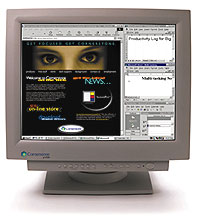
Cornerstone's ScreenPro assigns applications to user-selected real estate on big monitors. Only the largest ones receive the full advantage the layout utility provides.


Layout utility works with any monitor and graphics card to make sizing, resizing windows simpler


www.bigmonitors.com


Close the windows


Box Score ''''''''
ScreenPro

Layout utility for large monitors


Cornerstone Peripherals Technology Inc.;

Fremont, Calif.;

tel. 800-562-2552

www.bigmonitors.com

Price: Free download


+ ' Makes good use of extra real estate on large monitors

+ ' Free and compatible with any monitor

' ' Templates tend to put programs in
too-small windows


Real-life requirements:

19-inch or larger monitor, Windows 9x or NT


X
This website uses cookies to enhance user experience and to analyze performance and traffic on our website. We also share information about your use of our site with our social media, advertising and analytics partners. Learn More / Do Not Sell My Personal Information
Accept Cookies
X
Cookie Preferences Cookie List

Do Not Sell My Personal Information

When you visit our website, we store cookies on your browser to collect information. The information collected might relate to you, your preferences or your device, and is mostly used to make the site work as you expect it to and to provide a more personalized web experience. However, you can choose not to allow certain types of cookies, which may impact your experience of the site and the services we are able to offer. Click on the different category headings to find out more and change our default settings according to your preference. You cannot opt-out of our First Party Strictly Necessary Cookies as they are deployed in order to ensure the proper functioning of our website (such as prompting the cookie banner and remembering your settings, to log into your account, to redirect you when you log out, etc.). For more information about the First and Third Party Cookies used please follow this link.

Allow All Cookies

Manage Consent Preferences

Strictly Necessary Cookies - Always Active

We do not allow you to opt-out of our certain cookies, as they are necessary to ensure the proper functioning of our website (such as prompting our cookie banner and remembering your privacy choices) and/or to monitor site performance. These cookies are not used in a way that constitutes a “sale” of your data under the CCPA. You can set your browser to block or alert you about these cookies, but some parts of the site will not work as intended if you do so. You can usually find these settings in the Options or Preferences menu of your browser. Visit www.allaboutcookies.org to learn more.

Sale of Personal Data, Targeting & Social Media Cookies

Under the California Consumer Privacy Act, you have the right to opt-out of the sale of your personal information to third parties. These cookies collect information for analytics and to personalize your experience with targeted ads. You may exercise your right to opt out of the sale of personal information by using this toggle switch. If you opt out we will not be able to offer you personalised ads and will not hand over your personal information to any third parties. Additionally, you may contact our legal department for further clarification about your rights as a California consumer by using this Exercise My Rights link

If you have enabled privacy controls on your browser (such as a plugin), we have to take that as a valid request to opt-out. Therefore we would not be able to track your activity through the web. This may affect our ability to personalize ads according to your preferences.

Targeting cookies may be set through our site by our advertising partners. They may be used by those companies to build a profile of your interests and show you relevant adverts on other sites. They do not store directly personal information, but are based on uniquely identifying your browser and internet device. If you do not allow these cookies, you will experience less targeted advertising.

Social media cookies are set by a range of social media services that we have added to the site to enable you to share our content with your friends and networks. They are capable of tracking your browser across other sites and building up a profile of your interests. This may impact the content and messages you see on other websites you visit. If you do not allow these cookies you may not be able to use or see these sharing tools.

If you want to opt out of all of our lead reports and lists, please submit a privacy request at our Do Not Sell page.

Save Settings
Cookie Preferences Cookie List

Cookie List

A cookie is a small piece of data (text file) that a website – when visited by a user – asks your browser to store on your device in order to remember information about you, such as your language preference or login information. Those cookies are set by us and called first-party cookies. We also use third-party cookies – which are cookies from a domain different than the domain of the website you are visiting – for our advertising and marketing efforts. More specifically, we use cookies and other tracking technologies for the following purposes:

Strictly Necessary Cookies

We do not allow you to opt-out of our certain cookies, as they are necessary to ensure the proper functioning of our website (such as prompting our cookie banner and remembering your privacy choices) and/or to monitor site performance. These cookies are not used in a way that constitutes a “sale” of your data under the CCPA. You can set your browser to block or alert you about these cookies, but some parts of the site will not work as intended if you do so. You can usually find these settings in the Options or Preferences menu of your browser. Visit www.allaboutcookies.org to learn more.

Functional Cookies

We do not allow you to opt-out of our certain cookies, as they are necessary to ensure the proper functioning of our website (such as prompting our cookie banner and remembering your privacy choices) and/or to monitor site performance. These cookies are not used in a way that constitutes a “sale” of your data under the CCPA. You can set your browser to block or alert you about these cookies, but some parts of the site will not work as intended if you do so. You can usually find these settings in the Options or Preferences menu of your browser. Visit www.allaboutcookies.org to learn more.

Performance Cookies

We do not allow you to opt-out of our certain cookies, as they are necessary to ensure the proper functioning of our website (such as prompting our cookie banner and remembering your privacy choices) and/or to monitor site performance. These cookies are not used in a way that constitutes a “sale” of your data under the CCPA. You can set your browser to block or alert you about these cookies, but some parts of the site will not work as intended if you do so. You can usually find these settings in the Options or Preferences menu of your browser. Visit www.allaboutcookies.org to learn more.

Sale of Personal Data

We also use cookies to personalize your experience on our websites, including by determining the most relevant content and advertisements to show you, and to monitor site traffic and performance, so that we may improve our websites and your experience. You may opt out of our use of such cookies (and the associated “sale” of your Personal Information) by using this toggle switch. You will still see some advertising, regardless of your selection. Because we do not track you across different devices, browsers and GEMG properties, your selection will take effect only on this browser, this device and this website.

Social Media Cookies

We also use cookies to personalize your experience on our websites, including by determining the most relevant content and advertisements to show you, and to monitor site traffic and performance, so that we may improve our websites and your experience. You may opt out of our use of such cookies (and the associated “sale” of your Personal Information) by using this toggle switch. You will still see some advertising, regardless of your selection. Because we do not track you across different devices, browsers and GEMG properties, your selection will take effect only on this browser, this device and this website.

Targeting Cookies

We also use cookies to personalize your experience on our websites, including by determining the most relevant content and advertisements to show you, and to monitor site traffic and performance, so that we may improve our websites and your experience. You may opt out of our use of such cookies (and the associated “sale” of your Personal Information) by using this toggle switch. You will still see some advertising, regardless of your selection. Because we do not track you across different devices, browsers and GEMG properties, your selection will take effect only on this browser, this device and this website.


