
Norton AntiVirus 6 for Mac stays on guard

Version 6.0 of the popular Norton AntiVirus package for the Apple Macintosh is a fast and easy route to always-on protection from known, unknown and macro viruses.

The options are detailed, but except as noted below, most default settings should be left in place. There's plenty of guidance in addition to the booklet: succinct balloon help, a reference guide on the CD and Apple Guide files with definitions of terms. That's all pretty basic, however; there's little to steer a novice through the more advanced options.You can leave Auto-Protect on to check continuously for viruses, clicking it off only to avoid interruptions during other software installations. Auto-Protect ignores compressed files, and manual scans will do the same unless you change the Compression option. Users of utilities such as Aladdin's StuffIt Expander, and those who save Internet downloads, should consider making an initial scan of all compressed items.Compression does significantly increase scan time, however, and I found Norton AntiVirus wasted time trying to decompress already decompressed files.Users might wish to change the SafeZone setting.For greatest protection, the entire computer can be designated a SafeZone, so that every copied or downloaded file is scanned. AntiVirus works fast enough that the scanning is not intrusive. Files are checked only once, and even a new 10M file scans in about five seconds.Auto-Protect runs in background. For full scans, launching Norton AntiVirus will bring up a simple directory view to select files and folders individually.The program generates a list of any files that caused scan problems. Take note: Deleting a file from this list will erase it from the hard drive completely.Although you might well want to erase an infected file, it would be safer if Norton AntiVirus simply moved deleted files to the Trash, as happens in the file selection view. A history file shows results of previous scans, and any information deleted from this list will be gone forever, too.The initial scan of my test system ran into trouble with Adobe Photoshop. An error message claimed there was not enough memory, even though other, larger application files scanned fine.According to the package's Help, such an error could indicate file corruption. But once Norton AntiVirus was on the hard drive, increasing its memory allocation from 4M to 5M in the Get Info window stopped the error.Norton AntiVirus 6.0 is significantly faster than the previous version. A full initial scan of 4.5G of files, including compressed ones, took me 52 minutes with Version 5 but only 31 minutes with Version 6. Subsequent scans go faster, depending on the number of new or changed files.The package price includes one'years subscription to updates from Symantec's Web site, , downloaded by the improved LiveUpdate application. I updated to Norton AntiVirus 6.0.1 with LiveUpdate.Getting the latest virus definitions via LiveUpdate will keep the system on guard against oncoming threats. The Mac requires a restart after updates are installed. Automatic, periodic downloads are easy to schedule for systems that are always connected to the Internet.

By Joel Sparks

Special to GCN

Version 6.0 of the popular Norton AntiVirus package for the Apple Macintosh is a fast and easy route to always-on protection from known, unknown and macro viruses.

The installation takes only a few steps, detailed in a booklet tucked into the CD-ROM case. After restarting the Mac from the CD, allow 15 to 20 minutes for an initial virus scan. Installation then takes only a minute, followed by another restart to begin ongoing virus protection.
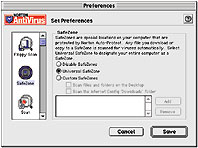

The entire Mac can become a SafeZone in which everything is autoscanned.


Box Score '''''''''''''

Norton AntiVirus 6.0 for Macintosh

Fast, always-on virus protection


Symantec Corp.; Cupertino, Calif.;

tel. 408-253-9600

www.symantec.com/nav/nav_mac

Price: $70.53 GSA; $29 upgrade from previous version

+ Auto-Protect for constant surveillance

+ Faster full scans than with previous version

+ One year of free updates

Real-life requirements:

Mac OS 8.0 or later version, PowerPC Processor, 24M of RAM, 10M free storage, CD-ROM drive, Internet connection for LiveUpdate


Move to trash


www symantec.com


Joel Sparks, a free-lance reviewer in Silver Spring, Md., has been a government lawyer and database programmer.
X
This website uses cookies to enhance user experience and to analyze performance and traffic on our website. We also share information about your use of our site with our social media, advertising and analytics partners. Learn More / Do Not Sell My Personal Information
Accept Cookies
X
Cookie Preferences Cookie List

Do Not Sell My Personal Information

When you visit our website, we store cookies on your browser to collect information. The information collected might relate to you, your preferences or your device, and is mostly used to make the site work as you expect it to and to provide a more personalized web experience. However, you can choose not to allow certain types of cookies, which may impact your experience of the site and the services we are able to offer. Click on the different category headings to find out more and change our default settings according to your preference. You cannot opt-out of our First Party Strictly Necessary Cookies as they are deployed in order to ensure the proper functioning of our website (such as prompting the cookie banner and remembering your settings, to log into your account, to redirect you when you log out, etc.). For more information about the First and Third Party Cookies used please follow this link.

Allow All Cookies

Manage Consent Preferences

Strictly Necessary Cookies - Always Active

We do not allow you to opt-out of our certain cookies, as they are necessary to ensure the proper functioning of our website (such as prompting our cookie banner and remembering your privacy choices) and/or to monitor site performance. These cookies are not used in a way that constitutes a “sale” of your data under the CCPA. You can set your browser to block or alert you about these cookies, but some parts of the site will not work as intended if you do so. You can usually find these settings in the Options or Preferences menu of your browser. Visit www.allaboutcookies.org to learn more.

Sale of Personal Data, Targeting & Social Media Cookies

Under the California Consumer Privacy Act, you have the right to opt-out of the sale of your personal information to third parties. These cookies collect information for analytics and to personalize your experience with targeted ads. You may exercise your right to opt out of the sale of personal information by using this toggle switch. If you opt out we will not be able to offer you personalised ads and will not hand over your personal information to any third parties. Additionally, you may contact our legal department for further clarification about your rights as a California consumer by using this Exercise My Rights link

If you have enabled privacy controls on your browser (such as a plugin), we have to take that as a valid request to opt-out. Therefore we would not be able to track your activity through the web. This may affect our ability to personalize ads according to your preferences.

Targeting cookies may be set through our site by our advertising partners. They may be used by those companies to build a profile of your interests and show you relevant adverts on other sites. They do not store directly personal information, but are based on uniquely identifying your browser and internet device. If you do not allow these cookies, you will experience less targeted advertising.

Social media cookies are set by a range of social media services that we have added to the site to enable you to share our content with your friends and networks. They are capable of tracking your browser across other sites and building up a profile of your interests. This may impact the content and messages you see on other websites you visit. If you do not allow these cookies you may not be able to use or see these sharing tools.

If you want to opt out of all of our lead reports and lists, please submit a privacy request at our Do Not Sell page.

Save Settings
Cookie Preferences Cookie List

Cookie List

A cookie is a small piece of data (text file) that a website – when visited by a user – asks your browser to store on your device in order to remember information about you, such as your language preference or login information. Those cookies are set by us and called first-party cookies. We also use third-party cookies – which are cookies from a domain different than the domain of the website you are visiting – for our advertising and marketing efforts. More specifically, we use cookies and other tracking technologies for the following purposes:

Strictly Necessary Cookies

We do not allow you to opt-out of our certain cookies, as they are necessary to ensure the proper functioning of our website (such as prompting our cookie banner and remembering your privacy choices) and/or to monitor site performance. These cookies are not used in a way that constitutes a “sale” of your data under the CCPA. You can set your browser to block or alert you about these cookies, but some parts of the site will not work as intended if you do so. You can usually find these settings in the Options or Preferences menu of your browser. Visit www.allaboutcookies.org to learn more.

Functional Cookies

We do not allow you to opt-out of our certain cookies, as they are necessary to ensure the proper functioning of our website (such as prompting our cookie banner and remembering your privacy choices) and/or to monitor site performance. These cookies are not used in a way that constitutes a “sale” of your data under the CCPA. You can set your browser to block or alert you about these cookies, but some parts of the site will not work as intended if you do so. You can usually find these settings in the Options or Preferences menu of your browser. Visit www.allaboutcookies.org to learn more.

Performance Cookies

We do not allow you to opt-out of our certain cookies, as they are necessary to ensure the proper functioning of our website (such as prompting our cookie banner and remembering your privacy choices) and/or to monitor site performance. These cookies are not used in a way that constitutes a “sale” of your data under the CCPA. You can set your browser to block or alert you about these cookies, but some parts of the site will not work as intended if you do so. You can usually find these settings in the Options or Preferences menu of your browser. Visit www.allaboutcookies.org to learn more.

Sale of Personal Data

We also use cookies to personalize your experience on our websites, including by determining the most relevant content and advertisements to show you, and to monitor site traffic and performance, so that we may improve our websites and your experience. You may opt out of our use of such cookies (and the associated “sale” of your Personal Information) by using this toggle switch. You will still see some advertising, regardless of your selection. Because we do not track you across different devices, browsers and GEMG properties, your selection will take effect only on this browser, this device and this website.

Social Media Cookies

We also use cookies to personalize your experience on our websites, including by determining the most relevant content and advertisements to show you, and to monitor site traffic and performance, so that we may improve our websites and your experience. You may opt out of our use of such cookies (and the associated “sale” of your Personal Information) by using this toggle switch. You will still see some advertising, regardless of your selection. Because we do not track you across different devices, browsers and GEMG properties, your selection will take effect only on this browser, this device and this website.

Targeting Cookies

We also use cookies to personalize your experience on our websites, including by determining the most relevant content and advertisements to show you, and to monitor site traffic and performance, so that we may improve our websites and your experience. You may opt out of our use of such cookies (and the associated “sale” of your Personal Information) by using this toggle switch. You will still see some advertising, regardless of your selection. Because we do not track you across different devices, browsers and GEMG properties, your selection will take effect only on this browser, this device and this website.


