
Justice likes its mirror images

Justice Department divisions that have been mirroring their files in real time can still do so under the new Justice Consolidated Office Network II.

Patricia DaukantasGCN StaffJustice Department divisions that have been mirroring their files in real time can still do so under the new Justice Consolidated Office Network II.For years, some Justice users have had a system that simultaneously saved file changes to desktop PCs and servers.Under JCON II, employees in the Civil, Tax and Civil Rights divisions and the 95 U.S. attorneys' offices will use the file synchronization functions of PeerSync 4.3 from Peer Software Inc. of Hauppauge, N.Y.As a background process on systems running Microsoft Windows NT, PeerSync makes a simultaneous backup on a server every time a user saves the file to a directory on a client computer.In the Civil Division, file mirroring 'is a cultural thing'something the users have definitely come to expect,' said Kevin Burket, the division's JCON project manager.With real-time file mirroring, if a PC hard drive fails, 'all you end up losing is any extra piece of software you might have installed,' Burket said. 'You don't lose any of your real data.'The JCON office automation system delivers word processing, file and print services, and e-mail to much of Justice. JCON II is now being deployed to supplant the original JCON, which has been plagued by technical glitches [, , and ].The JCON II architecture specifies Compaq Computer Corp. and Dell Computer Corp. clients connected to Compaq ProLiant 3000, 6500 and 7000 servers, all running NT 4.0.The Civil Division is 'a little over a third of the way done' converting its Windows 95 clients to NT and connecting them to JCON II, Burket said. Some machines needed hard drive upgrades and extra RAM to run NT.Before the Civil Division converted to JCON in 1997, it used an office automation system called Amicus, Burket said. Amicus resided on Data General Corp. machines running the proprietary AOS/VS operating system.'The Data General servers had been great but were kind of nearing the end of their lifecycle,' Burket said. 'They just didn't make parts for them anymore.'A customized Amicus application first gave the Civil Division synchronized file mirroring, Burket said. But JCON integrators ran into trouble when they tried to make the function work between Win95 clients and Unix servers.The initial mirroring package caused delays in copying files, said Tom Poore, senior technical staff member at DynCorp of Reston, Va. When users shut down their computers, a final mirroring process would hang.The application also appended a letter and a tilde symbol to the beginning of each backup filename on the server, but not on the client, Poore said. Justice officials wanted to get rid of the peculiarity.The JCON team turned to PeerSync about two years ago, after what Poore called an exhaustive search for a commercial product that met all the department's requirements.Even PeerSync didn't meet the specifications at first, so the integrators talked with Peer Software officials, who added the real-time mirroring and several other features to the commercial software, Poore said.Other vendors had said they would consider making changes to their software if Justice would pay for the development cost. 'We weren't interested in having someone custom-develop an application for us,' Poore said. 'It was a requirement that the product be commercially available in its end form.'PeerSync initially minimized itself on the Windows client taskbar, Poore said. At Justice's request, the application was changed to an unobtrusive icon in the tray at the lower right-hand corner of the screen.PeerSync is a client-side application that runs on users' PCs, not on the central server, Poore said.Besides the simultaneous file mirroring, some Justice groups use PeerSync for pushing application patches and upgrades to users at initial log-in.'This is handled seamlessly to the users. They don't even know that it occurred, other than that they've got new functionality in the application,' Poore said.As the PeerSync software mirrors files, it records the actions in a log file in the same directory in which PeerSync itself is installed, Poore said. Technical staff can troubleshoot the client computers remotely with the logs.Not all Justice agencies using JCON II employ the synchronized file mirroring.About 630 Civil Division employees are now on JCON II, while another 1,100 users are still on the original network, Burket said. The division's JCON II rollout probably won't be finished until this fall at field offices in New York and San Francisco, he said.Peer Software recently announced a new version of its PeerSync software, called PeerSync Pro II Version 5.0. But the Civil Division is 'not in a position to shift gears right now in the middle of a rollout,' Burket said.Once the division is fully converted to JCON II, the technical staff can start testing new software releases, he said.'The requirements and the requests that were made by Justice have certainly driven the evolution of the product,' Peer Software spokesman Charles Epstein said.
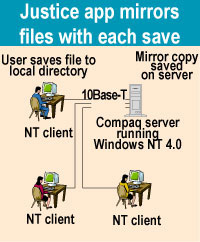
Data saving process has become standard practice among department users


Every time a user saves a file, PeerSync software makes a simultaneous backup that can be used when a hard drive fails.


GCNJune 22, 1998, Page 12May 8, Page 13


Finish it first


NEXT STORY: POWER USER

X
This website uses cookies to enhance user experience and to analyze performance and traffic on our website. We also share information about your use of our site with our social media, advertising and analytics partners. Learn More / Do Not Sell My Personal Information
Accept Cookies
X
Cookie Preferences Cookie List

Do Not Sell My Personal Information

When you visit our website, we store cookies on your browser to collect information. The information collected might relate to you, your preferences or your device, and is mostly used to make the site work as you expect it to and to provide a more personalized web experience. However, you can choose not to allow certain types of cookies, which may impact your experience of the site and the services we are able to offer. Click on the different category headings to find out more and change our default settings according to your preference. You cannot opt-out of our First Party Strictly Necessary Cookies as they are deployed in order to ensure the proper functioning of our website (such as prompting the cookie banner and remembering your settings, to log into your account, to redirect you when you log out, etc.). For more information about the First and Third Party Cookies used please follow this link.

Allow All Cookies

Manage Consent Preferences

Strictly Necessary Cookies - Always Active

We do not allow you to opt-out of our certain cookies, as they are necessary to ensure the proper functioning of our website (such as prompting our cookie banner and remembering your privacy choices) and/or to monitor site performance. These cookies are not used in a way that constitutes a “sale” of your data under the CCPA. You can set your browser to block or alert you about these cookies, but some parts of the site will not work as intended if you do so. You can usually find these settings in the Options or Preferences menu of your browser. Visit www.allaboutcookies.org to learn more.

Sale of Personal Data, Targeting & Social Media Cookies

Under the California Consumer Privacy Act, you have the right to opt-out of the sale of your personal information to third parties. These cookies collect information for analytics and to personalize your experience with targeted ads. You may exercise your right to opt out of the sale of personal information by using this toggle switch. If you opt out we will not be able to offer you personalised ads and will not hand over your personal information to any third parties. Additionally, you may contact our legal department for further clarification about your rights as a California consumer by using this Exercise My Rights link

If you have enabled privacy controls on your browser (such as a plugin), we have to take that as a valid request to opt-out. Therefore we would not be able to track your activity through the web. This may affect our ability to personalize ads according to your preferences.

Targeting cookies may be set through our site by our advertising partners. They may be used by those companies to build a profile of your interests and show you relevant adverts on other sites. They do not store directly personal information, but are based on uniquely identifying your browser and internet device. If you do not allow these cookies, you will experience less targeted advertising.

Social media cookies are set by a range of social media services that we have added to the site to enable you to share our content with your friends and networks. They are capable of tracking your browser across other sites and building up a profile of your interests. This may impact the content and messages you see on other websites you visit. If you do not allow these cookies you may not be able to use or see these sharing tools.

If you want to opt out of all of our lead reports and lists, please submit a privacy request at our Do Not Sell page.

Save Settings
Cookie Preferences Cookie List

Cookie List

A cookie is a small piece of data (text file) that a website – when visited by a user – asks your browser to store on your device in order to remember information about you, such as your language preference or login information. Those cookies are set by us and called first-party cookies. We also use third-party cookies – which are cookies from a domain different than the domain of the website you are visiting – for our advertising and marketing efforts. More specifically, we use cookies and other tracking technologies for the following purposes:

Strictly Necessary Cookies

We do not allow you to opt-out of our certain cookies, as they are necessary to ensure the proper functioning of our website (such as prompting our cookie banner and remembering your privacy choices) and/or to monitor site performance. These cookies are not used in a way that constitutes a “sale” of your data under the CCPA. You can set your browser to block or alert you about these cookies, but some parts of the site will not work as intended if you do so. You can usually find these settings in the Options or Preferences menu of your browser. Visit www.allaboutcookies.org to learn more.

Functional Cookies

We do not allow you to opt-out of our certain cookies, as they are necessary to ensure the proper functioning of our website (such as prompting our cookie banner and remembering your privacy choices) and/or to monitor site performance. These cookies are not used in a way that constitutes a “sale” of your data under the CCPA. You can set your browser to block or alert you about these cookies, but some parts of the site will not work as intended if you do so. You can usually find these settings in the Options or Preferences menu of your browser. Visit www.allaboutcookies.org to learn more.

Performance Cookies

We do not allow you to opt-out of our certain cookies, as they are necessary to ensure the proper functioning of our website (such as prompting our cookie banner and remembering your privacy choices) and/or to monitor site performance. These cookies are not used in a way that constitutes a “sale” of your data under the CCPA. You can set your browser to block or alert you about these cookies, but some parts of the site will not work as intended if you do so. You can usually find these settings in the Options or Preferences menu of your browser. Visit www.allaboutcookies.org to learn more.

Sale of Personal Data

We also use cookies to personalize your experience on our websites, including by determining the most relevant content and advertisements to show you, and to monitor site traffic and performance, so that we may improve our websites and your experience. You may opt out of our use of such cookies (and the associated “sale” of your Personal Information) by using this toggle switch. You will still see some advertising, regardless of your selection. Because we do not track you across different devices, browsers and GEMG properties, your selection will take effect only on this browser, this device and this website.

Social Media Cookies

We also use cookies to personalize your experience on our websites, including by determining the most relevant content and advertisements to show you, and to monitor site traffic and performance, so that we may improve our websites and your experience. You may opt out of our use of such cookies (and the associated “sale” of your Personal Information) by using this toggle switch. You will still see some advertising, regardless of your selection. Because we do not track you across different devices, browsers and GEMG properties, your selection will take effect only on this browser, this device and this website.

Targeting Cookies

We also use cookies to personalize your experience on our websites, including by determining the most relevant content and advertisements to show you, and to monitor site traffic and performance, so that we may improve our websites and your experience. You may opt out of our use of such cookies (and the associated “sale” of your Personal Information) by using this toggle switch. You will still see some advertising, regardless of your selection. Because we do not track you across different devices, browsers and GEMG properties, your selection will take effect only on this browser, this device and this website.



