Directory Snoop checks under the hood and more

Programs that examine the lowest levels of hexadecimal data on a hard drive are much scarcer now than in the days of MS-DOS, because Microsoft Windows purposely shields users from arcane commands.

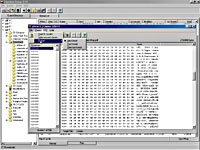
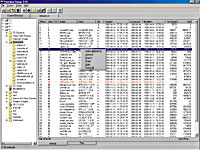
By William M. FrazierSpecial to GCNPrograms that examine the lowest levels of hexadecimal data on a hard drive are much scarcer now than in the days of MS-DOS, because Microsoft Windows purposely shields users from arcane commands.When I ran across Directory Snoop, it reminded me so much of some of the old MS-DOS utilities that I had to give it a try.Directory Snoop 3.14 is a cluster-level directory viewer and file uneraser, downloadable from the Web, at . It runs under Windows 9x and can access, at a very low level, any hard or removable drive that is uncompressed and formatted for 12-, 16- or 32-bit File Allocation Table file systems. Directory Snoop cannot access a network drive or a CD-ROM drive, however.The compressed download is less than 500K, and the installed software takes up less than 1M of storage, including the help file. There's no printed documentation, but the help file answered most of my questions about operating the $29 program.Directory Snoop not only shows you all deleted files prominently in red, it can recover them. You can view raw directory structures and file clusters. You can search and group files and clusters by content. If you find something on the drive that doesn't belong, you can permanently delete the file or individual clusters with a four-pass wiping function, said to be good enough to frustrate forensic hardware file recovery systems.Directory Snoop displays FAT and can purge erased filenames from the directory structure. It can also step forward and backward through a file's cluster chain.The first thing you see when Directory Snoop starts up is the main interface with two tabbed notebooklike pages, called the Current Directory and the Global List. Select any available hard or removable drive on the Current Directory page, and you'll see its files and subdirectories in the right pane. All the available information can be viewed in either Raw or Normal mode.In Normal mode'the default'the display is like that of Windows Explorer but more comprehensive. Fields tell you the first and last record number, whether a file has been erased or not, the long filename, the short filename and all file attributes. You can see the date the file was created, the dates of last access and last modification, and the first disk cluster number for the file. Red-marked filenames that have been deleted show a question mark as their first character.Raw mode displays the raw 32-byte directory entries in hexadecimal and text format.The Global List holds any group of files you select from multiple drives and directories. The first field displays the origin drive and directory name. The remaining fields are the same as on the Current Directory page.The Global List is useful when you want to collect a group of files and perform the same operation on each one.The Cluster Window appears when you select a file by double-clicking. You see raw cluster data in the right pane. The left pane displays the cluster chain for the selected file if the Chain tab is selected, or for all clusters on the partition if the FAT tab is selected.The Cluster Window is an excellent place to recover erased files. Open a new target file and then append data to it from the raw data on the disk. The Append Data dialog box has numerous options to control what data gets written to the new file. You can add a single cluster, a number of clusters or any number of bytes within a cluster.When selecting more than one cluster, you can choose to advance to the next cluster in the chain, the next cluster in the FAT or the next unused cluster. When you finish appending data to the file, close it by selecting Close Target File.To find specific data within a file or cluster, select the Search Clusters menu option. The dialog box that appears lets you find specific string data or hex values within a file. Search controls include first cluster, total number of clusters to search and method of cluster advancement.You can choose whether to make the search case-sensitive and whether the search should be for string data or hex data. You also can decide whether the search should find all matches within a cluster or stop with the first match.Finally, you can choose whether to find any data that crosses cluster boundaries.That's power! Directory Snoop is a terrific utility, but it should only be placed in the hands of technical support personnel and advanced users. Used maliciously or incorrectly, it could corrupt or delete valuable data forever.
Program lets you recover deleted files or permanently erase them from hard or removable drives


www.briggsoft.com


Can you read hexadecimal? Directory Snoop shows files in hex, text or directory format.


Flood of information


Box Score

Directory Snoop 3.14

Briggs Softworks; Houston

www.briggsoft.com

Price: $29 per copay; 250-user license $2,499


+ Recovers lost files and securely wipes unwanted data from hard drives

' Dangerous in the hands of novices


Real-life requirements:

Win9x, 1M of free storage, Internet connection for download


Serious searching


Directory Snoop shows deleted files in red with a question mark as the first character and can be used to recover them or wipe them from the drive permanently.


X
This website uses cookies to enhance user experience and to analyze performance and traffic on our website. We also share information about your use of our site with our social media, advertising and analytics partners. Learn More / Do Not Sell My Personal Information
Accept Cookies
X
Cookie Preferences Cookie List

Do Not Sell My Personal Information

When you visit our website, we store cookies on your browser to collect information. The information collected might relate to you, your preferences or your device, and is mostly used to make the site work as you expect it to and to provide a more personalized web experience. However, you can choose not to allow certain types of cookies, which may impact your experience of the site and the services we are able to offer. Click on the different category headings to find out more and change our default settings according to your preference. You cannot opt-out of our First Party Strictly Necessary Cookies as they are deployed in order to ensure the proper functioning of our website (such as prompting the cookie banner and remembering your settings, to log into your account, to redirect you when you log out, etc.). For more information about the First and Third Party Cookies used please follow this link.

Allow All Cookies

Manage Consent Preferences

Strictly Necessary Cookies - Always Active

We do not allow you to opt-out of our certain cookies, as they are necessary to ensure the proper functioning of our website (such as prompting our cookie banner and remembering your privacy choices) and/or to monitor site performance. These cookies are not used in a way that constitutes a “sale” of your data under the CCPA. You can set your browser to block or alert you about these cookies, but some parts of the site will not work as intended if you do so. You can usually find these settings in the Options or Preferences menu of your browser. Visit www.allaboutcookies.org to learn more.

Sale of Personal Data, Targeting & Social Media Cookies

Under the California Consumer Privacy Act, you have the right to opt-out of the sale of your personal information to third parties. These cookies collect information for analytics and to personalize your experience with targeted ads. You may exercise your right to opt out of the sale of personal information by using this toggle switch. If you opt out we will not be able to offer you personalised ads and will not hand over your personal information to any third parties. Additionally, you may contact our legal department for further clarification about your rights as a California consumer by using this Exercise My Rights link

If you have enabled privacy controls on your browser (such as a plugin), we have to take that as a valid request to opt-out. Therefore we would not be able to track your activity through the web. This may affect our ability to personalize ads according to your preferences.

Targeting cookies may be set through our site by our advertising partners. They may be used by those companies to build a profile of your interests and show you relevant adverts on other sites. They do not store directly personal information, but are based on uniquely identifying your browser and internet device. If you do not allow these cookies, you will experience less targeted advertising.

Social media cookies are set by a range of social media services that we have added to the site to enable you to share our content with your friends and networks. They are capable of tracking your browser across other sites and building up a profile of your interests. This may impact the content and messages you see on other websites you visit. If you do not allow these cookies you may not be able to use or see these sharing tools.

If you want to opt out of all of our lead reports and lists, please submit a privacy request at our Do Not Sell page.

Save Settings
Cookie Preferences Cookie List

Cookie List

A cookie is a small piece of data (text file) that a website – when visited by a user – asks your browser to store on your device in order to remember information about you, such as your language preference or login information. Those cookies are set by us and called first-party cookies. We also use third-party cookies – which are cookies from a domain different than the domain of the website you are visiting – for our advertising and marketing efforts. More specifically, we use cookies and other tracking technologies for the following purposes:

Strictly Necessary Cookies

We do not allow you to opt-out of our certain cookies, as they are necessary to ensure the proper functioning of our website (such as prompting our cookie banner and remembering your privacy choices) and/or to monitor site performance. These cookies are not used in a way that constitutes a “sale” of your data under the CCPA. You can set your browser to block or alert you about these cookies, but some parts of the site will not work as intended if you do so. You can usually find these settings in the Options or Preferences menu of your browser. Visit www.allaboutcookies.org to learn more.

Functional Cookies

We do not allow you to opt-out of our certain cookies, as they are necessary to ensure the proper functioning of our website (such as prompting our cookie banner and remembering your privacy choices) and/or to monitor site performance. These cookies are not used in a way that constitutes a “sale” of your data under the CCPA. You can set your browser to block or alert you about these cookies, but some parts of the site will not work as intended if you do so. You can usually find these settings in the Options or Preferences menu of your browser. Visit www.allaboutcookies.org to learn more.

Performance Cookies

We do not allow you to opt-out of our certain cookies, as they are necessary to ensure the proper functioning of our website (such as prompting our cookie banner and remembering your privacy choices) and/or to monitor site performance. These cookies are not used in a way that constitutes a “sale” of your data under the CCPA. You can set your browser to block or alert you about these cookies, but some parts of the site will not work as intended if you do so. You can usually find these settings in the Options or Preferences menu of your browser. Visit www.allaboutcookies.org to learn more.

Sale of Personal Data

We also use cookies to personalize your experience on our websites, including by determining the most relevant content and advertisements to show you, and to monitor site traffic and performance, so that we may improve our websites and your experience. You may opt out of our use of such cookies (and the associated “sale” of your Personal Information) by using this toggle switch. You will still see some advertising, regardless of your selection. Because we do not track you across different devices, browsers and GEMG properties, your selection will take effect only on this browser, this device and this website.

Social Media Cookies

We also use cookies to personalize your experience on our websites, including by determining the most relevant content and advertisements to show you, and to monitor site traffic and performance, so that we may improve our websites and your experience. You may opt out of our use of such cookies (and the associated “sale” of your Personal Information) by using this toggle switch. You will still see some advertising, regardless of your selection. Because we do not track you across different devices, browsers and GEMG properties, your selection will take effect only on this browser, this device and this website.

Targeting Cookies

We also use cookies to personalize your experience on our websites, including by determining the most relevant content and advertisements to show you, and to monitor site traffic and performance, so that we may improve our websites and your experience. You may opt out of our use of such cookies (and the associated “sale” of your Personal Information) by using this toggle switch. You will still see some advertising, regardless of your selection. Because we do not track you across different devices, browsers and GEMG properties, your selection will take effect only on this browser, this device and this website.