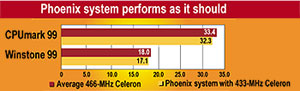
By Michael CheekGCN StaffFor some time, a 4-year-old PC'its 200-MHz Pentium processor stone cold'had sat idle in a corner of the GCN Lab.The Dell OptiPlex GXMT 5200 had once run Microsoft Windows 95 and served as my primary system. But I had moved on to a Pentium II because I needed a hard drive bigger than the OptiPlex's 811M drive. Inside, the PC was little more than a skeleton machine, stripped of its cards and cables for use in successor systems.Could the lab shake the dust off this old PC and get it to rise again, like the mythical phoenix?In one of the easiest upgrades I've ever seen, involving only two components plus a new processor, the OptiPlex came back from the discard pile as a solid, working lab client.What made it easy was the AcceleraPCI processor upgrade card from Evergreen Technologies Inc. of Corvallis, Ore. The PCI card acts as a motherboard on a card, bypassing the installed motherboard. On the card are a standard Intel Corp. processor, chip set and standard memory chips similar to those in notebook computers.AcceleraPCI cards are now available for Pentium and Pentium MMX systems. Even the oldest 60-MHz Pentium is a candidate for upgrade. The cards come with 433- or 466-MHz Celeron processors, the same ones available in new PCs. Evergreen plans to roll out Pentium III cards early this year.The company also will incorporate Pentium III Coppermine processors, starting at 500 MHz.From Evergreen's Web site, at , I downloaded a software prequalification program that created a bootable floppy disk with an application to check whether the OptiPlex was compatible with the AcceleraPCI.After trying the bootable floppy on systems around the lab, I found others could be upgraded. A 4-year-old Hewlett-Packard Vectra and an IBM PC 350 met the AcceleraPCI compatibility requirements. Unfortunately, none of the lab's Compaq Computer Corp. PCs could use the AcceleraPCI upgrade.For this review, I chose to upgrade the Dell OptiPlex for one reason: I had to be certain the internal BIOS was year 2000-ready.Hewlett-Packard Corp., IBM Corp. and Compaq all had given strong year 2000 support, but Dell's approach made the test much easier. All that's required of a user is to enter the serial number from the back of a system where requested on a company Web site at support.dell.com. Dell then gives you a detailed page of data about the system, from its so-called birth certificate to the correct BIOS version. The other makers' sites required more clicks to narrow down models and features before getting to specifics.So, with the appropriate 2000-ready BIOS installed on the OptiPlex, I took the next step of finding a new hard drive to replace the inadequate 811M drive.I found a brand-new 4.1G drive in the lab's inventory and installed it, making sure the jumpers were set to 'master.' Then, using fdisk, I set up a 32-bit File Allocation Table partition and formatted it. A 4G hard drive runs around $100. Larger drives, such as a 6.4G, are a bit more expensive, starting around $150.Next, I installed Windows 98 Second Edition, which costs $90 for an upgrade or $180 for the full version.Chances are the PC that you want to upgrade will already have an adequate hard drive and operating system. If so, you can skip the above steps and save $190. It will also save you the hassle of fully configuring the PC.Once I had everything up and running, I installed the Ziff-Davis Benchmark Operation's benchmark suite to determine baseline scores for the system.I did not expect explosive results from the OptiPlex's 200-MHz Pentium CPU, 64M of RAM and 2M of integrated video RAM. Although the system ran fine and without glitches, slow doesn't begin to describe its lethargic, painstaking effort to carry out the most basic tasks.I turned the machine off, unplugged it and prepared to install the AcceleraPCI card. It was easy'almost too easy.The OptiPlex had two PCI slots. I chose the top one to give the AcceleraPCI card a little air from the fan atop the main processor. I seated the card, screwed it in and replaced the cover. Plugging everything back in, I turned on the system.As soon as the OptiPlex BIOS had checked itself out, the AcceleraPCI's BIOS usurped control and started booting. Voil'.Then I hit a snag. The boot appeared to be working fine, but the PC hung up before starting the OS. After a couple of cold starts, it still hung up. I could get into the BIOS of the AcceleraPCI card, but it just wouldn't boot.A little searching on Evergreen's Web site, and I found out why: 'Dell OptiPlex systems require that the AcceleraPCI be running a custom BIOS version. Please contact Evergreen customer care to receive the correct update for your system.'I wish Evergreen had put the BIOS download on the Web site. An e-mail message later, however, I had the right BIOS.Flashing the AcceleraPCI turned out to be pretty easy. The executable file made a bootable disk. Once I started the PC, I went into the AcceleraPCI's BIOS and disabled the card there, which let the OptiPlex boot to the disk. The disk uploaded the custom BIOS to the card.Now, I had an actual voil'. The system, like the phoenix, stirred from the ashes.Win98 recognized the new processor. The OS asked for the .inf file, which includes driver information. Although the AcceleraPCI does not use any software drivers, I pointed Win98 to the .inf file on the floppy provided. In this case, the .inf file provided only basic data, such as the name of the card.Next, I studied the ZD CPUmark 99, which measures processor and memory performance, to learn the nitty-gritty results of the upgrade. The 200-MHz Pentium earned a score of 11.1. The AcceleraPCI's 433-MHz Celeron with 64M of RAM scored almost triple that: 32.3.No system lives by its processor alone, however. The Winstone 99 benchmark runs a series of scripts for applications such as Corel WordPerfect, Lotus 1-2-3, Microsoft Access and Netscape Navigator. The upgraded system's Winstone 99 performance improved by almost 28 percent, making it roughly equivalent to a 233-MHz Pentium MMX system.But I would need better performance from a lab client.I knew from my baseline tests what had slowed the rising phoenix'its paltry 2M of integrated video RAM. So for $100, I bought a Voodoo3 2000 PCI Card from 3dfx Interactive Inc. of San Jose, Calif. I expected strong improvement from its 16M of fast video RAM, and I got it.As with the AcceleraPCI, I turned off and unplugged the system before installing the card. 3dfx provided a CD-ROM and a movie about how to install the Voodoo3.Once the card was securely in place, I plugged the PC back in and booted up. The CD-ROM installed the drivers with ease. My phoenix soared to life.The ZD Business Graphics benchmarks showed an immediate, almost sixfold improvement, from a score of 22.9 with the 2M integrated graphics adapter to 132 with the Voodoo3.Overall system performance under Winstone 99 also jumped. Without the slow adapter, the Winstone score reached 17.1, making the system roughly 71 percent faster than a 233-MHz Pentium MMX.Compared with some 466-MHz Celeron PCs I reviewed late last year, the Phoenix scored as I would expect. It performed just slightly slower on Winstone and CPUmark'about 3 percent to 5 percent worse than a typical 466-MHz Celeron.The total price for the upgrade was around $540, which is comparable to the price tag on some new low-end PCs. To gauge whether the upgrade made sense financially, I went to Dell's Web site for government users and configured a new PC as similar as possible to the revamped Optiplex.A new OptiPlex GX100 minitower with a 433-MHz Celeron and 64M of RAM would run $837, although it had only 4M of video memory with an Accelerated Graphics Port whereas the phoenix has a 16M PCI Card.Given a price differential of $217 between a new PC under warranty and an upgraded old one, why bother?Well, consider that some systems won't need a new hard drive and OS, making the price gap $407. Also, many systems will accept a second hard drive, an option that would save considerable cash, setup time and data transfer effort.Another question looms: Will you be able to install Windows 2000 Professional on such a PC? Although the AcceleraPCI card meets Microsoft Corp.'s minimum specifications for running the Windows NT successor, I doubt it's a good idea. Microsoft recommends at least a 300-MHz processor and 64M of RAM for Win 2000.If the AcceleraPCI had 128M of RAM, it might handle Win 2000 Pro, but I'd prefer a Pentium III processor for the robust OS. Maybe when Pentium III versions of the AcceleraPCI come out, upgrading an old PC to run the new OS will be a viable option.So why, after all, should you consider using the AcceleraPCI card to get an old PC working up to snuff? Time and necessity could well be a motivating factor. Barring any AcceleraPCI BIOS issues, completing a processor upgrade and adding a new video card takes less than 30 minutes.So, you too can raise your own phoenix in quick order and at minimal cost.
Like the proverbial phoenix, an old PC gets new life after GCN Lab replaces processor, video cardwww.evertech.com
Phoenix upgrade costs less than a new system
|
'' Evergreen Technologies' AcceleraPCI
card with 433-MHz Celeron CPU and 64M of RAM . . . . . . . . . . . . . . . . . . . . |
$330 |
'' 3dfx Interactive Voodoo3 2000 PCI video card with 16M of memory . . . . . . | $100 |
'' 4.1G hard drive . . . . . . . . . . . . . . . . | $100 |
'' Microsoft Windows 98 Second Edition upgrade . . . . . . . . . . . . . . . . . . . . . . . |
$90 |
TOTAL . . . . . . . . . . . . . . . . . . . . . . |
$620 |
OTHER UPGRADE OPTIONS:
'' Additional 64M of memory for AcceleraPCI . . . . . . . |
$120 |
'' USB card (for PCI slot only) . . . . . |
$40 |
'' Sound card (ISA or PCI) . . . . . . . |
$40 to $100 |
'' Mouse . . . . . . . . | $20 to $75 |
'' Keyboard . . . . . . | $20 to $75 |
'' Fast Ethernet card (for PCI slot only) | $20 to $85 |
'' Internal 100M Zip drive . . . . . . . . | $100 |
|
Adequate savingsTest results