
Burst your bandwidth constraints





Workgroups used to scrape by with a few 10-Mbps hubs daisychained together. Today, they no longer can. Demand for network bandwidth is growing exponentially.
By John Breeden II and Michael CheekGCN StaffWorkgroups used to scrape by with a few 10-Mbps hubs daisychained together. Today, they no longer can. Demand for network bandwidth is growing exponentially.Internet and intranet dependency demands that each client have 100 Mbps of switched bandwidth. Servers need even more now that software vendors distribute updates via the Web.Imagine a small workgroup that, over the years, has grown substantially'from a few clients to 48, plus two servers. To review Layer 2 switch configurations, the GCN Lab set up just such a test scenario.We circulated the planned test topology to communications hardware companies and asked them to submit configurations with 36 clients having Fast Ethernet connections, 12 clients with standard Ethernet and two servers with fiber Gigabit Ethernet links.We specified that the imaginary workgroup should start off with a 12-port hub, add a 12-port hub and finally add a 24-port hub to serve all 48 clients to support full connectivity.We also requested two 1000Base-SX ports for the servers' Gigabit Ethernet links.Only Intel Corp. provided the exact configuration requested. The lab staff also reviewed configurations from Enterasys Networks, a subsidiary of Cabletron Systems Inc., and Hewlett-Packard Co.Each configuration revealed how the topology of a growing network varies based on the initial vendor selection. All the interconnections among port segments were proprietary, so having homogeneous equipment is a benefit.Each configuration also illustrated how network performance is affected by the circumstances of network growth.The GCN Lab uses the SmartBits communications tester from Netcom Systems Inc. of Calabasas, Calif., to evaluate network equipment. After connecting and verifying each connection, we used SmartBits to test various scenarios.One test generated Ethernet traffic among the server ports and clients. Under the clients-to-servers and servers-to-clients runs, all three vendors' setups performed almost exactly the same.Another test had one server port send traffic to the others. Again, our results showed no significant difference among the three configurations.Overall, we found the results acceptable for the straightforward tests.For a more difficult test, client-to-client traffic, we flooded each communications backplane with more than 2.3 Gbps of Ethernet packets. This test examined throughput, latency and packet loss.Throughput tells how much data makes its way from the source port to the destination port. Latency tells how long it takes the data to reach its destination. Packet loss checks for how much data is lost.Intel's configuration, although it reflected a growing network more realistically than the others, performed the worst on this test. Intel's 24-port base unit, an Express 510T switch, had three stackable switches; two Express 520T switches each provided 12 10/100-Mbps ports. In the block, the three Intel switches were larger than HP's wiring-closet-type configuration.Each of the three Intel switches incorporated two slots for additional modules. The Express 510T Switch had a matrix module with six plugs for proprietary connections to other switches.Both Intel Express 520T Switches had 1000Base-SX modules for 500 series switches; the modules included two proprietary plugs and an industry-standard 1000Base-SX fiber plug.Each of the 520T modules was connected to the 510T switch via proprietary cables and plugs. The switch had metal terminator face plates that had to be removed and replaced by connecting modules.Swapping out the face plates for the modules was not difficult, but we had to be careful to touch an unpainted, grounded surface on the switch and wear a wrist strap with at least 1M resistance to ensure carrying the same electrostatic charge as the enclosure. Making a spark in the operation could be deadly for the switch.Once the switches were configured and stacked properly, we used the software management interface to make sure the switch was configured properly for all the clients.In the test network, some users had standard Ethernet connections, and others had Fast Ethernet. By default, the switch's RJ-45 ports were set to the higher rate, which would have caused collisions and packet loss for the slower network clients, especially with the autonegotiation feature disabled.In the review scoring, the Intel switch lost points because making these changes was rather difficult.In theory, the switch has a lot of management functions including an adaptive forwarding mode, local management via a direct terminal connection or Telnet, the Simple Network Management Protocol, a virtual LAN control, the Internet Group Management Protocol and a pruning feature for multicast functions.But we found it tricky to use the basic text interface'the management mode of choice for most administrators. Intel's interface was less primitive than, say, a Cisco Systems switch console interface, but not by much. Of the three consoles reviewed, Intel's was the least sophisticated and most confusing.We did like that just below the console plug-in, Intel showed all appropriate communications settings.The MS-DOS-like shell let us enter commands and work with individual ports. But to change entire blocks of ports at a time required the loading of a proprietary program, Intel Device View for Windows.Again, the management functionality was a troublesome, and the instructions were of little help. It's technically true that the administrator could manage the switch as a single IP address, but each switch also must have its own address.The instructions imply that once the device is stacked, it acts as a single unit and can be managed as a single IP address'a valuable feature in a networked world where IP Version 4 addresses are dwindling. But if we neglected to give each switch an individual IP address, some of the communications tests did not reflect the setup's true performance.The need for individual addresses was unclear from the documentation. The switches seemed to work fine when they all shared an IP address. We noticed something was awry, however, when only about 10 percent of packets got through and much data was lost or delayed by collisions.Intel's configuration was the most logical for our workgroup scenario. It would let an organization start small and add modules as needed. But it had a big disadvantage. The setup's three modules, even in proper configuration, had trouble managing the switch's backplane, and performance suffered.We simulated a worst-case scenario in which all 48 clients were busily using the network. Although it's unlikely that everyone in a workgroup would try to tap network resources simultaneously, it's not inconceivable. The Intel switch's backplane quickly overloaded.During a 60-second test, only 29.3 percent of 64-byte packets made it through. This size packet is the most difficult for switches to process because they are smaller and more numerous than other packets. Larger packets occur much less frequently and therefore have better transfer rates for most communications devices.At the largest packet size, 1,518 bytes, the Intel switches sent through only 45 percent of the packets.To simulate more realistic use, we tested for half the users trying to access network resources at the same time. The Intel configuration did a lot better on this test, pushing through 54.9 percent of 64-byte packages. Of the large 1,518-byte packages, 90 percent made it.The Intel switch can be set to two modes: store-and-forward or cut-through. Cut-through sends packets as soon as they start to arrive. Store-and-forward waits for each complete packet before sending the packet on to its destination.The cut-through mode generates more dropped packets and errors than store-and-forward mode. The trade-off with store-and-forward is higher latency: Packets take more time to reach their destinations.When we set the Intel switch to store-and-forward, the latency averaged 40 microseconds, which is fairly high. Small, 64-byte packets experienced about 30-microsecond latency and 1,518-byte packages about a 45-microsecond delay.Our ultimate test forced the Intel configuration to send packets through all three switches. Because a source port on one of the 12-port Express 520T switches sends data to a destination port on the other 12-port switch, the packet must travel to the matrix module of the 24-port 510T.The round trip caused many problems in all the tests. Even though the backplane was undersubscribed, or underused, some packets got lost. For example, packets of 256, 512, 1,024 and 1,280 bytes had 40 percent throughput, but 7 percent to 9 percent of them disappeared.When oversubscribed, the Intel configuration lost from 41.2 percent to 57.6 percent of packets.Cabletron Systems sent us two 24-port switches connected by one proprietary cable. Each of the SmartStack ELS100-S24TX2M switches had three slots for modules. Both included a stacking module for connecting the switches.Both switches also included a 1000Base-SX module for connecting to the servers. The primary switch's third slot held a management module for console administration.The Cabletron configuration appeared to be the happy medium between the poorly performing Intel switch and the wiring-closet-like configuration from HP. Its overall excellent performance earned the Cabletron setup the Reviewer's Choice designation.When linked, the Cabletron switches shared a 2-Gbps backplane, which provided enough bandwidth to manage even a high volume of network traffic. The switch came set by default to a store-and-forward mode.The management of the Cabletron setup, both in hardware configuration and software monitoring, was the easiest of the three vendors' configurations.LED indicators were not beside or above each RJ-45 port; instead, they were in a block to the right of all the ports. This kept the cables from blocking the view of the indicators and made troubleshooting much easier. The lab staff was able to detect at a glance any ports that were having problems.A switch number display showed quickly where the network began and where it ended. If there were problems with Port 7 in Deck 3, for example, an administrator could look for the switch with the No. 3 prominently displayed and then examine the correct port.This would be helpful for large networks or if several administrators look after hardware, especially given that the third switch in a stack is not necessarily the third one up from the bottom.Cabletron's easy-to-use console management interface looked nothing like a standard text console, although it was. Cabletron initially set the first six ports to standard Ethernet, but because we wanted the slower ports dispersed through the network, we had to reconfigure the switches. Changing the port configuration from Ethernet to Fast Ethernet took less than five minutes.Cabletron did not include software for Microsoft Windows-style Web management, but we didn't miss it. Web management tools should be included in future versions.The Cabletron console could manage both switches from a single IP address.With the smallest and most difficult packet size, 64 bytes, the Cabletron switches pushed 68.8 percent of packets to their destinations. When the packet size jumped to 128 bytes'the worst-case scenario'performance was close to perfect, with 97.6 percent of all packets arriving. Common use along the network was no problem at all.It's worth noting, however, that at maximum load the Cabletron switch never achieved perfect performance. Even at the largest size'1,518-byte packets'it pushed only 98.1 percent of packets through. But it did give reliable performance, with a minimum 97.6 percent throughput at the maximum load for all packet sizes of more than 128 bytes. We verified this result through subsequent testing.The Cabletron setup experienced a small degree of latency with most packet sizes. At 90 percent load with smaller and easier to push packets, there was a 14-microsecond latency on average. That's quite good considering that most switches have about 11-microsecond latency under optimal conditions.With larger packet sizes at 90 percent load, the Cabletron setup had a 40-microsecond latency on average, putting it squarely in line with the Intel switches' performance.Cabletron's SmartStack shone in reliability. Almost no packets were lost'even at peak loads. For smaller packet sizes, 98 percent of packets made it through at peak.Even when it only scored 68 percent throughput, the Cabletron setup compensated by retransmitting any dropped packets. It sent 99.2 percent of all large packets to their destination under our nightmare traffic scenario. In normal use, all packets arrived all the time.The HP ProCurve 4000M switch chassis had 10 slots for different types of cards. By default, it included five cards with eight 10/100-Mbps ports. To meet our test scenario, HP added another 10/100 card plus two 1000Base-SX fiber cards.The ProCurve 4000M's 3.8-Gbps backplane beat the other configurations hands down. Even so, at some levels the throughput didn't reach the levels expected, especially given that the Cabletron configuration outperformed the ProCurve for six of seven packet sizes.The ProCurve did squeeze 90 percent of all 64-byte packets through'21 percent more than the Cabletron setup. And the ProCurve's latency, topping out at 16.2 microseconds, outshone both the Intel and Cabletron systems.Finally, the ProCurve performed incredibly well at saving packets. Less than 1 percent of 64-byte packets were lost, and no 512-byte or larger packets disappeared.As for manageability, HP excels with its TopTools package, which manages more than switches. It can also monitor HP printers, servers and clients.But TopTools takes a long time to load, and we found its system requirements a little too demanding. TopTools does not yet work under Windows 2000. It requires Windows NT 4.0 and 128M of RAM.Prices of the three setups did not vary as much as might be expected. Cabletron's price was low, at $4,112, in view of overall performance. We were also impressed by the cost of the HP ProCurve'at $4,459, little more than Cabletron's.The Intel configuration cost the most at $5,909. Still, for a growing network environment, its initial investment would have been much lower than that of the Cabletron and HP configurations. Total price is not the complete measure of value.All the configurations performed acceptably under most circumstances. Only the most challenging tests showed the inherent weakness of Intel's three-switch configuration. The HP ProCurve's amazing performance and low latency make it an excellent choice. But Cabletron's SmartStack was top-notch, both for its throughput and its console management, and made it the best all-around performer.
The GCN Lab gives a 50-port salute to Layer 2 switch setups that meet workgroup throughput needs

Cause and effect
Just a test
No block party
Strike a balance
Neck and neck
Doesn't do Win 2000
Cause and effect
 |
Just a test
No block party
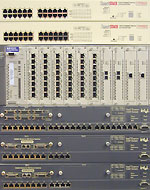 | Cabletron's SmartStack switches passed the GCN Lab's torture test for small to large Ethernet packets. |
Strike a balance
| HP's backplane loses fewest packets | ||||||||||||||||||||||||||||||||
|
Neck and neck
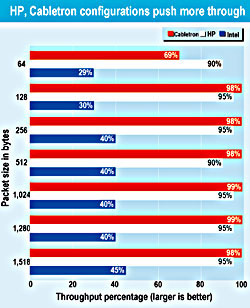 | Both the HP and the Cabletron configurations sent most of their packets through successfully. Intel's three-switch configuration had trouble moving packets from switch to switch. |
Doesn't do Win 2000
| SmartStack switches push packets best of the three | |||
 | SmartStack ELS2400 Cabletron Systems Inc. Rochester, N.H. 603-332-9400M www.enterasys.com | ProCurve 4000M Hewlett-Packard Co. Palo Alto, Calif. 703-204-2100 www.hp.com/rnd | Express 510T/520T Intel Corp. Santa Clara, Calif. 408-765-8080 www.intel.com |
| Final price | $4,112 | $4,459 | $5,909 |
| Initial investment | $1,464 | $2,200 | $1,083 |
| Configuration | Two 24-port stackable switches, each with a gigabit module | Single chassis with six 8-port 10/100-Mbps and two single-port gigabit cards | Two 12-port and one 24-port 10/100-Mbps stackable switches with connection/gigabit modules |
| Pros | + Strong throughput performance + Terrific console management | + Low latency and little packet loss + 3.8-Gbps backplane | + Low initial investment + Expandable in small steps |
| Cons | ' High latency ' No Windows or Web management | ' Costly initial investment ' High system requirements for Windows management tool | ' Switches need individual IP addresses ' Disappointing performance |
| Performance | A- | A- | C |
| Manageability | B+ | B | B+ |
| Value | A- | B- | B |
| Overall grade |   |  |  |
NEXT STORY: THE BELTWAY AND BEYOND