
These packages are gifts for groupware





Describing groupware is like drawing a diagram with a 5-inch brush and watercolors. You end up with an abstraction that fails to convey much about streamlining the information flow in workgroups.
GCN Lab finds two groupware products help get successful apps off the ground'in different waysBy Jason ByrneGCN StaffDescribing groupware is like drawing a diagram with a 5-inch brush and watercolors. You end up with an abstraction that fails to convey much about streamlining the information flow in workgroups.The GCN Lab recently took a look at two leading groupware products, Lotus Domino 5.0 and Microsoft BackOffice 4.5. Though different in their approaches, they share certain features.Some might say the comparison should have been between Domino and Microsoft Exchange, but the lab staff disagrees. Exchange by itself is nothing more than a messaging application. BackOffice fills more than just groupware or knowledge management functions and is more comparable to Domino. The government buys the two products for similar purposes.Buying, however, is only the first step. Considerable development work is necessary to get groupware to do the right tasks. Both packages provide tools to create suitable applications instead of setting up a groupware environment out of the box. Both have sample applications not intended for use in production environments. What the samples do is lay a foundation for further development and spark ideas.Often when offices deploy Domino or BackOffice for one specific task, the flexibility and power of the software inspires other applications no one had thought of before.The differences between the two are evident even before installation. BackOffice is a suite made up of individual Microsoft products. Its latest release finally makes it into an integrated suite; the individual pieces share more installation, management and development similarities than they ever did before.Within BackOffice 4.5 are Exchange Server 5.5, SQL Server 7.0, Systems Management Server 2.0, Site Server 2.0, SNA Server 4.0 and Proxy Server 2.0. All integrate with other Microsoft products in the Office suite and the Windows NT Option Pack. BackOffice relies heavily on the Microsoft Outlook client, Internet Explorer 5.0, FrontPage 2000 and Visual InterDev 6.0 for user and developer interaction.There is also a Small Business Server version of BackOffice, which supports up to 50 computers within a domain and does limited scaling of applications. Its fax and modem sharing features are not present in the full version.Compared with BackOffice 4.5, Lotus Domino 5.0 is monolithic, especially on the server side. Domino can be installed in three configurations, depending on site needs. Domino Mail Server, the simplest, does messaging only. Domino Application Server is a groupware application environment. Domino Enterprise Server combines Mail Server and Application Server with clustering and reliability functions.You can choose how far to swim into the Domino pool, and there are also variations on the client side. Domino Designer, previously called Notes Designer, handles the development of Domino applications. The lightweight Notes Mail client based on Internet standards in Version 4.6 has disappeared from 5.0. Lotus has gone back to having a single Notes client.On the server side, whereas BackOffice 4.5 is much easier to install than previous versions, Domino 5.0 remains comparatively less complicated and time-intensive because of its single-product focus.As for platforms, BackOffice 4.5 runs only under Windows NT. Domino 5.0 can run, or soon will, under NT 4.0 on Intel and Alpha platforms; IBM AIX, OS/390 and OS/2 Warp Server; SunSoft Solaris; and Hewlett-Packard HP-UX.Unfortunately, Lotus no longer supports Domino on Novell NetWare. Although NetWare 5 is still maturing as an application server environment, Domino's absence there leaves a fairly big hole in platform support.Many federal agencies feel comfortable with NT as an office application server, but when they look at deploying groupware applications widely, they want a true enterprise-level network operating system. As outstanding as BackOffice is in terms of features, manageability and flexibility, it remains tied to a single NOS, and a limited one at that.Both packages have sizable communities of active developers. Lotus benefits from its long history as the groupware pioneer. Microsoft's development partners tend to target their work more to specific products in the BackOffice suite, but they gain the advantage of Microsoft's product integration within BackOffice and across the entire Microsoft line.In addition to the usual support for new standards and features, both applications have been fine-tuned. BackOffice has changed mainly in installation, management and new versions of its components. Domino's most notable change is the completely new look of the Notes client. The old interface remains available a click away, but the new one does a wonderful job with Web navigation conventions to make work more intuitive for new users.BackOffice 4.5's installation and unified management tools will be a welcome relief to any user of current or past versions. From start to finish the installation, though still lengthy, has much better guidance and management.Unfortunately, that is a necessity. With so many tightly integrated products to install, the delicate ballet of getting everything working together has to be as straightforward and as automated as possible. Deep software integration in such a behemoth application does not make for nimbleness. The same can be said of Domino.Though it's a single product, it is not going to be up and running the day after installation. Both BackOffice and Domino are capable of doing pretty much anything asked of them, but they demand plenty of elbow grease in advance.The good news for both products is that common development tasks have been streamlined by intelligent programming. Creating a full-blown document management tracking and management system in Domino, for example, has gotten much easier over the years.I did it nine years ago with the first version of Notes, and it took months. With Domino 5.0, I could now bring applications up in a week or a few days.Both Microsoft and Lotus realize that the limiting factor is not what the software can do, but what the users can get it to do.Domino, basically a flat-file database, demands less understanding of the flow of data through an application. Because it handles data at the document level, a relational database would be of little use.Many BackOffice applications, however, rely on SQL Server for relational database functions. This is a boon for users looking to exchange more granular data between systems, and BackOffice can handle some data that Domino cannot.BackOffice bridges two worlds. On one side it does conventional groupware document creation, tracking and network routing. On the other side, it is almost a minidata warehouse.For sites that have a mostly Windows networked environment and diverse data sharing needs, BackOffice is a no-brainer choice'not only for messaging and groupware features, but also for better management of the entire network.For sites with heterogeneous networks and a focus on workflow, Domino is the better choice.Microsoft might be wise to beef up Exchange as a groupware application development environment on its own, and let BackOffice concentrate on the network and data management it does so well.Lotus would be wise to improve Domino administration, which is still too hard for managers familiar only with Windows NT networks.Both products have fully embraced the Internet, not only as a medium of data exchange but as part of their very fabric. Each supports most of the latest standards and protocols, and each has a promising future ahead.Groupware productivity demands planning and lots of development time to get a successful application off the ground. Fortunately these packages make the job easier than ever before.
The outer limit
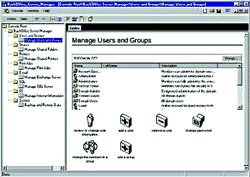
Backoffice Server Manager
The outer limit
| Box Score B BackOffice 4.8 Microsoft Corp. Radmond, Wash; tel: 800-285-7772; www.microsoft.com Price: $3,099 Pros and cons: + '' Groupware with relational database capabilities + '' Well integrated management - '' Runs only under NT Real-life requirements: 266-MHz or faster Pentium II, 256M of Ram, 4G disk storage | Box Score A- Lotus Domino 5.0 Lotus Domino 5.0 Lotus Development Corp., Cambridge, Mass.; tel. 800-343-5414 www.lotus.com Price: Enterprise Server $6,028, Mail Server $862, Application Server $2,183 Pros and cons: + Strong groupware capabilities + New client with intuitive, Web-like interface ' Lots of training needed for administrators Real-life requirements: 6G disk storage; NT 4.0 on Intel or Alpha with 96M or more RAM recommended; AIX 4.3.1 with 128M or more RAM; SunSoft Solaris 2.6 on Intel or Sparc, HP-UX 11.0 and OS/2 Warp Server 4 with 128M or more RAM; AS/400 V4R2 and OS/390 V2R6 with 256M or more RAM |
NEXT STORY: System blends data to draw an environmental map