U.are.U fingerprint scanner keeps access to your PC personal

Not only do I remember the days before PCs, but I once knew how to program the breadboard for an IBM Corp. card sorter. Installing new hardware and software has always been a hassle, but we're making progress.

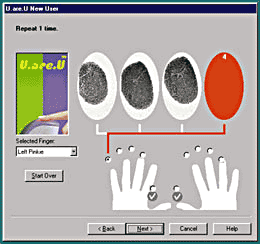
By Pete LoshinSpecial to GCNNot only do I remember the days before PCs, but I once knew how to program the breadboard for an IBM Corp. card sorter. Installing new hardware and software has always been a hassle, but we're making progress.Even with some unusual aspects to the installation, I managed to get Digital Persona's U.are.U fingerprint recognition system up and running under Microsoft Windows 98 in about five minutes. First, the weird part: The installation routine's first instruction is to get your Win98 install disk so you can load some .cab files. Once you're done, you've got to stick the U.are.U CD back in the drive, and you'll see both a continuation prompt and the initial install welcome prompt. The device's dim red glow brightens for scanning when it senses a finger nearby; I found the color unnerving at first but got used to it.At $149 for the basic package, which includes a Universal Serial Bus fingerprint scanner and log-in management and screen-saver software, U.are.U offers an attractive solution for standalone security. A networked version is expected this summer.If you opt for the U.are.U Deluxe that I tested, the price jumps to $199, but you get U.are.U Private Space software, which allows users of a single computer to encrypt their own personal areas. Though Digital Persona's documentation doesn't say anything about it, the encryption algorithm uses 128-bit keys with the Blowfish algorithm invented by Bruce Schneier.U.are.U pretty much does what it says it'll do, and that is to replace the passphrase with a fingerprint scan. To log on to Win98, put your finger on the glass and U.are.U welcomes you in.Enrolling a new user is easy. The user who installs the program becomes the security administrator and is allowed to run the enrollment program. Choose a finger from a mockup of a left and right hand, let it scan four times to get a solid reading and detect all the fingerprint attributes, and you're done.You can even enroll more than one user identification for yourself, assigning separate fingers for different IDs. From then on, you just scan your finger to log in; you can click an icon in the System Tray to activate a screen saver. At that point, only you can restore the screen by putting your finger down.Though Digital Persona ships U.are.U Deluxe in a big, bulky box, the box is mostly full of air. It contains two CDs, the scanner'shaped and sized roughly like a small wedge of watermelon'and two very thin, 5-inch-square booklets.Documentation is sparse but sufficient for most uses, and though you won't find much background information about what kind of encryption is in use or any information about false positives, you will find complete contact information for support, including a toll-free number.In addition to log-ins and the screen saver, U.are.U comes with a password bank feature that allows you to link your fingerprint to passphrases used to access different systems from your PC. You can add, change or delete passphrases and applications as necessary.U.are.U handily works as advertised. I can use it to allocate space on a shared family computer and keep my toddler away from his mommy's e-mail. The standalone version could be just the thing for securing isolated systems, while the upcoming networked version may provide an easy-to-use solution for some offices. But relying on fingerprint scanning alone as a single-factor access device may not give security sticklers the warm and fuzzy feeling of two- or three-factor systems.


In and out


No single factor


Tips for buyers

  • Always be careful about evaluating security needs. A standalone security device may not be sufficient for a networked system.

  • Evaluate biometrics in the context of the environment and the population: Fingerprint recognition may not be feasible with field personnel under extreme conditions where, for example, dirt can prevent scanners from working.

  • Consider, for higher security, building a duress option that allows access while it silently notifies authorities.

  • Remember the overall security architecture and how biometrics fit in with Microsoft Windows NT or Novell NDS directories, or an Entrust or other public-key infrastructure.


  • Realize that biometrics are not the only answer. Token access control devices come in all shapes and sizes, not just smart cards and card keys. For example, the iButton from Dallas semiconductor Corp. of Carrollton, Texas, can be integrated into a key fob, watch, ring or money clip.

NEXT STORY: Security Peripherals

X
This website uses cookies to enhance user experience and to analyze performance and traffic on our website. We also share information about your use of our site with our social media, advertising and analytics partners. Learn More / Do Not Sell My Personal Information
Accept Cookies
X
Cookie Preferences Cookie List

Do Not Sell My Personal Information

When you visit our website, we store cookies on your browser to collect information. The information collected might relate to you, your preferences or your device, and is mostly used to make the site work as you expect it to and to provide a more personalized web experience. However, you can choose not to allow certain types of cookies, which may impact your experience of the site and the services we are able to offer. Click on the different category headings to find out more and change our default settings according to your preference. You cannot opt-out of our First Party Strictly Necessary Cookies as they are deployed in order to ensure the proper functioning of our website (such as prompting the cookie banner and remembering your settings, to log into your account, to redirect you when you log out, etc.). For more information about the First and Third Party Cookies used please follow this link.

Allow All Cookies

Manage Consent Preferences

Strictly Necessary Cookies - Always Active

We do not allow you to opt-out of our certain cookies, as they are necessary to ensure the proper functioning of our website (such as prompting our cookie banner and remembering your privacy choices) and/or to monitor site performance. These cookies are not used in a way that constitutes a “sale” of your data under the CCPA. You can set your browser to block or alert you about these cookies, but some parts of the site will not work as intended if you do so. You can usually find these settings in the Options or Preferences menu of your browser. Visit www.allaboutcookies.org to learn more.

Sale of Personal Data, Targeting & Social Media Cookies

Under the California Consumer Privacy Act, you have the right to opt-out of the sale of your personal information to third parties. These cookies collect information for analytics and to personalize your experience with targeted ads. You may exercise your right to opt out of the sale of personal information by using this toggle switch. If you opt out we will not be able to offer you personalised ads and will not hand over your personal information to any third parties. Additionally, you may contact our legal department for further clarification about your rights as a California consumer by using this Exercise My Rights link

If you have enabled privacy controls on your browser (such as a plugin), we have to take that as a valid request to opt-out. Therefore we would not be able to track your activity through the web. This may affect our ability to personalize ads according to your preferences.

Targeting cookies may be set through our site by our advertising partners. They may be used by those companies to build a profile of your interests and show you relevant adverts on other sites. They do not store directly personal information, but are based on uniquely identifying your browser and internet device. If you do not allow these cookies, you will experience less targeted advertising.

Social media cookies are set by a range of social media services that we have added to the site to enable you to share our content with your friends and networks. They are capable of tracking your browser across other sites and building up a profile of your interests. This may impact the content and messages you see on other websites you visit. If you do not allow these cookies you may not be able to use or see these sharing tools.

If you want to opt out of all of our lead reports and lists, please submit a privacy request at our Do Not Sell page.

Save Settings
Cookie Preferences Cookie List

Cookie List

A cookie is a small piece of data (text file) that a website – when visited by a user – asks your browser to store on your device in order to remember information about you, such as your language preference or login information. Those cookies are set by us and called first-party cookies. We also use third-party cookies – which are cookies from a domain different than the domain of the website you are visiting – for our advertising and marketing efforts. More specifically, we use cookies and other tracking technologies for the following purposes:

Strictly Necessary Cookies

We do not allow you to opt-out of our certain cookies, as they are necessary to ensure the proper functioning of our website (such as prompting our cookie banner and remembering your privacy choices) and/or to monitor site performance. These cookies are not used in a way that constitutes a “sale” of your data under the CCPA. You can set your browser to block or alert you about these cookies, but some parts of the site will not work as intended if you do so. You can usually find these settings in the Options or Preferences menu of your browser. Visit www.allaboutcookies.org to learn more.

Functional Cookies

We do not allow you to opt-out of our certain cookies, as they are necessary to ensure the proper functioning of our website (such as prompting our cookie banner and remembering your privacy choices) and/or to monitor site performance. These cookies are not used in a way that constitutes a “sale” of your data under the CCPA. You can set your browser to block or alert you about these cookies, but some parts of the site will not work as intended if you do so. You can usually find these settings in the Options or Preferences menu of your browser. Visit www.allaboutcookies.org to learn more.

Performance Cookies

We do not allow you to opt-out of our certain cookies, as they are necessary to ensure the proper functioning of our website (such as prompting our cookie banner and remembering your privacy choices) and/or to monitor site performance. These cookies are not used in a way that constitutes a “sale” of your data under the CCPA. You can set your browser to block or alert you about these cookies, but some parts of the site will not work as intended if you do so. You can usually find these settings in the Options or Preferences menu of your browser. Visit www.allaboutcookies.org to learn more.

Sale of Personal Data

We also use cookies to personalize your experience on our websites, including by determining the most relevant content and advertisements to show you, and to monitor site traffic and performance, so that we may improve our websites and your experience. You may opt out of our use of such cookies (and the associated “sale” of your Personal Information) by using this toggle switch. You will still see some advertising, regardless of your selection. Because we do not track you across different devices, browsers and GEMG properties, your selection will take effect only on this browser, this device and this website.

Social Media Cookies

We also use cookies to personalize your experience on our websites, including by determining the most relevant content and advertisements to show you, and to monitor site traffic and performance, so that we may improve our websites and your experience. You may opt out of our use of such cookies (and the associated “sale” of your Personal Information) by using this toggle switch. You will still see some advertising, regardless of your selection. Because we do not track you across different devices, browsers and GEMG properties, your selection will take effect only on this browser, this device and this website.

Targeting Cookies

We also use cookies to personalize your experience on our websites, including by determining the most relevant content and advertisements to show you, and to monitor site traffic and performance, so that we may improve our websites and your experience. You may opt out of our use of such cookies (and the associated “sale” of your Personal Information) by using this toggle switch. You will still see some advertising, regardless of your selection. Because we do not track you across different devices, browsers and GEMG properties, your selection will take effect only on this browser, this device and this website.