
USB: This Bus Is Going Places





If you haven't yet boarded the Universal Serial Bus bandwagon, you will want to find out where it's going. It's a technology that lives up to its claims and fills a growing need for a way to add peripherals to a system.
By Mark A. KellnerSpecial to GCNIf you haven't yet boarded the Universal Serial Bus bandwagon, you will want to find out where it's going. It's a technology that lives up to its claims and fills a growing need for a way to add peripherals to a system.Not long ago, the Centronics parallel interface and the RS-232 serial interface were enough. But as the number of peripherals grew, these ports clogged, leading to jerry-built substitutes such as A/B switches and the like. Users seeking to connect a printer, scanner, PalmPilot, external modem and perhaps a Zip drive were beginning to learn the meaning of the phrase maxed out. Alternatives such as infrared communications are widely touted but haven't gained mass acceptance as a way to get peripherals to communicate with a PC.What users want is a way to hot-swap items and get up and running quickly. You may not need a digital camera constantly connected to your PC, but you want be able to hook it up, reliably, when you must. Ditto for a handheld computer or other device. While the IEEE 1394 standard, also known as FireWire, has fans in imaging and data storage, USB has a greater range of applications.According to its proponents at the Universal Serial Bus Implementers Forum, 'USB is a ' one-size-fits-all plug and socket connection for adding a wide variety of peripherals to desktop PCs and notebooks.' USB devices are available for digital cameras, joysticks, keyboards, mice, scanners, speakers and videophones.'''With USB, users don't need to adjust system settings, insert add-in cards or restart the computer when adding peripherals,' thereby providing true plug-and-play capability, the group said in a news release. 'PC users can also easily add or remove up to 127 devices on a PC by using USB hub peripherals such as monitors and keyboards that have additional USB ports.'Unlike a lot of industry hyperbole, these claims are largely valid. These peripherals and support for the USB standard by Apple Computer Inc., Intel Corp. and Microsoft Corp. broke open the market. The fact that the USB connection worked at all was icing on the cake.The USB port is on almost every new notebook PC sold today. Apple Computer's iMac, PowerBook G3 and G3 desktop computers are either dependent on the USB port to connect to peripherals or include the USB port as a standard, a first for the Macintosh computing platforms. Scanners from companies such as UMAX Technologies Inc. of Fremont, Calif., printers from Epson America Inc. and Hewlett-Packard Co. and keyboards from Microsoft'to name three classes of devices'all have USB connectors.A market study by San Jose, Calif., research firm Dataquest Inc., projects that 100 percent of PC shipments in 2001 will be of USB-compatible units; the installed base of USB-compatible PCs will exceed 500 million by then. That represents nearly 300 percent growth over the 1998 figure of 136 million USB-equipped PCs, according to Dataquest.The USB connection is a faster way to shift data between computers, and among PCs and other devices. For example, Traveling Software of Bothell, Wash., claims up to 6-Mbps file transfer speeds using a USB cable and its new LapLink Professional software. That's fast.'' Perhaps the greatest advantage USB offers is an end to the frustration of installing peripherals. USB-compatible equipment is said to manifest plug-and-play connectivity: Just hook up a device and you're ready to roll without the hassle of setting switches or figuring out interrupt request settings.There is, after all, more than a little irony in the fact that the main connections PC or notebook users depend on'the printer and serial ports'are decades old and encumbered by all sorts of technological limitations. You can, with some effort, install more than one parallel or serial port on most PCs, but the interrupt conflicts that result when trying to hook up several devices might be enough to drive you away.At the same time, there are practical limits to the number of such ports that can be installed on one machine, and that number is certain to be below the 127 that USB enthusiasts boast about.It is natural to view such pronouncements with skepticism, but, in reality, USB lives up to its promise. The growing number and variety of USB peripherals clearly indicate that this is no passing fancy but a healthy trend.'The reason to go with USB is speed,' said Steve Bellow, co-founder of Belkin Components Inc., a leading producer of PC cables and USB adapters and accessories. The USB port allows for faster data transfer, he said.Belkin, which made its name in the 1980s by figuring out all the pin-out connectors that early PC users needed to hook up their computers and printers, is carving out a niche selling USB accessories such as keyboards, joysticks and mice, along with adapters and cables. One of the most popular adapters will allow iMac users to hook up to a parallel-port-equipped printer, Bellow said.Microsoft is extending its reach into the USB market. Its hardware unit is gearing up for the launch this fall of two USB-based keyboards. One will feature a series of Internet control buttons, and the other will offer two extra USB ports'just the thing for adding a video camera or the USB-styled speakers Microsoft is also offering.Scott Schulte, keyboard product line manager at Microsoft, said, 'Instant accessibility is also the reason we've incorporated USB ports on the keyboards. After all, who wants to climb under their desk to plug in a digital camera or game device?'The USB connection is also popular for communications with'and control of'more mundane office equipment such as the Meridian 9617 USB desktop telephone from Nortel Networks Corp. of Brampton, Ontario. For computer makers, the USB connection has been firmly established. Eric Brennan, a portables product manager at Compaq Computer Corp., said USB is 'a popular feature we will keep on our portables.''We have a lot of requests for it [to connect] the monitors, scanners, cameras, keyboards. I think things are picking up in the USB peripheral area, unlike infrared,' Brennan said.But even some of the most pro-USB people in the industry suggest that the technology has its limits. USB hubs can't handle more than two high-powered devices per hub, for example. Others dispute whether USB is really the best output connection for high-quality audio.C. Hock Leow, vice president of the multimedia division at Creative Labs, Inc. of Milpitas, Calif., said USB is great for video cameras but lousy for audio devices. Chaining together a USB keyboard, a USB mouse and USB speakers would produce interrupts when all three are in use, he said.'When you drop a bit, you hear pops,' Leow said. Video cameras, because of buffering and image quality, can handle those changes, but, he said, 'the eye is more forgiving than the ear.'Despite these challenges, Creative is planning to use USB for video cameras and other methods of connectivity that include asymmetrical digital subscriber lines, he said.More information can be found on the USB Implementers Forum Web site, at www.usb.org/usbready.exe, where you can get a software program to test your PC for USB readiness. The software is easy to download and use.
 Plug-in technology lets
users bridge platforms, integrate peripherals
and expand the network reach of port-limited PCs
One of these nine tools lets you phase in video, printing and scanning capabilities
Market makers
Mark A. Kellner is a free-lance technology writer in Marina del Rey, Calif. He can be reached via e-mail at mark@kellner2000.com.
users bridge platforms, integrate peripherals
and expand the network reach of port-limited PCs
| Get rolling |
|
One of these nine tools lets you phase in video, printing and scanning capabilities
Vendor | Product | Category | Platform | Features | Price |
Acer Peripherals America Inc. San Jose, Calif. 408-434-3300 www.acerperipherals.com | AcerScan Prisa 620UT | Multi-imaging scanner | PC, Mac | Includes 5-by-7 transparency unit | $169 |
ATEN International Co. Ltd. Irvine, Calif. 949-250-1260 www.aten-usa.com | US-401 | 4-port switch | PC, iMac | Lets four computers with USB share devices; manual switching | $59 |
UH-124 | 4-port hub | iMac | Connects four USB devices | $69 | |
Belkin Components Inc. Compton, Calif. 800-223-5546 www.belkin.com | USB ExpressBus Plus | USB, parallel, serial hub | PC | Connects various devices including legacy systems | $129 |
USB BusPort for Macintosh | PCI card adapter | Mac | Adds USB ports to older Mac systems | $60 | |
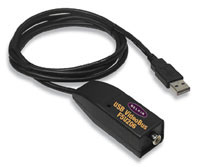
USB Parallel Printer Adapter | Printer cable | PC | Connects printers via USB to parallel port | $80 | |
Epson America Inc. Torrance, Calif. 800-463-7766 www.epson.com | StylusColor 740 | USB printer | PC, Mac | Has USB, parallel, Mac serial ports | $250 |
Iomega Corp. Roy, Utah 800-697-8833 www.iomega.com | ZIP USB Drive | Removable storage | PC, Mac | Uses 100M cartridges | $130 |
3Com Corp. Santa Clara, Calif. 800-638-3266 www.3com.com | 3Com PC HomeConnect Digital Camera | Desktop video | PC | Is a small camera offering full-motion video and digital images; has extra software for using images in e-mail | $179 |
Market makers
Mark A. Kellner is a free-lance technology writer in Marina del Rey, Calif. He can be reached via e-mail at mark@kellner2000.com.
NEXT STORY: VR IS THE REAL DEAL