
Minitowers score with maximum power
Featured eBooks





Towers of power, the eight PC clients tested by the GCN Lab fit into the minitower mold rather than the category of mammoth 4-foot towers in vogue a few years ago.
By Michael CheekGCN StaffTowers of power, the eight PC clients tested by the GCN Lab fit into the minitower mold rather than the category of mammoth 4-foot towers in vogue a few years ago.The identically configured 550-MHz Pentium III desktop systems could slip beneath a desk, but no power user would want to hide them. Some came in standard beige boxes; others had sleek curves and striking hues.SGI's 320 Visual Workstation stood out visually for its distinctive design in purple and charcoal with a nifty sliding panel for access to external bays. Micron PC Inc.'s snazzy silver accents and Dell Computer Corp.'s easy-to-access panel showed how much chassis fashion and function have evolved in the last few years.Looking more conservative than the others, the IBM PC 300 PL rocketed to top place in the comparison, earning the Reviewer's Choice designation. Its angular facade and handy top-grip might make it plain compared with the rest, but the IBM unit stood out for many reasons. It had solid client capabilities and benchmark scores second only to one other system in the review. IBM punctuated the high scores with a low price.The IBM unit had only one minor fault, one that I hope will be fixed in future revisions. The card slot protectors had two sharp metal strips on the outside. Similar slot protectors have sliced my fingers open in the past [, July 13, 1998, Page 38], so be careful hauling this system around.Chassis accessibility required no tools, thumbscrews, buttons or latches. The side panel slid right off. Of course, a lock in back could restrict access if necessary.The interior had a superior design with all wires bundled into a compartment away from the motherboard. The odd location of the five card slots, almost in the center of the minitower, turned out to be very accessible because sound, video and network interface were integrated on the motherboard.The PC 300 PL's two available bays were adequate, although cables and wires are always a detriment around vacant bays. IBM did a good job of keeping bay entry easy.The Dell OptiPlex GX1 and the Compaq Deskpro EN 6550+ each took a back seat to the IBM unit in this round of testing. Both had seven card slots, but both had to fill a single slot.The OptiPlex did not have 16M of video RAM as part of its integrated Accelerated Graphics Port; the current integrated video goes only to 8M. To meet the specifications of the review, which required all systems to be configured the same, Dell had to fudge with a PCI video card.Compaq's Deskpro EN 6550+ lacked an integrated network interface card; a 10/100-Mbps NIC filled one slot.The two units had a lot in common, especially inside, where the servicing latches were made of green plastic. The Dell OptiPlex chassis is a perennial favorite in the GCN Lab, but a couple of new features caught my eye.For one thing, the lock on the back was difficult to find. I spent a lot of time pushing the front button, but the panel did not open as it should. Dell should put a label in back to make it clear that a latch needs to be slid to an unlocked position.Inside, wires and cables were not as well-organized as in previous OptiPlex generations, and they plugged into the motherboard in odd places. But the removable card cage made filling the slots easy. And the curves of Dell's minitower had a classic simplicity.The Compaq Deskpro was less accessible, with thumbscrews securing the side panel. It had a removable card cage for easy access, and its interior was well tagged to explain how to remove and service components. But there was only a single internal bay, occupied by the hard drive.The PowerMate 8100 from NEC Computer Systems Division also lacked a second internal bay.Three thumbscrews had to be loosened to take the metal panel off the PowerMate 8100, which had a rather bare interior. Cables for the power unit and bays were out of the way in an upper compartment. Only one full-sized external bay was vacant, and accessing it to install a new device would have been close to impossible.Although the NEC had a small cooling fan on the processor, it lacked a larger one for the minitower itself.The last time NEC sent the lab a PowerMate, the unit died before tests were concluded [, July 13, 1998, Page 31]. The present unit made it all the way through without glitches.The E in Gateway Inc.'s model names originally was supposed to stand for enterprise. Other test units in this review had components integrated on the motherboard, but the Gateway E-4200 550 had no integrated video, network interface or sound.Inside, cables and wires were everywhere. A plastic manifold to direct cool air over the processor relied on the fan of the E-4200's power unit.The Gateway had the maximum number of bays: eight total and four available. Gateway includes Intel LANDesk Client Manager with its systems, but it was absent from this test system, which was the only one without a client management tool installed.Usability also turned out to be a problem with the Titan Pro 550 from start-up Legend GEC.The Titan Pro's performance lived up to its colossal name, earning the highest overall benchmark scores. Elsewhere, the Titan toppled. Legend GEC provided the PC AlertIII client management browser, which kept popping up an error message that the fan wasn't working even though the fan was whirring away just fine. I could not get the error message to go away, so I had to disable PC AlertIII to continue the tests.The Titan Pro also came with Y2K Doctor, a utility that was more of a quack than a doctor. It told me the Titan Pro's BIOS failed the year 2000 rollover test, but Norton 2000 from Symantec Corp. of Cupertino, Calif., confirmed what I saw: The BIOS worked fine.The Titan Pro was the only one of the eight units that required a tool to open. The chassis interior revealed crisscrossed cables and wires, some bundled and attached to vacant bays. Its motherboard did not integrate sound, network interface or video.This first GCN Lab client comparison using benchmarks from Ziff-Davis Benchmark Operation found the top six units clustered closely together. On ZD's Winstone 99 Version 1.1, which examines overall system performance, the scores of the top six all were within 6 percent of one another.The Micron and SGI machines were about 20 percent lower in Winstone 99 scores.Micron's chassis improvement was a mixed blessing. Last year, lab reviewers rated the chassis among the most difficult to access. The curvy new chassis premiering in the ClientPro CS had more personality than its plain-Jane predecessors, and its shimmering silver accents framed the external bays. In back, a handle easily unlatched the panel, although it was awkward to push and pull at the same time.The interior, however, was less than accessible. Micron should supply labels and indicators to show administrators which latch releases which component.A blue plastic door blocked everything inside. The door's function was unclear, although it apparently could house two cooling fans. Two oblique latches released the door to swing on its hinges out of the way. Inside, cables and wires were everywhere, partially blocking access to plugs near the memory bank slots. The card slots did have one nice innovation. A single exterior thumbscrew released a panel that secured all cards in place.Despite the ClientPro name, Micron evidently uses the same chassis for its consumer PC line. The motherboard had an integrated joystick port but lacked an integrated network interface. A 10/100-Mbps NIC occupied one slot.Like the Gateway, the ClientPro CS had the maximum number of bays: eight total and four available.Performance was the lowest of all the clients in the comparison. The unit's slow graphics accelerator and sluggish hard drive were probably responsible for dropping the Micron's scores 20 percent below those of top performers.The SGI unit also ranked about 20 percent lower than the top boxes. The distinctive machine would do much better as a built-to-the-hilt specialized workstation than as a general office client.With effort, I could pop the 320 Visual Workstation's purple panel free from the charcoal box to get inside. But getting the purple panel back into place required pushing. Inside were five cooling fans'three on the chassis, one on the processor and one on the graphics accelerator chip.The tangle of cables and the almost impossible-to-remove power supply obstructed access to the bays. Perhaps that was why SGI did not include the requested internal Zip removable drive from Iomega Corp. of Roy, Utah. Had it been there, the 320 would have had only one internal bay.The cables and wires also partially blocked access to the proprietary bank of RAM chips, measuring 2 inches by 1.3 inches and shorter than the industry-standard RAM sticks in all the other clients.SGI's many proprietary components do not make the unit friendly for a heterogeneous enterprise, especially for government agencies that redeploy PCs and components. The 320 Visual Workstation also lacked a standard PS/2 keyboard and mouse ports. The keyboard and mouse connections were for the Universal Serial Bus, but without any unique features warranting USB.In any enterprise environment, keyboards and mice give out quite often, and USB replacement devices are not readily available. The SGI also had limited card and bay expandability.Graphics and hard drive performance scores were low. The graphics system borrowed mapping memory from the main RAM banks, which landed the SGI's ZD CPUmark 99 score for processing power at the bottom of the heap. The price was about double that of the other systems.Any of these PC clients could fit well into an enterprise, although some would fit in better than others. The IBM, Dell and Compaq units all offer a balance of top performance, expandability and value. XXXSPLITXXX-
Eight 550-MHz Pentium III systems scream, with IBM the fastest of them all

GCN
On the rebound
GCN
Pretty chassis, but '
 |
GCN
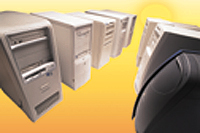
 | Six systems performed within 6 percent of each other. The Micron and SGI minitowers could not keep up with the rest; their benchmarks were about 20 percent lower than the top-performing systems. |
On the rebound
GCN
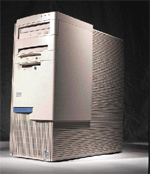 | The Reviewer's Choice is the IBM Corp. PC 300 PL minitower for its performance, scores and price. |
Pretty chassis, but '
 | Deskpro EN 6550+ Compaq Computer Corp. Houston 800-727-5472 www.compaq.com/govt | OptiPlex GX1 Dell Computer Corp. Austin, Texas 800-694-3355 www.dell.com/client/fed | E-4200 550 Gateway Inc. North Sioux City, S.D. 800-315-2536 www.gateway.com/gov | PC 300 PL IBM Corp. Armonk, N.Y. 800-426-2968 www.pc.ibm.com/us/ibmpc |
| Price | $2,084 GSA | $1,859 GSA | $2,087 GSA | $2,049 GSA |
| Pros and cons | ||||
| Pros | Labeled, well-organized interior; roomy, easy-to- use card cage | Nice chassis with easy access; roomy, easy- to-use card cage | Expansion bays available; good high-end graphics | Superb performance; superior all-around system performance |
| Cons | No available internal bay; no integrated network interface | No integrated 16M video; PCI card occupies slot | Client management tool not installed; few integrated components | Sharp metal edges on external card slot protectors |
| Client management (Part of usability grade) | ||||
| Included tools | Compaq Intelligent Manageability | Dell OpenManage Client | none | Intel LANDesk Client Manager |
| Year 2000 readiness | Pass | Pass | Pass | Pass |
| Accessibility (Part of usability grade) | ||||
| Chassis | Fair; toolless entry: three thumbscrews | Good; toolless entry: button releases panel | Fair; toolless entry: two thumbscrews | Excellent; toolless entry: panel slides off easily |
| Interior organization | Excellent; wires out of the way; clearly marked labels | Good; nice card cage; some wires need to be bundled | Poor; tangle of cables and wires; power fan cools processor | Good; wires out of the way; all components accessible |
| Expandability (Part of features and configuration grade) | ||||
| Bays | Four external, one internal; one external available | Four external, two internal; one external, one internal available | Five external, three internal; two external, two internal available | Four external, two internal; one external, one internal available |
| Slots | Five PCI, two ISA; four PCI, two ISA available | Three PCI, two ISA, two shared; two PCI, one ISA, two shared available | Three PCI, one ISA, one shared; one PCI, one ISA one shared available/td> | Two PCI, two ISA, one shared all available |
| Memory/td> | Three slots; two available | Three slots; two available | Three slots; two available | Three slots; two available |
| Benchmarks (Part of performance grade) | ||||
| CPUmark 99 | 40.8 | 40.5 | 40.7 | 41.8 |
| Business Graphics WinMark | 149 | 190 | 138 | 227 |
| High-end Graphics WinMark | 373 | 407 | 423 | 404 |
| Business Disk WinMark in megabytes/sec | 5.5 | 5.5 | 4.9 | 5.4 |
| High-end Disk WinMark in megabytes/sec | 13.2 | 12.5 | 11.6 | 12.8 |
| Grades | ||||
| Usability | B+ | B+ | D+ | A |
| Features and configuration | B' | A' | A' | A |
| Performance | B | B+ | B | A' |
| Overall grade |  |   |  |   |
| Titan Pro 550 Legend GEC Akron, Ohio 800-465-0379 www.legendgec/titanpro | ClientPro CS Micron PC Inc. Nampa, Idaho 888-742-4342 government.micronpc.com | PowerMate 8100 NEC Computer Systems Division Sacramento, Calif. 888-446-8632 www.neccsd.com/govt | 320 Visual Workstation SGI Mountain View, Calif. 888-400-4744 visual.sgi.com |
| Price | $1,882 GSA | $2,110 GSA | $2,316 GSA | $4,205 GSA |
| Pros and cons | ||||
| Pros | Best overall benchmark performance; good price point | Improved chassis design for accessibilty; expansion bays available | Solid performance, especially hard drive access | Good choice for specialized workstation tasks |
| Cons | Poor chassis design and client management tool | Lowest overall benchmark performance; no integrated NIC | Sparse interior; no cooling fan; no internal bay | Not for general office environment; proprietary components |
| Client management (Part of usability grade) | ||||
| Included tools | Inaccurate PC AlertIII | Intel LANDesk Client Manager | Intel LANDesk Client Manager | Intel LANDesk Client Manager |
| Year 2000 readiness | Y2K Doctor, provided by Legend GEC, says its own system fails; Norton 2000 says it passes | Pass | Pass | Pass |
| Accessibility (Part of usability grade) | ||||
| Chassis | Poor; two screws for entry: requires screwdriver | Good; toolless entry: latch releases panel | Fair; toolless entry: three thumbscrews | Fair; toolless entry: easy to open, difficult to close | Interior organization | Poor; tangle of cables and wires; some bundled wires block bays | Poor; plastic door block access; tangled cables and wires | Fair; cables out of the way; available bay hard to access | Fair; cables hinder RAM access; power supply obscures bays |
| Expandability (Part of features and configuration grade) | ||||
| Bays | Five external, two internal; two external, one internal available | Five external, three internal; two external, two internal available | Four external, one internal; one external available | Three external, two internal; one internal available if Zip drive is included |
| Slots | Four PCI, one ISA, one shared; two PCI, one ISA, one shared available | Three PCI, one ISA, one shared; three PCI, one ISA available | Three PCI, one ISA, one shared; all available | Three PCI: one 32-bit, two 64-bit; all available |
| Memory | Three slots; one available | Three slots; two available | Three slots; two available | 12 proprietary slots; six available |
| Benchmarks (Part of performance grade) | ||||
| CPUmark 99 | 40.6 | 40.7 | 40.6 | 40.0 |
| Business Graphics WinMark | 220 | 104 | 189 | 161 |
| High-end Graphics WinMark | 394 | 346 | 411 | 346 |
| Business Disk WinMark in megabytes/sec | 6.1 | 4.4 | 4.6 | 3.7 |
| High-end Disk WinMark in megabytes/sec | 13.9 | 6.8 | 13.9 | 8.4 |
| Grades | ||||
| Usability | D | C+ | C+ | C' |
| Features and configuration | B' | B+ | C+ | C |
| Performance | A | D | B+ | D+ |
| Overall grade |  |  | |  |
NEXT STORY: Stragglers make a dash for the Y2K finish line