
PORTABLE PRINTERS





Paperless office? What paperless office? I have never seen one, have you? Even out of the office, the need for paper is always with you, perhaps more now than ever.
By John McCormickSpecial to GCNPaperless office? What paperless office? I have never seen one, have you? Even out of the office, the need for paper is always with you, perhaps more now than ever.'In the beginning, road warriors were equipped with a notepad, a pen and a suitcase full of wrinkled clothes.Then came the notebook PC, and everything changed'except the wrinkled clothes. Jobs that had been done only at an office desk now could be done just about anywhere. A new generation of road warrior was born, one that has evolved quickly with technology.My first notebook weighed 16 pounds and had a single 720K floppy disk drive. At first it impressed clients; now it's a doorstop. It still works, but it's so slow and large that I haven't even been able to donate it to a charity.My clients expect a lot more of me these days when I travel. I need online maps linked to a Global Positioning System, quick access to giant databases and a CD-ROM drive. And on most jobs, I couldn't leave the office if I didn't also have a portable printer.Whether I need a large-print copy of the speech I write tonight to give tomorrow, handouts for the audience, transparencies for an overhead projector, signs or a contract, I can produce high-quality documents and images in less than a minute per page on a battery-operated ink-jet printer.When a government employee leaves the office today, he or she will likely have a fast, lightweight notebook computer, complete with a modem to communicate with the main office. Most government offices don't routinely have portable printers bundled with their notebooks yet, but that's likely going to change; these printers are just too useful. If you didn't carry a printer on your last trip, you probably had a dozen occasions to wish you had.While you can haul almost any smaller printer along on a trip, a truly portable printer is one that can be powered by internal batteries. This guide is limited to those small, lightweight printers that either come with a battery pack or offer one as an option.They are very light'some weighing about a pound or less'and range from thin-paper, monochrome bar code printers to those capable of handling full color on letter-size paper. Many will work with both notebook PC and handheld operating systems, and most have acceptable printing resolutions, even as high as 720 by 720 dots per inch. Printing speeds are slow compared with the big printers back at the office, but you have to make some concessions on the road.If you carry along the corded power supply, these printers can do almost anything a desktop printer can. The same holds for battery operation, except that you are limited to about 40 pages of printout, even with a new, fully charged battery.Be aware that battery life is transient. As the battery ages its capacity drops, just as it does for your notebook computer, so view battery-life estimates given by vendors warily. They are accurate enough when everything is new, but after even a few uses the capacity of any rechargeable battery decreases, especially if you fail to charge it according to directions every time.The ability to print text is important, but veteran road warriors can tell you it won't be enough for long.Color printing is probably the most important option available for many of these battery-operated printers. It is expensive on a per-page basis to print full color, but the use of a small amount of attention-getting spot color is relatively inexpensive and fast with an ink-jet printer.Another option for some portable printers is a page feeder, which is useful if you are preparing a dozen or more documents and don't have access to a copier.A common problem with portable printers is getting paper to feed accurately. It's not unusual for pages to be pulled through slightly crooked. A page feeder will reduce this tendency and can produce better-quality documents, making this a useful option even if you will only be printing single pages.But that's just the beginning. Although portable printers, at least ink-jet models, are extremely versatile, most of their capabilities depend less on the printer itself than on the supplies bought for it. Paper is an important supply to consider.Inexpensive copier paper will work well with most portable printers, but special tasks require special supplies. Canon Computer Systems Inc. alone offers a baker's dozen of special papers to select from. Listed as being for the Canon BJC-50 and BJC-80 printers, the same media can be used with other printers. Likewise for most specialty products offered by other manufacturers.Canon's paper supplies range from its Brilliant White paper'$12 for 500 sheets'to transparencies that cost $50 for 55 sheets. You can also get such things as a starter's kit, banner paper and packs of greeting cards.'' High Gloss Photo Film costs $18 for 10 sheets. Reprints of 8-by-10-inch glossies from a photo store is probably a better option, but if you only need a few photos'perhaps for photo IDs'using this paper and cutting the pictures is a cost-effective option.WIn addition, there are 4- by 5-inch photo cards, opaque papers, water-resistant papers, ledger-sized photo papers, high-resolution pages, cotton fabric paper, and various sizes of T-shirt transfer papers.The prices of such supplies, from Canon or any vendor, are worth weighing, because they will add to the printer's operating costs.Another important factor is how you use color. Although the idea of printing in color is attractive, the adage 'less is more' ought to be foremost in your mind when designing a printed page.A splash of color can enhance almost any document, but too much will not only be expensive but also could defeat the purpose of using color for emphasis.Printer manufacturers typically estimate print costs as about 5 cents per monochrome page and about 20 cents per color page, but that's the cost of the ink and doesn't include the cost of high-quality papers necessary to make color really stand out.Inexpensive copier-grade paper will give you disappointing results. For printing photographs or complex images, plan to pay 50 cents to $1 a page or more for high-grade paper that will show color inks at their best.Also, color ink print heads will cost about $50 and are rated to last only about 4,000 pages printing on 15 to 20 percent of the page.Black ink print heads cost about $10 less and are rated about the same, but they usually produce text, which on average takes up only a small portion of the page. In contrast, people are often tempted to print large color blocks.The third cost is ink. Color ink tanks run about $20 and print fewer than 100 pages, even if you are conservative with your use of color. Black ink costs about half as much, though a tank typically will produce only about 60 pages.Printing in color, of course, often is worth the expense. But before you make that determination, be sure you know the full expense.
They're so inexpensive, versatile and lightweight,
they may soon become standard equipment
for government travelers
Next time, take one
ide world of paper
John McCormick, a free-lance writer and computer consultant, has been working with computers since the early 1960s.
One of these 16 units can lighten a traveler's printing load
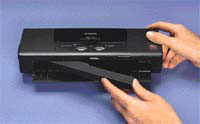 | Canon's BTC-50 color bubble-jet printer, priced at $349, weighs 2 pounds and prints 5.5 ppm at 720-by-360 resolution. |
They're so inexpensive, versatile and lightweight,
they may soon become standard equipment
for government travelers
Next time, take one
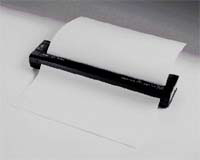 | The Pentax PocketJet II, a monochrome printer, weighs 1.15 pounds with the battery. It's priced at $399. |
ide world of paper
| Quick test |
|
John McCormick, a free-lance writer and computer consultant, has been working with computers since the early 1960s.
| Points to ponder on printers | |
|
|
One of these 16 units can lighten a traveler's printing load
| Vendor | Product | Platforms | Type | Interface | Size (height by width by | weight in pounds with battery | Resolution in dots per inch | Maximum speed in pages per minute or inches per second | Notes (all accept 8.5-inch wide paper unless noted) | Price |
| Brother International Corp. Somerset, N.J. 888-879-3232 www.brother.com | MP-21Cdx | Windows 3.x, 9x, NT | Ink-jet | Parallel or PC Card | 4.1 by 11.8 by 2 | 2.5 | 720 by 720 | 0.25 ppm | Color, powered through PC Card, includes sheet feeder | $350 |
| Canon Computer Systems Inc. Costa Mesa, Calif. 800-652-2666 www.ccsi.canon.com | BJC-50 | Win 3.x, 9x, NT, CE, Palm OS | Bubble-jet | IrDA | 11.9 by 1.9 by 4.4 | 2 | 720 by 360 | 5.5 ppm | Color, 34K buffer | $349 |
BJC-80 | Win 3.x, 9x, NT, CE, Palm OS | Bubble-jet | IrDA | 11.8 by 6.2 by 2.2 | 3.1 | 720 by 360 | 4.5 ppm | Color, 34K buffer | $299 | |
Citizen America Corp. El Segundo, Calif. 310-643-9825 www. citizen-america.com | PN50 | Win 3.x, 9x, NT | Thermal fusion | Parallel | 10 by 2 by 3 | 1.4 | 360 by 360 | 2 ppm | Monochrome, 30 to 40 pages per battery charge | $199 |
PN60i | Win 3.x, 9x, NT, MS-DOS | Thermal fusion | Parallel | 10 by 1.8 by 2 | 1.4 | 360 by 360 | 2 ppm | Color, 64K buffer | $399 | |
PN60 Mac | Mac OS | Thermal fusion | Parallel | 10 by 1.8 by 2 | 1.4 | 360 by 360 | 2 ppm | Color, 64K buffer | $299 | |
PD04 | Any | Direct thermal | IrDA, Serial | 5.8 by 4.3 by 1 | 14 ounces | 203 | 2 ips | Monochrome bar code and text, 4-inch width | $795 | |
Comtec Information Systems Inc. Warwick, R.I. 401-739-5800 www. comtecinfosys.com | RP3
| Win 3.x, 9x, NT | Direct thermal | Serial | 6.8 by 5 by 2.9 | 2 | 203 | 3 ips | Monochrome, 3-inch printer for labels, tags or receipts | $1,336 |
Datasouth Computer Corp. Charlotte, N.C. 704-523-8500 www.datasouth.com | CodeWriter 4102 | Any | Direct thermal | Serial | 8.7 by 3.5 by 7.7 | 4.5 | 203 | 2 ips | Monochrome bar code and graphics, 4.5-inch width | $1,695 |
Eltron International Inc. Camarillo, Calif. 800-344-4003 www.eltron.com | Xport | Any | Thermal | Parallel or IrDA | 3.6 by 2.6 by 5.5 | 1 | 203 | Monochrome bar code, text and graphics, 2-inch width | $495 | |
Transport (P2242) | Any | Thermal | Serial | 7.4 by 3 by 5.6 | 3.6 | 203 | 2 ips | Monochrome bar code, text and graphics, 4-inch width | $895 | |
Hewlett-Packard Co. Palo Alto, Calif. 800-752-0900 www.hp.com | DeskJet 340 CBI
| MS-DOS, Win 3.x, 9x, NT | Ink-jet | Parallel, serial, IrDA | 5.9 by 12.2 by 2.6 | 5 | 600 by 300 | 2 ppm | Color, 16K to 48K buffer, includes battery and IrDA adapter | $300 |
Monarch Marking Systems Inc. Miamisburg, Ohio 937-865-2123 www.monarch.com | Renegade (9490) | Any | Thermal | Serial | 8.7 by 8.1 by 2.8 | 4 | 192 | 1.8 ips | Monochrome bar code, 4-inch width | $1,495 |
Rascal (9450) | Any | Thermal | Serial | 4.3 by 3.3 by 5.4 | 1.56 | 203 | 2 ips | Monochrome bar code and text, 256K memory, 2-inch width | $1,115 | |
Pentax Technologies Corp. Broomfield, Colo. 303-460-1600 www.pentaxtech.com | PocketJet II | Win 3.x, 95 | Thermal | Parallel | 1.18 by 10.04 by 2.17 | 1.15 | 300 by 300 | 3 ppm | Monochrome, no buffer | $399 |
PocketJet 200 | Win 3.x, 9x, NT, CE | Thermal | Parallel | 1.18 by 10.04 by 2.17 | 1.15 | 200 by 200 | 3 ppm | Monochrome, no buffer | $319 |
NEXT STORY: 3Com's way-cool Palm VII puts wireless in hand