SiteScape Forum can create a mirror image of the way your office works

A good groupware package should be able to reflect the office environment and function in much the same way.

A good groupware package should be able to reflect the office environment and function in much the same way.SiteScape Forum Version 4.0, formerly the AltaVista Forum, from SiteScape Inc. allows users to create a secure virtual office that has a message board interface. Users can initiate and participate in online discussions, share documents, chat, schedule meetings using shared calendars and maintain personal home pages that include lists of favorite links.The initial screen of SiteScape Forum looks like a standard message board. But unlike standard message boards, not all the entries in this screen are discussion topics. There are standard discussion topics, indicated by quotation marks. But there are also documents, indicated by an icon representing a sheet of paper; Web pages, indicated by an icon that looks like an eyeball; and surveys, indicated by a check-box icon.Most of the features are available from a pull-down menu. For example, to add a discussion topic, you select the Add Discussion Topic tool from the menu, enter the discussion topic name and a few keywords, then whatever text you want. You can allow or disallow other members of your group to change your entry. And you can have the system maintain either an access count or a list of the people who looked at the message.Surveys are used to poll a workgroup to see what its members think about specific topics. To add a survey question, you select the Add Survey Question tool. Then you type in the appropriate boxes the question you are asking, the replies that survey participants can check, and comments. If the survey requires more explanation than can comfortably fit in the comments box, the survey's creator can attach one or more documents to the survey.The person creating the survey can also decide if the results should be tallied and displayed in real time or only after the survey deadline date has passed.To add a Web page to the program, you select the appropriate tool, then enter keywords, any comments and the uniform resource locator. If you add comments, a user selecting the message board post will first see the comments and can then move to the Web page by clicking on a link. If there are no comments, clicking on the post brings the user directly to the Web page.Creating a workflow is almost as easy as posting a document, survey or URL. There are five steps to defining a workflow.First, identify the stages of the workflow. For example, the stages for an upgrade to a new PC could be, 'User request,' 'Supervisor OK,' 'IS department OK,' 'Delivery and setup of PC,' and 'User training complete.'Second, define any questions to be asked at each stage. For example, a question in the Supervisor OK stage might be, 'Does the user need to use an application that requires a new PC?'Third, define the transitions criteria. This is a set of Boolean operators based on responses to the questions in the previous stage. For example, you can indicate that if the supervisor responds yes to both questions, the form will move to the next stage. If not, the request is returned to the user.Fourth, define the access rights'who can view or make changes to the document'for each stage.Finally, determine what notifications must be made as the document progresses from stage to stage. ''

By Larry Stevens

Special to GCN


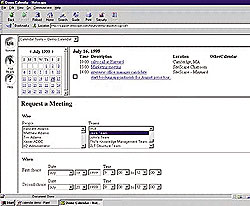
With SiteScape Forum's message board interface, users can schedule team meetings through shared calendars; the groupware has an easy-to-use pull-down menu.


Easy access


NEXT STORY: GROUP(WARE) THERAPY

X
This website uses cookies to enhance user experience and to analyze performance and traffic on our website. We also share information about your use of our site with our social media, advertising and analytics partners. Learn More / Do Not Sell My Personal Information
Accept Cookies
X
Cookie Preferences Cookie List

Do Not Sell My Personal Information

When you visit our website, we store cookies on your browser to collect information. The information collected might relate to you, your preferences or your device, and is mostly used to make the site work as you expect it to and to provide a more personalized web experience. However, you can choose not to allow certain types of cookies, which may impact your experience of the site and the services we are able to offer. Click on the different category headings to find out more and change our default settings according to your preference. You cannot opt-out of our First Party Strictly Necessary Cookies as they are deployed in order to ensure the proper functioning of our website (such as prompting the cookie banner and remembering your settings, to log into your account, to redirect you when you log out, etc.). For more information about the First and Third Party Cookies used please follow this link.

Allow All Cookies

Manage Consent Preferences

Strictly Necessary Cookies - Always Active

We do not allow you to opt-out of our certain cookies, as they are necessary to ensure the proper functioning of our website (such as prompting our cookie banner and remembering your privacy choices) and/or to monitor site performance. These cookies are not used in a way that constitutes a “sale” of your data under the CCPA. You can set your browser to block or alert you about these cookies, but some parts of the site will not work as intended if you do so. You can usually find these settings in the Options or Preferences menu of your browser. Visit www.allaboutcookies.org to learn more.

Sale of Personal Data, Targeting & Social Media Cookies

Under the California Consumer Privacy Act, you have the right to opt-out of the sale of your personal information to third parties. These cookies collect information for analytics and to personalize your experience with targeted ads. You may exercise your right to opt out of the sale of personal information by using this toggle switch. If you opt out we will not be able to offer you personalised ads and will not hand over your personal information to any third parties. Additionally, you may contact our legal department for further clarification about your rights as a California consumer by using this Exercise My Rights link

If you have enabled privacy controls on your browser (such as a plugin), we have to take that as a valid request to opt-out. Therefore we would not be able to track your activity through the web. This may affect our ability to personalize ads according to your preferences.

Targeting cookies may be set through our site by our advertising partners. They may be used by those companies to build a profile of your interests and show you relevant adverts on other sites. They do not store directly personal information, but are based on uniquely identifying your browser and internet device. If you do not allow these cookies, you will experience less targeted advertising.

Social media cookies are set by a range of social media services that we have added to the site to enable you to share our content with your friends and networks. They are capable of tracking your browser across other sites and building up a profile of your interests. This may impact the content and messages you see on other websites you visit. If you do not allow these cookies you may not be able to use or see these sharing tools.

If you want to opt out of all of our lead reports and lists, please submit a privacy request at our Do Not Sell page.

Save Settings
Cookie Preferences Cookie List

Cookie List

A cookie is a small piece of data (text file) that a website – when visited by a user – asks your browser to store on your device in order to remember information about you, such as your language preference or login information. Those cookies are set by us and called first-party cookies. We also use third-party cookies – which are cookies from a domain different than the domain of the website you are visiting – for our advertising and marketing efforts. More specifically, we use cookies and other tracking technologies for the following purposes:

Strictly Necessary Cookies

We do not allow you to opt-out of our certain cookies, as they are necessary to ensure the proper functioning of our website (such as prompting our cookie banner and remembering your privacy choices) and/or to monitor site performance. These cookies are not used in a way that constitutes a “sale” of your data under the CCPA. You can set your browser to block or alert you about these cookies, but some parts of the site will not work as intended if you do so. You can usually find these settings in the Options or Preferences menu of your browser. Visit www.allaboutcookies.org to learn more.

Functional Cookies

We do not allow you to opt-out of our certain cookies, as they are necessary to ensure the proper functioning of our website (such as prompting our cookie banner and remembering your privacy choices) and/or to monitor site performance. These cookies are not used in a way that constitutes a “sale” of your data under the CCPA. You can set your browser to block or alert you about these cookies, but some parts of the site will not work as intended if you do so. You can usually find these settings in the Options or Preferences menu of your browser. Visit www.allaboutcookies.org to learn more.

Performance Cookies

We do not allow you to opt-out of our certain cookies, as they are necessary to ensure the proper functioning of our website (such as prompting our cookie banner and remembering your privacy choices) and/or to monitor site performance. These cookies are not used in a way that constitutes a “sale” of your data under the CCPA. You can set your browser to block or alert you about these cookies, but some parts of the site will not work as intended if you do so. You can usually find these settings in the Options or Preferences menu of your browser. Visit www.allaboutcookies.org to learn more.

Sale of Personal Data

We also use cookies to personalize your experience on our websites, including by determining the most relevant content and advertisements to show you, and to monitor site traffic and performance, so that we may improve our websites and your experience. You may opt out of our use of such cookies (and the associated “sale” of your Personal Information) by using this toggle switch. You will still see some advertising, regardless of your selection. Because we do not track you across different devices, browsers and GEMG properties, your selection will take effect only on this browser, this device and this website.

Social Media Cookies

We also use cookies to personalize your experience on our websites, including by determining the most relevant content and advertisements to show you, and to monitor site traffic and performance, so that we may improve our websites and your experience. You may opt out of our use of such cookies (and the associated “sale” of your Personal Information) by using this toggle switch. You will still see some advertising, regardless of your selection. Because we do not track you across different devices, browsers and GEMG properties, your selection will take effect only on this browser, this device and this website.

Targeting Cookies

We also use cookies to personalize your experience on our websites, including by determining the most relevant content and advertisements to show you, and to monitor site traffic and performance, so that we may improve our websites and your experience. You may opt out of our use of such cookies (and the associated “sale” of your Personal Information) by using this toggle switch. You will still see some advertising, regardless of your selection. Because we do not track you across different devices, browsers and GEMG properties, your selection will take effect only on this browser, this device and this website.