PC Card personal digital assistant falls a little flat

The Rex Pro 5 deserves a big hand for packing into a Type II PC Card what is perhaps the smallest, most useful personal digital assistant available today.

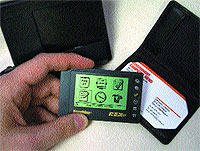
By Michael CheekGCN StaffThe Rex Pro 5 deserves a big hand for packing into a Type II PC Card what is perhaps the smallest, most useful personal digital assistant available today.The card fits in any notebook computer's PC Card slot, or you can use a slip-in reader that attaches to a PC serial port.The included TrueSync Plus software from Starfish Software Inc. synchronizes Rex Pro data with the PC.Sized like a business card except for the 3/8-inch thickness, the unit has a clear, monochrome LCD screen measuring 1.25 inches by 2.13 inches. Along the right side are six buttons'the only way to input data directly. The Rex Pro comes with 512K of RAM, and its two included watchlike batteries are supposed to last up to six months.As a handy tool for appointment reminders and keeping addresses, the Rex Pro performs well, but it can't handle anything more. Just try entering a short note. The alphabet appears on two lines. You must highlight each letter, one by one, to type'we're talking tedious. And forget e-mail.It took quite a bit of work to get the Starfish software to synchronize with my Microsoft Outlook 2000 schedule and contacts. When I finally succeeded, TrueSync got too helpful and scheduled a second set of the exact same appointments throughout my calendar.I organize contacts by categories. Outlook by default offers more than a dozen categories, but TrueSync can handle only four and, if not properly mapped, fails to transfer categorized contacts to the Rex Pro. My most important contacts'the ones marked priority'did not appear on the Rex Pro on the first try.Starfish has updated TrueSync for Outlook 2000, but the update confuses the current version with the previous version, Outlook 98. Moreover, there is no utility for entering directly into the Rex Pro information that you might not want to keep on your PC.Some of the device's size restrictions could be overcome with a friendlier desktop software interface. I wanted to try TrueSync Desktop, the personal information manager written specifically for the Rex Pro. But once I had installed TrueSync for Outlook, I was forbidden to install the other version, even after I wiped the Outlook version from the hard drive. That implies the uninstall routine failed to delete all of its entries from the Microsoft Windows Registry.TrueSync Plus can also link with Outlook 97 and 98, Microsoft Schedule+ 7.x, Lotus Organizer 97 and 97GS, Symantec Act 3.x and 4.0, and Starfish Sidekick 98 and 99.The Rex Pro has two alarms, short and long. The short alarm doesn't ring long enough, just four seconds, and the long alarm rings too long at 20 seconds. No snooze delay is available, and if you miss hearing the alarm, which is easy to do, there is no follow-up beep to make sure you acknowledge the appointment.The main screen ought to show the owner's name, and password protection also is lacking. As it stands, if you lose the Rex Pro, anyone can access your data.Size and convenience are enticing, but the TrueSync software and the hardware limitations make the Rex Pro fall about as flat as a PC Card.In next week's issue, I will review a wireless pager that can send and receive e-mail, manage your appointments and do other little services.


Franklin's Rex Pro includes a handy holder and a docking base. The Rex Pro is basically a PC Card merged with a personal information manager.


Box Score ''''''''

Rex Pro 5

Personal digital assistant

with PC Card


Franklin Electronic Publishers Inc.;

Burlington, N.J.;

tel. 800-266-5626

www.franklin.com/rex

Price: $191 from resellers


+' Compact size

+' PC Card compatibility

'' Needs more customizable options


TrueSync Plus ''
PDA synchronization software


Starfish Software Inc.;

Scotts Valley, Calif.;

tel. 831-461-5800
www.starfish.com

Price: Free with Rex Pro 5; $70 for other Rex devices


+' Synchronizes with PC data if properly configured

'' Hard to understand

'' Messed up appointment calendar on first synch


Real-life requirements:

Windows 9x or NT, 133-MHz or faster Pentium, 32M of RAM, 25M of free storage, CD-ROM drive, Type II PC Card slot or available serial port for docking station


Not so friendly


NEXT STORY: PROFESSIONAL CALENDAR

X
This website uses cookies to enhance user experience and to analyze performance and traffic on our website. We also share information about your use of our site with our social media, advertising and analytics partners. Learn More / Do Not Sell My Personal Information
Accept Cookies
X
Cookie Preferences Cookie List

Do Not Sell My Personal Information

When you visit our website, we store cookies on your browser to collect information. The information collected might relate to you, your preferences or your device, and is mostly used to make the site work as you expect it to and to provide a more personalized web experience. However, you can choose not to allow certain types of cookies, which may impact your experience of the site and the services we are able to offer. Click on the different category headings to find out more and change our default settings according to your preference. You cannot opt-out of our First Party Strictly Necessary Cookies as they are deployed in order to ensure the proper functioning of our website (such as prompting the cookie banner and remembering your settings, to log into your account, to redirect you when you log out, etc.). For more information about the First and Third Party Cookies used please follow this link.

Allow All Cookies

Manage Consent Preferences

Strictly Necessary Cookies - Always Active

We do not allow you to opt-out of our certain cookies, as they are necessary to ensure the proper functioning of our website (such as prompting our cookie banner and remembering your privacy choices) and/or to monitor site performance. These cookies are not used in a way that constitutes a “sale” of your data under the CCPA. You can set your browser to block or alert you about these cookies, but some parts of the site will not work as intended if you do so. You can usually find these settings in the Options or Preferences menu of your browser. Visit www.allaboutcookies.org to learn more.

Sale of Personal Data, Targeting & Social Media Cookies

Under the California Consumer Privacy Act, you have the right to opt-out of the sale of your personal information to third parties. These cookies collect information for analytics and to personalize your experience with targeted ads. You may exercise your right to opt out of the sale of personal information by using this toggle switch. If you opt out we will not be able to offer you personalised ads and will not hand over your personal information to any third parties. Additionally, you may contact our legal department for further clarification about your rights as a California consumer by using this Exercise My Rights link

If you have enabled privacy controls on your browser (such as a plugin), we have to take that as a valid request to opt-out. Therefore we would not be able to track your activity through the web. This may affect our ability to personalize ads according to your preferences.

Targeting cookies may be set through our site by our advertising partners. They may be used by those companies to build a profile of your interests and show you relevant adverts on other sites. They do not store directly personal information, but are based on uniquely identifying your browser and internet device. If you do not allow these cookies, you will experience less targeted advertising.

Social media cookies are set by a range of social media services that we have added to the site to enable you to share our content with your friends and networks. They are capable of tracking your browser across other sites and building up a profile of your interests. This may impact the content and messages you see on other websites you visit. If you do not allow these cookies you may not be able to use or see these sharing tools.

If you want to opt out of all of our lead reports and lists, please submit a privacy request at our Do Not Sell page.

Save Settings
Cookie Preferences Cookie List

Cookie List

A cookie is a small piece of data (text file) that a website – when visited by a user – asks your browser to store on your device in order to remember information about you, such as your language preference or login information. Those cookies are set by us and called first-party cookies. We also use third-party cookies – which are cookies from a domain different than the domain of the website you are visiting – for our advertising and marketing efforts. More specifically, we use cookies and other tracking technologies for the following purposes:

Strictly Necessary Cookies

We do not allow you to opt-out of our certain cookies, as they are necessary to ensure the proper functioning of our website (such as prompting our cookie banner and remembering your privacy choices) and/or to monitor site performance. These cookies are not used in a way that constitutes a “sale” of your data under the CCPA. You can set your browser to block or alert you about these cookies, but some parts of the site will not work as intended if you do so. You can usually find these settings in the Options or Preferences menu of your browser. Visit www.allaboutcookies.org to learn more.

Functional Cookies

We do not allow you to opt-out of our certain cookies, as they are necessary to ensure the proper functioning of our website (such as prompting our cookie banner and remembering your privacy choices) and/or to monitor site performance. These cookies are not used in a way that constitutes a “sale” of your data under the CCPA. You can set your browser to block or alert you about these cookies, but some parts of the site will not work as intended if you do so. You can usually find these settings in the Options or Preferences menu of your browser. Visit www.allaboutcookies.org to learn more.

Performance Cookies

We do not allow you to opt-out of our certain cookies, as they are necessary to ensure the proper functioning of our website (such as prompting our cookie banner and remembering your privacy choices) and/or to monitor site performance. These cookies are not used in a way that constitutes a “sale” of your data under the CCPA. You can set your browser to block or alert you about these cookies, but some parts of the site will not work as intended if you do so. You can usually find these settings in the Options or Preferences menu of your browser. Visit www.allaboutcookies.org to learn more.

Sale of Personal Data

We also use cookies to personalize your experience on our websites, including by determining the most relevant content and advertisements to show you, and to monitor site traffic and performance, so that we may improve our websites and your experience. You may opt out of our use of such cookies (and the associated “sale” of your Personal Information) by using this toggle switch. You will still see some advertising, regardless of your selection. Because we do not track you across different devices, browsers and GEMG properties, your selection will take effect only on this browser, this device and this website.

Social Media Cookies

We also use cookies to personalize your experience on our websites, including by determining the most relevant content and advertisements to show you, and to monitor site traffic and performance, so that we may improve our websites and your experience. You may opt out of our use of such cookies (and the associated “sale” of your Personal Information) by using this toggle switch. You will still see some advertising, regardless of your selection. Because we do not track you across different devices, browsers and GEMG properties, your selection will take effect only on this browser, this device and this website.

Targeting Cookies

We also use cookies to personalize your experience on our websites, including by determining the most relevant content and advertisements to show you, and to monitor site traffic and performance, so that we may improve our websites and your experience. You may opt out of our use of such cookies (and the associated “sale” of your Personal Information) by using this toggle switch. You will still see some advertising, regardless of your selection. Because we do not track you across different devices, browsers and GEMG properties, your selection will take effect only on this browser, this device and this website.