
UPTIME ALL THE TIME





temporary power outage can be a pleasant experience if you are, say, at a downtown restaurant with your significant other. The waiter lights a candle and fills your glass with a little more cabernet sauvignon.
By J.B. MilesSpecial to GCNA temporary power outage can be a pleasant experience if you are, say, at a downtown restaurant with your significant other. The waiter lights a candle and fills your glass with a little more cabernet sauvignon. A warm glow fills the room, and a romantic evening is made even more romantic.But romance, alas, is not in the job description of an information services manager responsible for a department full of workstations, file servers, telephone systems, network hubs, bridges and routers. A power disturbance might give a manager chills, but they're not the pleasant kind. The blood runs cold. The heart turns to stone.The best medicine for this is prevention, in the form of uninterruptible power supplies. UPSes protect sensitive electronic equipment against problems arising when the power goes down for hours, minutes or even a few milliseconds. The devices provide a constant source of electricity and prevent the damage and data loss that occurs during a power failure.A blackout isn't the only power glitch managers have to reckon with. It's just the most visible. You cannot miss a blackout because everything shuts down, including lights, telephones and the office coffeepot.Brownouts, or voltage sags, are subtler but potentially just as dangerous to your equipment. Most of them last from 20 milliseconds to several hours and their outward evidence may seem as benign as an almost imperceptible dimming of lights. Typical voltage spikes or surges are of very short duration'about .05 of an electrical cycle'but can pump about 2,000 volts through an unprotected circuit.A micro cut, another form of disruption, is the loss of power for less than one full cycle and isn't normally perceptible to the eye. What is called dirty power often comes from unexpected sources, such as fluorescent lights, radios, air conditioners, copiers and fax machines, and results in microscopic interference of a normal power flow.Finally, radio-frequency interference (RFI) or electromagnetic interference (EMI) can emanate from nearby monitors, modems and a host of other sources.All of these nasty phenomena have at least one thing in common: They can damage electronic and computer components, sometimes catastrophically.Sometimes the damage is limited to temporary computer memory loss and system operating errors. Sometimes mission-critical files and programs are lost or damaged permanently. Whatever the case, the cost to your organization can amount to hundreds of thousands of dollars per year in lost data and systems downtime. The only real antidote to the problem is a UPS.UPSes work by automatically sensing decreases in the amount of electricity coming from the wall plugs they are connected to. If the power source is cut off or reduced, a UPS can instantly boost it to a constant flow. If the power supply is dirty or subject to RFI or EMI problems, a UPS can clean it up automatically by adjusting the shape of electrical sine waves.Most UPSes also contain a surge protector, which helps prevent damage whenever a sudden power spike or surge occurs.All UPSes are constructed from the same basic components. A rectifier/charger converts incoming alternating current (AC) into direct current (DC), which is used to charge the system's battery and in some cases power the inverter. A battery or array of batteries stores energy in case of a power failure.The inverter takes DC power from the rectifier or battery and converts it into clean AC power for the equipment load'computers, telephone systems, network gear'attached to the UPS. As mentioned, most UPSes also include surge protectors, and most contain other filters to eliminate voltage spikes, noise and other forms of interference.Most UPSes are controlled by a microprocessor, which eliminates the need to manually switch between the main AC power source and the inverter. Power management software helps run the show by giving information about the status of the electrical supply and providing the means by which to communicate with other networked devices.The UPSes featured in this buying guide are designed mainly to protect departmental servers in case of power failure. From a variety of products sized for different purposes by most of the manufacturers listed in the accompanying chart, this guide lists UPSes in the 1,000-volt-amp to 5,000-VA range.The smallest of these are capable of backing up a couple of departmental servers long enough to accomplish an orderly shutdown in case of power problems. The largest can back up five to a dozen or more servers, telephone private branch exchanges, assorted bridges, hubs and other network gear for up to an hour if additional batteries are purchased with the main unit.You can buy a 1,000-VA'650 to 670 volt'UPS, such as Para Systems Inc.'s Minuteman Pro 1000, Powerware Corp.'s PW5105 1000, or Tripp Lite Inc.'s BC Pro 1,050/1400 or OmniSmart 1400 PNP for less than $600.Most 1,000-VA units will provide you with seven to 20 minutes of backup time, depending on the amount of load attached. Expect to pay more for higher VA output, more backup time and more overall system features.A look at the chart will show that UPSes sized up to about 1,500 VA are usually available in the $800 to $999 price range. Systems in the 2,000-VA sizes and up will typically cost $1,000 or more, depending on the features you select. MGE UPS Systems Inc.'s Pulsar EX20 and EX30 are fairly typical 2000-VA and 3000-VA systems in cabinet and rackmount designs with backup times averaging 45-plus minutes and prices ranging from $1,545 to $2,825.Although different vendors' UPSes might look similar, at least in packaging, the type you ought to choose depends largely on your budget and the primary use to which it will be put. An outline of those uses: Offline, or standby, UPSes make the switchover between the regular AC power source coming from the wall plug and battery power only when a power disturbance occurs. When the power fails, the standby UPS battery-powered inverter kicks in to supply power temporarily so that equipment connected to it may be shut down before it is damaged. The brief lag time before the internal battery comes online isn't usually enough to cause computers and departmental servers to shut down. Single-phase standby UPSes are the least complicated and therefore the least expensive. These UPSes add a transformer to the inverter that minimizes the need to kick in the battery with every power fluctuation. The transformer activates if the AC supply line falls beneath a certain parameter. If the input voltage falls lower, the battery is used to supply backup power. Line-interactive UPSes handle power fluctuations better than offline systems, and are cheaper to build and sell than online types. Online UPSes supply continuous power to connected equipment from internal batteries, eliminating any lag time when power failures occur. The battery or batteries recharge continually from the AC source. These UPSes will continue to generate power in case of a power failure but cannot recharge their batteries without an AC power source.Which type should you choose? Offline or standby UPSes are generally lower-priced than the other types and are capable of keeping computers running during most power fluctuations. But I wouldn't recommend using one in systems where data loss would be catastrophic.If you are plagued by frequent power fluctuations caused by power-hungry equipment, such as an air conditioner, but not frequent power outages, a line-interactive UPS would be a good choice because its transformer, not its battery, easily handles most problems.If I were running a mission-critical operation, I'd choose an online UPS as the best protection. Online UPSes run constantly with no lag time between AC and battery power. How much power do you need? You want as much UPS power as you can get, but it's silly to buy a $4,500 UPS to protect a $1,200 workstation unless it holds critical data.In the United States, the size of a UPS is determined by VA, a number achieved by multiplying the amps by 120. Most UPS manufacturers suggest that when sizing a UPS, you should first determine all the hardware that will be connected to it and then add each piece of hardware's amp rating'look on your computer server's backplane'and multiply the total by 120 for domestic requirements.Because it is generally recommended that a UPS' capacity exceeds its total requirements by 25 percent, factor this in, too. So, a desktop PC that runs between 180 VA and 280 VA needs a 300-VA UPS. If your department requires backing up between one and 10 servers at any given time, or if you want individual protection for mission-critical servers, the 1,000-VA to 5,000-VA UPSes listed in this guide are up to the task.
When the power goes out, a UPS can keep your operation going
Clean it up
On command
Offline.
Line-interactive.
Online.
J.B. Miles writes about communications and computers from Pahoa, Hawaii.
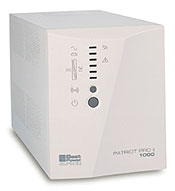 | Best Power's Patriot Pro II has a 1,000-VA rating and an estimated run time of 18 minutes at half load and seven minutes at full load. It's priced at $529. |
Clean it up
On command
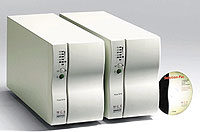 | The Pulsar EX10 and EX15 from MGE UPS Systems have respective VA ratings of 1,000 and 1,500 and estimated full-load run times of 27 minutes and 40 minutes. |
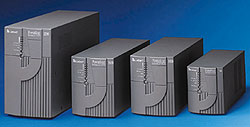 | Liebert's PowerSure Interactive UPSes range up to 2,200 VA. Prices are $778 for 1,000 VA, $1,100 for 1,400 VA and $1,690 for 2,200 VA. |
Offline.
Line-interactive.
Online.
| ||||||||||||||||
J.B. Miles writes about communications and computers from Pahoa, Hawaii.
NEXT STORY: Extra features are key to keeping