
Installing Linux is not for the timid





This is the first of two reviews about Red Hat Linux 6.1. This part discusses installation of the operating system. A follow-up will detail how to run applications under the OS.
By Michael CheekGCN StaffFriends in geekdom tell me I have sinned. I have spent much too much time staring at the Windows of the Microsoft cathedral. Now, CD-ROMs in hand, I'm ready to convert'or at least to convert one of the GCN Lab's client PCs to Red Hat Linux.Can one of the Windows faithful wear the Red Hat? Here is my diary as I walked through the installation.Almost a decade ago, I was initiated into Microsoft Windows 3.0 on a 286 PC, and I strayed only once with an Apple Macintosh Quadra 610. Will Windows NT 4.0 take me back if I stray with the newly released Red Hat Linux 6.1 Deluxe operating system? Will this be a Linux genesis and a Windows exodus? I open the first book, Installation Guide, on Oct. 21 at 11:02 a.m.I hit my first snag on Page 24. Red Hat lists 16 things to enter about the PC, such as hard drives and network and video adapters. It takes a little time to get everything recorded.Tip: If you have Norton Utilities from Symantec Corp. of Cupertino, Calif., it can pull up some of the information. I also visit the lab server to get specifics about network addresses, subnet masks and so on. Generally, the information is easy to gather.At 12:07 p.m., I go to lunch. At 1:35 p.m., back from errands, I learn that the hard drive must be prepared for Linux. I'm brave enough to try the not-for-the-timid fdisk MS-DOS utility or even Red Hat's provided fips, a partitioning utility. But how do I get it to run?I am attempting the installation on a Compaq Deskpro EN and, unfortunately, its BIOS doesn't allow a floppy boot. It does allow a CD-ROM boot. Red Hat's CD is bootable, but it doesn't let the user drop into its included utilities to partition the hard drive. I call Compaq to see whether there's a secret to getting a floppy boot. I wait.Next day, Friday, at 10:32 a.m., I learn that the Deskpro EN has a diskette controller error that prevents the BIOS from seeing the floppy as a boot option. The following Monday at 11:05 a.m., I receive a new system that allows booting from the floppy drive. That's the good news. But I've made a mistake, as the fdisk utility does not work with non-MS-DOS systems. I am hitting major snags. Among them is the fact that, using fdisk, I deleted the primary partition. Then I tried to use fips to create a Linux partition. But fips wants an MS-DOS partition present to begin. So I must recreate the DOS partition and format the drive.Once I get fips to run, I find its interface confusing. And then it won't work, insisting it needs a File Allocation Table-12 format.I search on the Web for better partition utilities. I find Ranish Partition Manager, a shareware application from Mikhail Ranish, at his personal Web site, . I create a Linux partition, which is among the simple interface options.At 12:55 p.m., I finally begin the installation of Red Hat Linux 6.1.The graphical interface and wizard process are easy enough. I like the step-by-step approach, which makes certain that standard components such as the keyboard are checked. The mouse selection page shows several brand names along with generic mouse types. My Microsoft IntelliMouse with PS/2 interface is listed.Now comes the difficult part. Do I want a Gnome workstation? A KDE environment? A server? Or custom installation? I choose the custom option because text at the left of the screen says, 'Only the custom-class installation gives you complete flexibility.'' Oops. When Red Hat's Disk Druid starts, suddenly I can partition everything. Why at the beginning did the installation guide recommend using fips and getting disk partitions ready? So I have to delete all my partitions and start afresh.For Windows users, let me explain that the c: drive no longer exists under Linux. Nor does any other drive letter followed by a colon. Linux and other Unix flavors use a different naming system. The partitions I create act like their own disks.The partitioning is relatively simple. First, I need a swap partition of an amount equal to the system's RAM. I have 128M of RAM, so I create a Linux swap partition of 128M. As the name suggests, the swap portion supports Linux's virtual memory.The second section, known as /boot, should be 16M maximum. That contains the operating system kernel.The root partition, known only as '/'', is created next. For a full installation, it must be 1.5G or larger. I have a 12.4G drive, so I make it 3G. Root contains the entire operating system file.From that point on, the installation guide is a little obscure. Although I have the option of finishing off the disk with partitions such as /home, /local/usr, /tmp and others, I have no idea what each does, and the help menu offers no explanation. Appendix C in the Reference Guide doesn't help. So I create a /home partition of around 5G and a /usr partition of 4G.Next, Red Hat's installation process offers to scan and format the created partitions. I'm starting to notice buttons to turn things on or off. It's hard to tell which is on and which is off. Maybe colors or X marks would clarify.I think I'm telling it to format and scan all my partitions.Next, I come to LILO, the Linux Loader. For multiple OS environments, LILO allows boot options to other operating systems. But as my system will be exclusively Linux, I initially opt not to use LILO. Then I find a little warning in the book: 'If you choose not to install LILO for any reason, you will not be able to boot your Red Hat Linux system directly and will need to use another boot method (such as a boot diskette).''In that case, I guess I need LILO. I leave the default settings untouched.Now I'm up to network installation. Because the lab network has Dynamic Host Configuration Protocol services running under Windows NT Server, I'm going to select that option and hope it can grab the right information.Next I must create a password to access the root directory. Users can be created here, too. But I'm the only one at the moment, so I enter a password of more than six characters.The next screen asks for the authentication configuration. I leave the default settings there, too.Then I select the 'packages'' within the OS I want installed. I change few of the defaults, leaving most of the server stuff off and the workstation stuff on. Under the X Window System test, the graphics adapter is correctly detected. I point to the right monitor, and a test shows everything working.At 2:51 p.m., actual installation begins. By 3:38 p.m., the disk formatting and scanning finally end. Now the packages are being written to the hard drive. One thing I can say for Windows'it scans disks much faster. By 3:49 p.m., all the packages are done, and it's time to run Linux.At 3:50 p.m., it crashes. At 4:12 p.m., I still don't know why it's crashing. At the graphical log-in to the Linux root, I try to type my password, but before I finish typing, the cursor disappears. I'm afraid I might have to start all over. Maybe it's the graphical log-in. At 5:03 p.m., I head home.On Tuesday, at 8:49 a.m., I start over. In Disk Druid, I create the swap disk, root and /boot directories as before. I add /home, /usr and /local/usr at about 2G each. I do not try to enlarge any directories.When I get to the X Window setup, this time I don't select a graphical log-in; that's where it crashed before.By 10:37 a.m., I have reached the shell log-in and successfully logged in to the root. In other words, I'm running Linux.If you're a Windows user like me, you might be wondering, 'What is the shell?'' while Unix users are probably laughing at my naivete. I expect maybe a dozen e-mail messages complaining about the following explanation.Think of the shell as the MS-DOS text underpinnings of Windows 3.1. There are graphical versions of Windows on top, to smooth the way for those of us without the knowledge to tap into the shell's power. That's what Gnome and KDE stand for, I've learned. Now that I've gotten this far, how do I get to the Gnome graphical interface?Before I can answer that question, I start taking a look around. In pre-Web days, I used to visit the Internet using a remote terminal connected to a Sun Microsystems Sparcserver, so I know just enough Unix shell commands to make me dangerous.A quick primer for those who once used MS-DOS: The list command, ls, works like dir for a directory listing. Any files that begin with a dot are considered hidden. The command ls -a lets you look at all files.Changing directories uses the same command in MS-DOS and Unix: cd. Typing 'cd ..' takes you up one directory level.Another powerful and helpful tool is the man command, which brings up the manual for any command or application. It's like asking for help. So typing 'man ls,' for example, will give you details about the list command.At 11:34 a.m., I finally find the command startx. Because the graphical interface log-in is not the default, I'd suggest that Red Hat highlight the startx command more prominently.By 11:57 a.m., I've been playing in Gnome and am confused again. Gnome looks a lot like Windows 9x with a pop-up menu at the right. It is a little more powerful and integrates components such as virtual desktops.But the system's sound doesn't work, and I am not yet on the network. I think I need to install that networking portion. Wait, I find it under the menu for administration. Now I must make some changes by adding addresses and other network-specific technical information.I'm online at 12:11 p.m., but without sound. At 2:02 p.m., sound still doesn't work, and I have a headache that's throbbing to the pulse of the monitor's refresh rate. I cannot figure out how to fix it.Shouldn't Linux be easier and more approachable for Windows users? I asked myself several times over my full-time, weeklong experience with Red Hat Linux 6.1.I've used PCs and Macs for more than 17 years. Except for dabbling in Unix early in the Internet's pre-Web days, I admit to limited Unix experience. I fully expected to encounter some of the glitches mentioned above. After all, the lab staff has found that Windows doesn't exactly install smoothly, either. I know some devoted Linux users, but I was determined to do this all by myself without assistance.I had hoped Red Hat designed its installation process for the common user with a slant toward Windows. No such luck.Answers to basic questions sometimes hid themselves completely, and the included guides gave no clues for finding them. I'm still searching to learn how to change the resolution or refresh rate. The sound still does not work.For real value, Red Hat ought to assemble a comprehensive help menu with additional guidance for Windows users. Pressing the so-called Integrated Help Menu merely pops up a nonsearchable browser window with the same confusing documentation as the manuals.A fundamental help menu with a solid search function would suit me well. Even better would be a reorganization of the paper documentation.Gnome desperately needs reorganization. Menu items look scrambled and sometimes appear three or four times. My sole objective was to see whether a Windows user could switch to Linux with minimum heartache and hassle. The answer is no. If Red Hat wants converts, the Linux switch must be as easy and painless as possible.
In the GCN Lab, one reviewer finds shift from Windows to Red Hat Linux 6.1 is no easy task
This is the first of two reviews about Red Hat Linux 6.1. This part discusses installation of the operating system. A follow-up will detail how to run applications under the OS.

Give it the boot
www.users.intercom.com/~ranish/part/
A shell of itself
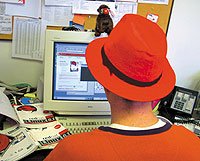 | Is a fashion statement enough to convert a Windows user to Red Hat Linux 6.1? Not necessarily. It's a tough operating system for anyone used to Windows. |
This is the first of two reviews about Red Hat Linux 6.1. This part discusses installation of the operating system. A follow-up will detail how to run applications under the OS.
Give it the boot
www.users.intercom.com/~ranish/part/
A shell of itself
Box Score '''''''' |
Red Hat Linux 6.1 Deluxe Open-source operating system
|
NEXT STORY: @INFO.POLICY