QUtilities makes silk purse out of Win CE sow's ear

Compaq Computer Corp. has tackled substantial flaws in the Microsoft Windows CE operating system to make its Aero handheld computers more useful and usable.

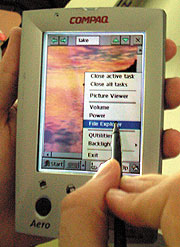
At last there's no more need to worry about a crash from too many open programs. Another option lets you Close Active Task'for example, close the scheduler after a new appointment is entered. Compaq's workaround does an excellent job of making CE more functional.In addition to closing programs, QUtilities has an option called File Explorer. It brings up a menu that looks like the Windows 98 file menu complete with a directory tree and folders. You can move files from folder to folder by dragging them along, just as on a desktop system.There's even an option to look at network files, assuming the Aero is synchronized with a networked PC. I transferred a large file from a network drive to the device by clicking and dragging. Although it took some time, the file successfully transferred, and I could carry it along with me.QUtilities has a few other nice features, such as changing the Aero's backlighting and volume settings, though they were never much of a problem. All system options can go into one easy-to-reach location.With QUtilities, Compaq has done what Microsoft Corp. didn't: It has made CE functional. Aero users no longer have to trade off a good OS to get pocket portability. I believe the new system is even easier to use than the Palm OS, and Compaq is giving it away to all Aero users. This is one Aero that is on target to capture the hearts of handheld users.

By John Breeden II

GCN Staff


Compaq Computer Corp. has tackled substantial flaws in the Microsoft Windows CE operating system to make its Aero handheld computers more useful and usable.


Although the monochrome Aero 1500 can compete ounce for ounce against the Palm handheld from Palm Computing Inc. of Santa Clara, Calif., I never had a problem with the 1500's size. I did, however, intensely dislike its OS.

In comparison reviews conducted by the GCN Lab, devices running WinCE have lost points compared with those running Palm OS. Compaq's engineers now have leveled the playing field via free software, QUtilities. The software can be downloaded from the Web for old and new Compaq handheld devices.

WinCE's main flaw'like that of the mythical Ouroboros snake'is that it eats its own tail. Programs stay open when the user switches to other programs. Closing them becomes a fairly difficult process.

After a time, CE devices run out of available memory and either refuse to open new programs or crash. You can't rely on a handheld's limited memory to drive multiple programs, and the problem gets worse when you have no idea what's still running.

Digging out a color version, the Aero 2130, from the post-review pile [GCN, June 7, Page 23], I charged its batteries and synchronized it with one of the lab's test computers. Setup of the new OS download was a breeze, and the software comes standard on newer models.

To get the QUtilities program, point your browser to www.compaq.com and find the handheld devices section. The program downloads to a PC hard drive. When you connect an Aero and run the program, it downloads the new software to the handheld in about five minutes, depending on the speed of the serial port. Then you press the Aero's reset key to enable the new software.

I twice saw a message telling me to press the reset button to continue and thought the download was not completed properly. A message stating that the program has downloaded successfully but needs a reset to take effect would have been less confusing.

Once I reset the Aero, I was treated to a surprise: The backlit display had increased from 256 colors to 16 million. Apparently the upgrade also increased the screen's color capacity. It would not be a huge boost for most business applications, but I can now look at photographs on the Aero, whereas before they were washed out.


The most noticeable difference in the OS is a giant red Q that appears on the task bar. When you tap the Q, the QUtilities program menu activates.

At the top of the menu bar is the most useful component, and it's appropriately the easiest to find. When you click on the choice marked Close All Tasks, the utility shuts down every program running and takes you to the main CE menu.


Box Score''''''''

QUtilities

Free software upgrade

for Compaq handhelds


Compaq Computer Corp.;

Houston;

tel. 281-370-0670

www.compaq.com

Price: Free download


+Closes programs to keep Windows CE from crashing

+Adds fully functional file utility

'Works only with Compaq handhelds


Real-life requirements:

PC and Web connection for download


NEXT STORY: Alert is issued on IPv6

X
This website uses cookies to enhance user experience and to analyze performance and traffic on our website. We also share information about your use of our site with our social media, advertising and analytics partners. Learn More / Do Not Sell My Personal Information
Accept Cookies
X
Cookie Preferences Cookie List

Do Not Sell My Personal Information

When you visit our website, we store cookies on your browser to collect information. The information collected might relate to you, your preferences or your device, and is mostly used to make the site work as you expect it to and to provide a more personalized web experience. However, you can choose not to allow certain types of cookies, which may impact your experience of the site and the services we are able to offer. Click on the different category headings to find out more and change our default settings according to your preference. You cannot opt-out of our First Party Strictly Necessary Cookies as they are deployed in order to ensure the proper functioning of our website (such as prompting the cookie banner and remembering your settings, to log into your account, to redirect you when you log out, etc.). For more information about the First and Third Party Cookies used please follow this link.

Allow All Cookies

Manage Consent Preferences

Strictly Necessary Cookies - Always Active

We do not allow you to opt-out of our certain cookies, as they are necessary to ensure the proper functioning of our website (such as prompting our cookie banner and remembering your privacy choices) and/or to monitor site performance. These cookies are not used in a way that constitutes a “sale” of your data under the CCPA. You can set your browser to block or alert you about these cookies, but some parts of the site will not work as intended if you do so. You can usually find these settings in the Options or Preferences menu of your browser. Visit www.allaboutcookies.org to learn more.

Sale of Personal Data, Targeting & Social Media Cookies

Under the California Consumer Privacy Act, you have the right to opt-out of the sale of your personal information to third parties. These cookies collect information for analytics and to personalize your experience with targeted ads. You may exercise your right to opt out of the sale of personal information by using this toggle switch. If you opt out we will not be able to offer you personalised ads and will not hand over your personal information to any third parties. Additionally, you may contact our legal department for further clarification about your rights as a California consumer by using this Exercise My Rights link

If you have enabled privacy controls on your browser (such as a plugin), we have to take that as a valid request to opt-out. Therefore we would not be able to track your activity through the web. This may affect our ability to personalize ads according to your preferences.

Targeting cookies may be set through our site by our advertising partners. They may be used by those companies to build a profile of your interests and show you relevant adverts on other sites. They do not store directly personal information, but are based on uniquely identifying your browser and internet device. If you do not allow these cookies, you will experience less targeted advertising.

Social media cookies are set by a range of social media services that we have added to the site to enable you to share our content with your friends and networks. They are capable of tracking your browser across other sites and building up a profile of your interests. This may impact the content and messages you see on other websites you visit. If you do not allow these cookies you may not be able to use or see these sharing tools.

If you want to opt out of all of our lead reports and lists, please submit a privacy request at our Do Not Sell page.

Save Settings
Cookie Preferences Cookie List

Cookie List

A cookie is a small piece of data (text file) that a website – when visited by a user – asks your browser to store on your device in order to remember information about you, such as your language preference or login information. Those cookies are set by us and called first-party cookies. We also use third-party cookies – which are cookies from a domain different than the domain of the website you are visiting – for our advertising and marketing efforts. More specifically, we use cookies and other tracking technologies for the following purposes:

Strictly Necessary Cookies

We do not allow you to opt-out of our certain cookies, as they are necessary to ensure the proper functioning of our website (such as prompting our cookie banner and remembering your privacy choices) and/or to monitor site performance. These cookies are not used in a way that constitutes a “sale” of your data under the CCPA. You can set your browser to block or alert you about these cookies, but some parts of the site will not work as intended if you do so. You can usually find these settings in the Options or Preferences menu of your browser. Visit www.allaboutcookies.org to learn more.

Functional Cookies

We do not allow you to opt-out of our certain cookies, as they are necessary to ensure the proper functioning of our website (such as prompting our cookie banner and remembering your privacy choices) and/or to monitor site performance. These cookies are not used in a way that constitutes a “sale” of your data under the CCPA. You can set your browser to block or alert you about these cookies, but some parts of the site will not work as intended if you do so. You can usually find these settings in the Options or Preferences menu of your browser. Visit www.allaboutcookies.org to learn more.

Performance Cookies

We do not allow you to opt-out of our certain cookies, as they are necessary to ensure the proper functioning of our website (such as prompting our cookie banner and remembering your privacy choices) and/or to monitor site performance. These cookies are not used in a way that constitutes a “sale” of your data under the CCPA. You can set your browser to block or alert you about these cookies, but some parts of the site will not work as intended if you do so. You can usually find these settings in the Options or Preferences menu of your browser. Visit www.allaboutcookies.org to learn more.

Sale of Personal Data

We also use cookies to personalize your experience on our websites, including by determining the most relevant content and advertisements to show you, and to monitor site traffic and performance, so that we may improve our websites and your experience. You may opt out of our use of such cookies (and the associated “sale” of your Personal Information) by using this toggle switch. You will still see some advertising, regardless of your selection. Because we do not track you across different devices, browsers and GEMG properties, your selection will take effect only on this browser, this device and this website.

Social Media Cookies

We also use cookies to personalize your experience on our websites, including by determining the most relevant content and advertisements to show you, and to monitor site traffic and performance, so that we may improve our websites and your experience. You may opt out of our use of such cookies (and the associated “sale” of your Personal Information) by using this toggle switch. You will still see some advertising, regardless of your selection. Because we do not track you across different devices, browsers and GEMG properties, your selection will take effect only on this browser, this device and this website.

Targeting Cookies

We also use cookies to personalize your experience on our websites, including by determining the most relevant content and advertisements to show you, and to monitor site traffic and performance, so that we may improve our websites and your experience. You may opt out of our use of such cookies (and the associated “sale” of your Personal Information) by using this toggle switch. You will still see some advertising, regardless of your selection. Because we do not track you across different devices, browsers and GEMG properties, your selection will take effect only on this browser, this device and this website.