By Steve GravesSpecial to GCNWebmasters spend an inordinate amount of time gleaning bits of management information for their users. The more Web traffic information webmasters give, the more is demanded of them.Accurate traffic analysis is daunting enough for a single, high-traffic Web server. It becomes arduous indeed in complex environments that have several servers or a cluster with load-balancing software to distribute demand. Each machine maintains its own logs, and most log analysis software lacks the intelligence to follow a user from machine to machine.In such environments, WebTrends Enterprise Reporting Server can help. It is neither priced nor intended for casual use but rather for managing high-traffic sites, enterprise intranets, server clusters and Web server farms.Enterprise Reporting Server automatically generates daily, weekly, monthly, quarterly and yearly reports on the fly or at scheduled intervals. Everything is configured and administered through Netscape Navigator, Microsoft Internet Explorer 4.x or any other Java-enabled browser.Enterprise Reporting Server can track user activity for dynamically driven Web sites such as those using Microsoft Active Server Pages, ColdFusion from Allaire Corp. of Cambridge, Mass., or Common Gateway Interface scripts. It can track user sessions even if a user's connection passes to another machine during an electronic transaction.An administrator can analyze and report on sites that have up to 160 million hits daily, 40G log files and 1,000-server clusters, company officials said.More prosaically, Web managers can use Enterprise Reporting Server to generate sweeping snapshots of their server activity or to drill down to report on a single directory, page or click-throughs for a specific link.Enterprise Reporting Server runs under Linux or SunSoft Solaris, but it can analyze the log files from more than 30 Unix, Microsoft Windows and Apple Macintosh servers. A version for Windows NT will be released soon.The software is complex enough to warrant administrator training, available through the software publisher. A comprehensive, wirebound user manual and online documentation come with the package.WebTrends employs its own support technicians rather than contracting out the service. I got good technical support after waiting three to 20 minutes. When things get busy, the support reverts to a call'back system. I left a message early one afternoon and got a call at midmorning the next day.The user interface is built on Hypertext Markup Language, Java applets and JavaScript technology. WebTrends acknowledges Unix users with a command-line option that can reach almost every function, making it easier to write server automation scripts.Administrative controls are strong. Reports and program features can be in the clear or restricted to specific users or groups. You can build permissions based on server accounts or use Enterprise Reporting Server to add another layer of security on top of an existing security program.Administrative controls have workgrouplike permission features. The administrator can permit designated users to modify or create new reports and profiles, edit report styles, or adjust analysis and report parameters.With granular permission control, users can customize their own reports instead of tying up the Web manager. This is a godsend if the manager must meet different reporting needs for several department heads.The first step in generating a report is to create a profile that tells WebTrends where the site resides; whether it is on a single server, multiple servers or server clusters; the file types and locations; the home page location; the default server file definitions; and the location for storing report data.You must also specify the reports to be created and a schedule for running or updating them. The administrator can add, edit and modify all profiles, including those created by users. Profiles can be copied and edited, minimizing the need for redundant data input. It usually takes more time to collect the network information than it does to make the profile from WebTrends' tabbed property sheets.All configuration information is saved in plain text files. Power users can bypass the graphical interface and modify their files with a text editor. You can also use a workaround import feature with the text files. For example, after I finished testing WebTrends on one machine, I decided to move the program to another machine. Rather than redo the profiles, I copied the associated text files to a floppy diskette and moved them. I could run my reports on the new machine with no problem.After creating a profile, you can customize the look of your reports with an agency logo, color scheme, preferred fonts and in-house terminology. Most users will find that with a little tweaking, out-of-the box reports suit most of their needs.I would prefer a set of modifiable report templates to the Report Editor, which forces users to look up each element in a scrolling list.When you run a report, the Reporting Server analyzes the log file data and creates reports based on the customized profile settings. Reports are generated and posted automatically as HTML files. You can also specify saving them as Microsoft Word files. I was disappointed that I couldn't save reports as Microsoft Excel spreadsheets or have the server automatically e-mail them, an option long offered in WebTrends' Enterprise Suite for NT.One cool feature is the calendar interface for reports. Click on a day, week, quarter or year in the graphical calendar to bring up the report for the selected period.Here's what WebTrends can tell about a site:' Who visits and whether they are repeat or new visitors. Graphs or tables can show top users, authenticated users and least-frequent users.' What pages they look at, how long they spend, the most- and least-accessed pages, the average time on site, and the browsers used.' What times visitors arrive, how long they stay and what they do. You can focus on an hour of a particular day, cumulative activity in the past six months, an exact time period down to the second or real-time data.' Where the visitors came from. You can determine which Web sites, search engines, keywords or banners are most effective at driving traffic.' How visitors navigate through the site by directories, which platforms they use, and whether spiders and robots visited.Most statistical packages can handle only static pages. WebTrends can track product or user identification strings, incorporating page translations into reports. Say you're the Mint selling commemorative coins online. You can monitor which coins customers most want to see.A uniform resource locator search-and-replace feature automatically replaces content between specified start and end points. You can then join frame sets, mirrored pages and unique user ID markers into single pages for tracking.The replaced text can also serve as a user ID string for visitor analysis.WebTrends' product line uses Internet Domain Name System lookup technology, sometimes referred to as reverse DNS. Enterprise Reporting Server studies the IP addresses collected in server logs and translates them into domain names. Once a domain name is determined, the software can glean city, state, country, browser and other information about the visitor.The Web server hardware can handle the DNS lookup process automatically as it logs activity, or Enterprise Reporting Server can do the job as it analyzes log files.Although the server does DNS lookup more efficiently, many webmasters might prefer to disable this feature to minimize server overhead.Enterprise Reporting Server can optionally cache the data in an internal database, eliminating the need to look up information for repeat visitors. I estimate this cuts the time required to generate subsequent reports for large log files by at least half.Filters permit limiting the scope of WebTrends' analysis and reports by specifying the data. You can filter out elements such as directories, URLs, file types or individual files, browser types, traffic by day or just about any other criterion in the traffic reports. Filters are configurable to include or exclude data. The default setting screens nothing out.Exclude filters ignore specific activity. You can combine filter elements in an exclude filter and use multiple exclude filters in a single profile. By combining exclude and include filters, you can drill down to almost any desired piece of information.After reading the documentation and learning the software architecture, it's possible to install and configure the package in less than an hour. It took me about another hour to process 200M of monthly log files and produce my first custom report. The bigger the logs, the more memory is needed'1G to 1.5G per hour depending on the hardware, the site architecture and, if DNS lookup is enabled, the TCP/IP connection and number of new, uncached sessions.Visit www.webtrends.com/products/ers to try a live, online demonstration, take a product tour and sample reports. Then, if you feel Enterprise Reporting Server might meet your needs, download the Linux and Solaris demo versions, which function for 30 days.My guess is most enterprise Web managers are going to run Enterprise Reporting Server on a dedicated box to avoid sucking cycles from the Web server. You could buy Red Hat Linux for $29, spend another $1,000 for a Pentium box and plunk down $1,500 for the Linux-flavored Enterprise Reporting Server, investing about $2,500. Red Hat gives free, 90-day installation support, and you can buy priority service contracts, too.
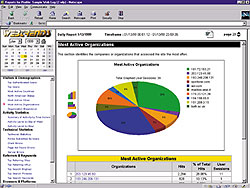
Application gives specific detailsthe who, what, when, where and how oftenabout site visitors Routine reports Permission grantedTwo-way processSteve Graves, a former GCN product reviewer, is publisher of Technical News Service Inc. of Cheverly, Md.