OS upgrades across multiple platforms prove successful

The GCN Lab fed CD-ROMs of Microsoft Windows 2000 code into the drives of more than a dozen systems'PCs, notebooks and servers. For the most part, upgrades went without glitches.

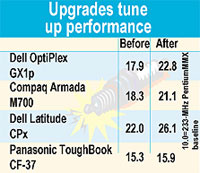
The difficulties that did occur stemmed mostly from incompatible drivers. Only one proved crippling, on a server whose RAID storage subsystem's drivers were not yet released. Win 2000 could not read the drives.Some systems benefited from BIOS upgrades made for the year 2000 transition.Before starting to upgrade each system, the Win 2000 CD ran the Microsoft Windows 2000 Product Analyzer.This 2.6M application, downloadable free from , determines whether a system has proper hardware for the upgrade and which of its applications should be disabled or uninstalled.As far as performance goes, Win 2000 improved overall benchmark scores for the upgraded systems, but we think much of the improvement came from more efficient disk usage. Many systems used the Windows File Allocation Table, and we let Win 2000 convert them to the NT File System.Here's a partial list of the systems we upgraded:: We were having trouble with this system before the upgrade. None of the lab's Ziff-Davis Benchmark Operation applications would run all the way through.The Equium also crashed randomly when working with other programs. Thinking it might be an operating system problem, we first upgraded NT from Service Pack 4.0 to 6.0a.The 6.0a installation went smoothly in about 15 minutes, but it did not help whatever problems the system was having.Then we installed Win 2000, which took about 35 minutes without any hang-ups. When it was done, the Equium could run all the programs it previously could not.. As one of the lab director's primary testing clients, the OptiPlex has had dozens of applications installed and uninstalled.A couple of annoying bugs have crept in, such as missing files that cause boot errors. After a 45-minute upgrade to Win 2000, the errors disappeared.. This upgrade took the longest'more than 90 minutes. Win 2000 installed fine over Win95, but this Deskpro does not have enough horsepower to take advantage of the powerful OS. Basic processes run far too long.The system was on a Novell NetWare network. Win 2000 detected that and installed NetWare client files, which worked fine.. We cannot blame Microsoft or Dell for the problems with this one. We never got Win 2000 installed because there were no drivers available for the server's RAID storage subsystem.Before considering any upgrade, especially involving specialty hardware such as RAID, make certain Win 2000 drivers are available.. Win 2000 Server takes longer to install than the Professional version, but not by much. In about an hour we were up and running. Because this system has standard SCSI drives, we did not encounter driver problems as with the RAID server.. We weren't ready to wipe Win98 off this system, so we chose to make a clean installation of Windows 2000 on a second hard drive. We did run into trouble, however, after Win 2000 was running. It would not recognize a mouse attached to the Dimension, although the keyboard worked fine.Moreover, in the boot process, when the user selects which OS to run while a timer counts down, arrow keystrokes went unrecognized.We tried to force Win 2000 to recognize the mouse, but no mouse showed up among the hardware devices available.The solution? Because the BIOS could detect both mouse and keyboard, we decided the problem lay there.'The system already had the most recent BIOS, but after a reset to factory defaults and with Plug and Play enabled, Win 2000 installed the mouse and everything worked fine. Win98 and Win 2000 still coexist very well on this system.. Installation took almost an hour but there were no hang-ups. The upgraded system scored a half-point higher on the ZD benchmark compared with a benchmark run just before the upgrade.. The lab reviewed both notebooks recently [], and the Compaq's benchmarks were remarkably low.'Win 2000 took care of that, bumping ZD's Winstone 99 score up almost three points into the range where the Latitude had performed. But the Latitude also improved, by almost four points.

By Michael Cheek and John Breeden II

GCN Staff

The GCN Lab fed CD-ROMs of Microsoft Windows 2000 code into the drives of more than a dozen systems'PCs, notebooks and servers. For the most part, upgrades went without glitches.


Using Ziff-Davis Business Winstone 99 Version 1.1, the GCN Lab recorded some strong improvements in benchmark scores.


www.microsoft.com/windows2000/upgrade/compat/ready.asp


Equium 7300D PC from Toshiba America Information Systems Inc. with a 500-MHz Celeron, 64M of RAM and Windows NT 4.0 Service Pack 6.0a


OptiPlex GX1p PC from Dell Computer Corp. with a 450-MHz Pentium II, 256M of RAM and NT 4.0 SP 5


Deskpro 2000 from Compaq Computer Corp. with a 266-MHz Pentium II, 64M of RAM and Windows 95


Dell PowerEdge 2300 server with dual 400-MHz Pentium IIs, 256M of RAM and no OS


Express 5800 ES1200 Series server from NEC Computer Systems Division with dual 300-MHz Pentium IIs, 128M of RAM and no OS


Dell Dimension XPS D300 with a 300-MHz Pentium II, 128M of RAM, and dual-boot Win98 and Win 2000


ToughBook CF-37 notebook from Panasonic Personal Computer Co. with a 366-MHz Celeron, 64M of RAM and Win98

Compaq Armada M700 and Dell Latitude CPx notebooks, each with a 500-MHz Pentium III, 128M of RAM and Win98GCN, Feb. 7, Page 25

NEXT STORY: LAB NOTES

X
This website uses cookies to enhance user experience and to analyze performance and traffic on our website. We also share information about your use of our site with our social media, advertising and analytics partners. Learn More / Do Not Sell My Personal Information
Accept Cookies
X
Cookie Preferences Cookie List

Do Not Sell My Personal Information

When you visit our website, we store cookies on your browser to collect information. The information collected might relate to you, your preferences or your device, and is mostly used to make the site work as you expect it to and to provide a more personalized web experience. However, you can choose not to allow certain types of cookies, which may impact your experience of the site and the services we are able to offer. Click on the different category headings to find out more and change our default settings according to your preference. You cannot opt-out of our First Party Strictly Necessary Cookies as they are deployed in order to ensure the proper functioning of our website (such as prompting the cookie banner and remembering your settings, to log into your account, to redirect you when you log out, etc.). For more information about the First and Third Party Cookies used please follow this link.

Allow All Cookies

Manage Consent Preferences

Strictly Necessary Cookies - Always Active

We do not allow you to opt-out of our certain cookies, as they are necessary to ensure the proper functioning of our website (such as prompting our cookie banner and remembering your privacy choices) and/or to monitor site performance. These cookies are not used in a way that constitutes a “sale” of your data under the CCPA. You can set your browser to block or alert you about these cookies, but some parts of the site will not work as intended if you do so. You can usually find these settings in the Options or Preferences menu of your browser. Visit www.allaboutcookies.org to learn more.

Sale of Personal Data, Targeting & Social Media Cookies

Under the California Consumer Privacy Act, you have the right to opt-out of the sale of your personal information to third parties. These cookies collect information for analytics and to personalize your experience with targeted ads. You may exercise your right to opt out of the sale of personal information by using this toggle switch. If you opt out we will not be able to offer you personalised ads and will not hand over your personal information to any third parties. Additionally, you may contact our legal department for further clarification about your rights as a California consumer by using this Exercise My Rights link

If you have enabled privacy controls on your browser (such as a plugin), we have to take that as a valid request to opt-out. Therefore we would not be able to track your activity through the web. This may affect our ability to personalize ads according to your preferences.

Targeting cookies may be set through our site by our advertising partners. They may be used by those companies to build a profile of your interests and show you relevant adverts on other sites. They do not store directly personal information, but are based on uniquely identifying your browser and internet device. If you do not allow these cookies, you will experience less targeted advertising.

Social media cookies are set by a range of social media services that we have added to the site to enable you to share our content with your friends and networks. They are capable of tracking your browser across other sites and building up a profile of your interests. This may impact the content and messages you see on other websites you visit. If you do not allow these cookies you may not be able to use or see these sharing tools.

If you want to opt out of all of our lead reports and lists, please submit a privacy request at our Do Not Sell page.

Save Settings
Cookie Preferences Cookie List

Cookie List

A cookie is a small piece of data (text file) that a website – when visited by a user – asks your browser to store on your device in order to remember information about you, such as your language preference or login information. Those cookies are set by us and called first-party cookies. We also use third-party cookies – which are cookies from a domain different than the domain of the website you are visiting – for our advertising and marketing efforts. More specifically, we use cookies and other tracking technologies for the following purposes:

Strictly Necessary Cookies

We do not allow you to opt-out of our certain cookies, as they are necessary to ensure the proper functioning of our website (such as prompting our cookie banner and remembering your privacy choices) and/or to monitor site performance. These cookies are not used in a way that constitutes a “sale” of your data under the CCPA. You can set your browser to block or alert you about these cookies, but some parts of the site will not work as intended if you do so. You can usually find these settings in the Options or Preferences menu of your browser. Visit www.allaboutcookies.org to learn more.

Functional Cookies

We do not allow you to opt-out of our certain cookies, as they are necessary to ensure the proper functioning of our website (such as prompting our cookie banner and remembering your privacy choices) and/or to monitor site performance. These cookies are not used in a way that constitutes a “sale” of your data under the CCPA. You can set your browser to block or alert you about these cookies, but some parts of the site will not work as intended if you do so. You can usually find these settings in the Options or Preferences menu of your browser. Visit www.allaboutcookies.org to learn more.

Performance Cookies

We do not allow you to opt-out of our certain cookies, as they are necessary to ensure the proper functioning of our website (such as prompting our cookie banner and remembering your privacy choices) and/or to monitor site performance. These cookies are not used in a way that constitutes a “sale” of your data under the CCPA. You can set your browser to block or alert you about these cookies, but some parts of the site will not work as intended if you do so. You can usually find these settings in the Options or Preferences menu of your browser. Visit www.allaboutcookies.org to learn more.

Sale of Personal Data

We also use cookies to personalize your experience on our websites, including by determining the most relevant content and advertisements to show you, and to monitor site traffic and performance, so that we may improve our websites and your experience. You may opt out of our use of such cookies (and the associated “sale” of your Personal Information) by using this toggle switch. You will still see some advertising, regardless of your selection. Because we do not track you across different devices, browsers and GEMG properties, your selection will take effect only on this browser, this device and this website.

Social Media Cookies

We also use cookies to personalize your experience on our websites, including by determining the most relevant content and advertisements to show you, and to monitor site traffic and performance, so that we may improve our websites and your experience. You may opt out of our use of such cookies (and the associated “sale” of your Personal Information) by using this toggle switch. You will still see some advertising, regardless of your selection. Because we do not track you across different devices, browsers and GEMG properties, your selection will take effect only on this browser, this device and this website.

Targeting Cookies

We also use cookies to personalize your experience on our websites, including by determining the most relevant content and advertisements to show you, and to monitor site traffic and performance, so that we may improve our websites and your experience. You may opt out of our use of such cookies (and the associated “sale” of your Personal Information) by using this toggle switch. You will still see some advertising, regardless of your selection. Because we do not track you across different devices, browsers and GEMG properties, your selection will take effect only on this browser, this device and this website.