Compaq's iPaq aims for the enterprise

Small form factor, low profile, minitower'no matter how much the desktop computer has changed in size, its insides haven't changed that much.

By Michael CheekGCN StaffSmall form factor, low profile, minitower'no matter how much the desktop computer has changed in size, its insides haven't changed that much.From the first Pentium in the early 1990s to the Pentium III, PC components have stayed recognizably the same. Now the Compaq iPaq presents a turning point.Neither the silver-and-black chassis nor the vertical minitower is radically new. It's what the iPaq leaves out that is significant: ISA, PCI and Accelerated Graphics Port cards. Even serial, parallel and PS/2 ports for a keyboard and mouse are absent from some iPaqs.Compaq and many other computer makers call this trend 'legacy-free,' 'legacy-lite' or 'legacy-reduced.' But what it indicates is a shift of computing power to the enterprise network.Compaq calls the iPaq an Internet device, although it lacks a modem. The integrated 10/100-Mbps network adapter is its only communication component. The iPaq targets the enterprise, not the Internet.My test iPaq system had a 500-MHz Pentium III processor and a 6.4G hard drive. That's fairly high-end but a far cry from the latest PCs with 800-MHz processors and 24G drives.The iPaq's Intel motherboard supplies 4M of dedicated video RAM but also borrows from the 128M of primary memory. Don't expect the graphics performance to approach what you'd get from a 32M Accelerated Graphics Port card, but it will be acceptable for the office.There's a modular bay just like the one in Compaq's Armada notebook line. The bay accommodates a 24X CD-ROM drive, a 6X DVD drive, a 6G hard drive, or an Imation LS-120 drive that takes 120M SuperDisks or ordinary 1.4M floppies. Devices in the bay can be switched on the fly without rebooting, although users should alert the software to the change.My test system was a legacy-lite model, which has serial, parallel and two PS/2 ports. Also, two Universal Serial Bus ports are on the front. Compaq's legacy-free model leaves out the serial, parallel and PS/2 ports in favor of two additional USB ports in back.The right side of the iPaq case unsnaps for access to the hard drive and one vacant memory slot.Everything about the iPaq is middle-of-the-road'what computer makers call the sweet spot. The $849 price seems pretty sweet, too. The legacy-free model is $799.About $300'more than a third of the price'goes to software, particularly the new Microsoft Windows 2000 Professional operating system. More than another third goes to the Intel processor. Compaq would not give further details about component prices, but getting rid of multiple components does bring down the price.A few years back, Oracle Corp. chairman Larry Ellison and others heavily promoted network computers, network PCs and netPCs with the idea of shifting a lot of the computing workload from the client to the server.In many respects, the scheme was a step backward to dumb-terminal days when everything resided on a big mainframe in a chilly room. But users who had gotten accustomed to more power on their desks didn't want to give the power back. The marketplace said a resounding 'no' to the NC.At the same time, the Internet exploded into prominence. Every organization, public or private, began paying attention to the Internet and to software that is Internet-enabled and Web-accessible.In this virtual world, the power isn't in the server, it's in the servers. Power is dispersed around the network. The enterprise has the power. Internet, intranet or extranet'it makes no difference where a client plugs in.So while the iPaq slims down and targets the sweet spot, it keeps enough power to please the user and tap into everything on the network.The unit itself is attractive'14 inches tall, 6 inches wide and 10 inches deep'like a low-profile desktop standing on end. It can be tucked away, although its unusual rocket shape prevents it from supporting a monitor.Compaq's modular bay integration works particularly well. Clicking an icon in the Windows system tray lets the user disable the device in the bay and insert another one.Although the CD drive works fine, it spins loudly. The sides of the iPaq need insulation to dampen the vibrations of the CD and hard drives against the plastic shell.Generally, the performance benchmarks were just about right for a desktop PC system with the iPaq's specifications. Video performance didn't scream, but overall the iPaq came through fine.Compaq left a lot out of the iPaq. What it put in is fairly radical: PC Transplant software from Altiris Inc., which gathers all the iPaq's 'personality' data'the user's favorite Web sites, Web cookies and files, right down to wallpaper and color choices'for transfer intact to another system.This is great. An administrator can set up the optimal PC image and transplant it to any number of networked systems. A user can easily move everything from an old system to a new one. PC Transplant even has special settings for migrating from one operating system to another.Unfortunately, the Altiris software comes preinstalled on the iPaq, and Compaq does not include an extra copy of the Lindon, Utah, company's program to install on an old system for transferring its setup to the iPaq. That's disappointing.I like having the USB ports up front. If you have ever tried to plug in a digital camera or other USB device, you know how difficult it is to find the obscure little port somewhere in the tangle of wires in back. The iPaq makes USB's hot-swappable nature even more obvious.Sounds good, tooBeneath the USB ports in front is a speaker that produces crisp sound, reducing the need for external speakers. If you want privacy, above the USB ports is a place for a headphone that disables the speaker. There's also a microphone plug-in.The power button at the top of the tower puts the iPaq on standby if pressed briefly while the power is on. Holding the power button down turns the system off.My legacy-lite test unit had a color-coded back to identify all the plugs. The presence of the standard PS/2 plugs means that wear- and damage-prone keyboards and mice can be replaced as usual. Until more companies sell USB keyboards and mice at lower prices, I suspect government users will stick with PS/2 input devices, which can be found for about $20 each whereas USB versions cost $50 or more.The charcoal iPaq keyboard has seven buttons along the top in a silver area, designed for quick access to e-mail, the Web and other popular services.Although Compaq calls the iPaq an Internet device, it's more a business PC than anything else. The sleek appearance and muted colors fit it for the office. Tangerine and lime may look cooler, but until someone produces PCs styled in military camouflage or patriotic red, white and blue, federal users will probably choose less dramatic hues.
Sleek new design leaves out cards and modem, but its accent on connectivity shows it means business


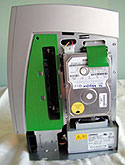
The inside story


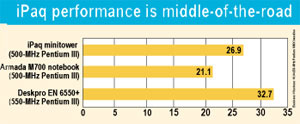
Of three fast Pentium III Compaq computers the GCN Lab benchmarked recently, the iPaq outpaced the notebook but didn't match the desktop PC.


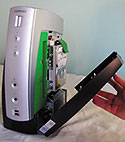
The iPaq has a modular bay on the left and a removable right wing for access to the hard drive and a vacant memory slot.


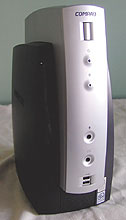
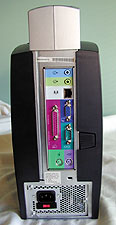
The 'legacy-lite' model of the the new Compaq minitower comes with parallel, serial and PS/2 ports for a keyboard and mouse.


Net gains


Box Score'''''''''''''''


iPaq
Desktop computer


Compaq Computer Corp.; Houston;

tel. 800-727-5472

www.compaq.com/govt

Price: $849 for legacy-lite model


+ Sleek form factor

+ Solid performance and good features

' CD-ROM and hard drives noisy


UsabilityA
Features & ConfigurationA-
Performance
ZD's Business Winstone 99:
About 2.7 times faster than a 233 MHz Pentium MMX
A-
26.9


The overall grade comprises scores for three factors: usability (40 percent), features and configuration (30 percent), and performance (30 percent). The lab used ZD's Winstone 99 Version 1.2. The baseline 10.0 Winstone unit is a 233-MHz Pentium MMX. For benchmark information, go to www.gcn.com/gcnlab/benchmark.


A button on the right-hand panel opens up the green area for drive and memory upgrades. The motherboard and power supply are then easily accessible.


X
This website uses cookies to enhance user experience and to analyze performance and traffic on our website. We also share information about your use of our site with our social media, advertising and analytics partners. Learn More / Do Not Sell My Personal Information
Accept Cookies
X
Cookie Preferences Cookie List

Do Not Sell My Personal Information

When you visit our website, we store cookies on your browser to collect information. The information collected might relate to you, your preferences or your device, and is mostly used to make the site work as you expect it to and to provide a more personalized web experience. However, you can choose not to allow certain types of cookies, which may impact your experience of the site and the services we are able to offer. Click on the different category headings to find out more and change our default settings according to your preference. You cannot opt-out of our First Party Strictly Necessary Cookies as they are deployed in order to ensure the proper functioning of our website (such as prompting the cookie banner and remembering your settings, to log into your account, to redirect you when you log out, etc.). For more information about the First and Third Party Cookies used please follow this link.

Allow All Cookies

Manage Consent Preferences

Strictly Necessary Cookies - Always Active

We do not allow you to opt-out of our certain cookies, as they are necessary to ensure the proper functioning of our website (such as prompting our cookie banner and remembering your privacy choices) and/or to monitor site performance. These cookies are not used in a way that constitutes a “sale” of your data under the CCPA. You can set your browser to block or alert you about these cookies, but some parts of the site will not work as intended if you do so. You can usually find these settings in the Options or Preferences menu of your browser. Visit www.allaboutcookies.org to learn more.

Sale of Personal Data, Targeting & Social Media Cookies

Under the California Consumer Privacy Act, you have the right to opt-out of the sale of your personal information to third parties. These cookies collect information for analytics and to personalize your experience with targeted ads. You may exercise your right to opt out of the sale of personal information by using this toggle switch. If you opt out we will not be able to offer you personalised ads and will not hand over your personal information to any third parties. Additionally, you may contact our legal department for further clarification about your rights as a California consumer by using this Exercise My Rights link

If you have enabled privacy controls on your browser (such as a plugin), we have to take that as a valid request to opt-out. Therefore we would not be able to track your activity through the web. This may affect our ability to personalize ads according to your preferences.

Targeting cookies may be set through our site by our advertising partners. They may be used by those companies to build a profile of your interests and show you relevant adverts on other sites. They do not store directly personal information, but are based on uniquely identifying your browser and internet device. If you do not allow these cookies, you will experience less targeted advertising.

Social media cookies are set by a range of social media services that we have added to the site to enable you to share our content with your friends and networks. They are capable of tracking your browser across other sites and building up a profile of your interests. This may impact the content and messages you see on other websites you visit. If you do not allow these cookies you may not be able to use or see these sharing tools.

If you want to opt out of all of our lead reports and lists, please submit a privacy request at our Do Not Sell page.

Save Settings
Cookie Preferences Cookie List

Cookie List

A cookie is a small piece of data (text file) that a website – when visited by a user – asks your browser to store on your device in order to remember information about you, such as your language preference or login information. Those cookies are set by us and called first-party cookies. We also use third-party cookies – which are cookies from a domain different than the domain of the website you are visiting – for our advertising and marketing efforts. More specifically, we use cookies and other tracking technologies for the following purposes:

Strictly Necessary Cookies

We do not allow you to opt-out of our certain cookies, as they are necessary to ensure the proper functioning of our website (such as prompting our cookie banner and remembering your privacy choices) and/or to monitor site performance. These cookies are not used in a way that constitutes a “sale” of your data under the CCPA. You can set your browser to block or alert you about these cookies, but some parts of the site will not work as intended if you do so. You can usually find these settings in the Options or Preferences menu of your browser. Visit www.allaboutcookies.org to learn more.

Functional Cookies

We do not allow you to opt-out of our certain cookies, as they are necessary to ensure the proper functioning of our website (such as prompting our cookie banner and remembering your privacy choices) and/or to monitor site performance. These cookies are not used in a way that constitutes a “sale” of your data under the CCPA. You can set your browser to block or alert you about these cookies, but some parts of the site will not work as intended if you do so. You can usually find these settings in the Options or Preferences menu of your browser. Visit www.allaboutcookies.org to learn more.

Performance Cookies

We do not allow you to opt-out of our certain cookies, as they are necessary to ensure the proper functioning of our website (such as prompting our cookie banner and remembering your privacy choices) and/or to monitor site performance. These cookies are not used in a way that constitutes a “sale” of your data under the CCPA. You can set your browser to block or alert you about these cookies, but some parts of the site will not work as intended if you do so. You can usually find these settings in the Options or Preferences menu of your browser. Visit www.allaboutcookies.org to learn more.

Sale of Personal Data

We also use cookies to personalize your experience on our websites, including by determining the most relevant content and advertisements to show you, and to monitor site traffic and performance, so that we may improve our websites and your experience. You may opt out of our use of such cookies (and the associated “sale” of your Personal Information) by using this toggle switch. You will still see some advertising, regardless of your selection. Because we do not track you across different devices, browsers and GEMG properties, your selection will take effect only on this browser, this device and this website.

Social Media Cookies

We also use cookies to personalize your experience on our websites, including by determining the most relevant content and advertisements to show you, and to monitor site traffic and performance, so that we may improve our websites and your experience. You may opt out of our use of such cookies (and the associated “sale” of your Personal Information) by using this toggle switch. You will still see some advertising, regardless of your selection. Because we do not track you across different devices, browsers and GEMG properties, your selection will take effect only on this browser, this device and this website.

Targeting Cookies

We also use cookies to personalize your experience on our websites, including by determining the most relevant content and advertisements to show you, and to monitor site traffic and performance, so that we may improve our websites and your experience. You may opt out of our use of such cookies (and the associated “sale” of your Personal Information) by using this toggle switch. You will still see some advertising, regardless of your selection. Because we do not track you across different devices, browsers and GEMG properties, your selection will take effect only on this browser, this device and this website.