
Internet Explorer rules on Mac and PC





New Web browsers are sprouting like dandelions in spring, and the GCN Lab has dug up several good performers, a couple of promising newcomers and a disappointing once-favorite.
By Michael CheekGCN Staffand Joel SparksSpecial to GCNNew Web browsers are sprouting like dandelions in spring, and the GCN Lab has dug up several good performers, a couple of promising newcomers and a disappointing once-favorite.The lab examined seven browsers from four companies'three Microsoft Windows versions, three Apple Mac OS versions and one for Linux.In this blossoming environment where developers must address more operating systems than before, we found that Microsoft Corp. produces the best browser right now for both Mac OS and Windows. Its Internet Explorer 5.0 for the Mac earned a Reviewer's Choice designation.If you prefer to avoid Microsoft products because of uncertainty about its antitrust outcome, look at Opera Software's Version 4 browser for Windows or iCab Co.'s Version 2 browser for the Macintosh.As for Linux users and Netscape fans, our advice is to stick with Netscape Communicator 4.x and avoid Netscape 6 on all platforms.Netscape Communications Corp.'s effort to make its browser more accommodating for the company's new owner, America Online Inc., has bloated Version 6. Netscape skipped a Version 5, using the 1998 open-code version as the basis for Version 6.We tested the first betas of Version 6 for Windows, Mac OS and Linux. The good news is that they all look basically the same. The bad news is the beta only made us happier with Internet Explorer.Crude around the edges, Netscape 6 spends a lot of energy trying to grab user attention for AOL's content and that of its partners. The beta download for Windows and Mac OS starts off with a 190K application for selecting the components to fetch from Netscape's Web site. A typical installation includes the browser plus apps for e-mail, newsgroups, Web authoring and AOL's Instant Messenger. The realistic total runs between 16M and 26M.Netscape boasts that its browser-only option takes up only 5.5M. That's true. But the Java engine'an essential tool on the Internet'needs another 7M. Mail and newsgroup software adds 1M, and a spell-checker comes in at a half-megabyte. Add Netscape's own components, such as AOL Instant Messenger, and it's easy to go to 16M and beyond.For Linux, the beta Version 6 is a single compressed .tgz file of about 10M'a bit more manageable but also more complex. Because Linux lacks a standard application installer, Netscape provides a ReadMe file with a series of shell commands to install the browser.Opening Netscape 6 is more like watching a commercial than using a browser. From the start, it tries to mediate between the user and the Web.As the software guides the user through the wilds of cyberspace, the path coincidentally detours first through the Web sites of Netscape's corporate partners. For users who know where they want to go and would like to get there faster, this is irrelevant and annoying.First the user is invited to 'activate' the software by registering with Netscape'an unnecessary process that's presented as a requirement. Then the default home page opens at Netscape.com, which immediately sends a cookie. The user's life as a heavily tracked customer has begun; numerous cookies are stored before voluntary browsing can even start.Going through the activation ties the Netscape browser closely into the user's personal data. Someone who isn't sharp-eyed enough to uncheck the 'Send me info!' box can count on spam in the mailbox.There's plenty of spam already on the screen. A panel at the left side called My Sidebar dumps a bunch of clickable tabs, and every time Netscape starts up, the tabs download Web pages. Although Netscape is careful to say Version 6 hasn't been tuned for performance, this single factor makes downloading anything with the Netscape browser very, very slow, as it's already requesting pages to fill the sidebar.Worse, the menus are both redundant and inconsistent.For example, there's a Business and Finance folder built into the bookmarks, a separate Business tab at the bottom of the screen with different links, a Personal Finance channel in the Channels tab and a Stocks tab in the sidebar.Similarly, there's a News tab in the sidebar, a News Channel, a News and Sports folder in the bookmarks, a Sports link under Free Time, a Market News link and a sidebar tab devoted to news site, CNN.com. It's the clearest illustration we have ever seen of information overload.It's possible to customize the interface somewhat by deleting tabs from the sidebar, for example, or adding new tabs. But guess what? The sidebar never goes away.Netscape boasts of its new rendering engine for displaying Web sites, but on the Mac, the dialog boxes have ugly, tiny text. Common Mac shortcuts such as Apple-F for the Find function aren't available. Preferences include options for the mouse wheel, which unfortunately is still a rarity in the Mac world.Under Windows, Netscape 6 isn't much better. It doesn't feel native, it just looks and feels like a Web page itself.The Linux browser is exactly like the Mac and Windows versions.Netscape promises future versions will deploy so-called software skins, which stretch over the display to personalize it with colors and icons. For example, a skin could be color-coordinated with agency colors and logos. Skins will surface in lots of other places; Linux users are familiar with similar themes found under Enlightenment.We experienced a number of crashes with both Windows and Mac versions of Netscape 6, which is to be expected from beta software. What we did not expect was crashes when Netscape tried to hand off processes to Internet standards such as Adobe Acrobat Portable Document Format files. Netscape even crashed when one reviewer tried to open Netscape's own .PDF Reviewer Guide for the browser itself. The only way the guide could be read was by resorting to Internet Explorer.Netscape 6 handles cookies well, providing an editable list and a good memory for which sites the user has turned down. Internet Explorer sometimes conveniently forgets those choices.When first run, Netscape automatically searches the hard drive for Explorer's Favorites and imports them as Bookmarks, which is important to users considering a browser switch.No one wants to rebuild a bookmark list from scratch. But the imported Favorites remain buried in their own folder and can't easily be moved. They must be dragged one at a time.The uniform resource locator window is also the search window. In theory, this is a good idea. If the user doesn't enter a good address, the browser looks for the closest thing. Results can be made to pop up in a Search Results sidebar.The user can change the default search engine by choosing from a preset list. In any other modern browser, typing a common word such as 'stocks' would bring up , an intelligent guess about the desired destination. Typing the same word into Netscape 6, however, using the default Netscape search option, generates a keyword search. This is a Netscape-hosted document that displays Netscape's own pages first, then Netscape-reviewed Web sites, and finally any other URLs.The final release will presumably eliminate some of the instability. But there will have to be a lot of changes before this browser can compete. Technologically timid users who want a big, friendly corporate hand-holder in cyberspace might like Netscape 6.Anyone who wants a clean browsing experience should wait for a revision of this confusing browser.Or better yet, open Internet Explorer.Microsoft just began offering Version 5.0 for the Mac, although it has been available under Windows for more than a year. For Windows, Microsoft recently released a beta version of Internet Explorer 5.5.We'd like to see Microsoft do two things: develop a Linux version of Explorer and develop all OS versions at the same pace.For the Mac, an 'early 2000' release date for Explorer 5 turned out to be late March. The 6.8M download creates a disk image with the simple instruction 'To install, just copy this folder to your hard disk.' But the work of distributing the Microsoft system files on the hard drive still remains to be done.For some reason, Microsoft delays this until the first launch, and users would be well advised to take the usual precautions: Close all other applications, turn off old-fashioned antivirus protection that doesn't play nice with installers, and be prepared for a restart.Under Mac OS, Explorer 5 sports a refreshingly less crowded design. One important button is missing'the one to decrease font size. Explorer 5 displays Web text much larger than older versions did. Combined with other subtle changes caused by the new Hypertext Markup Language rendering engine, it's enough to scramble less-advanced page designs. The new engine does give a slight but noticeable improvement in loading speed.Explorer 5 claims to be more stable than its predecessors. Although it may no longer deserve its nickname of Exploder, it's no rock. Our test Mac experienced a crash almost every day during the reviews.A couple of quibbles about appearance: The iMac-like Browser Color menu affects only buttons and trim and is basically useless. And marking all Web addresses with the @ symbol'which serves a definite function in e-mail addresses'confuses the many users who still don't know the difference.A few minutes with the Customize Toolbars option soon produced the desired buttons, including the missing font-size control. It was also easy to customize the familiar Toolbar Favorites, a short list of sites reachable with a single click. We easily added our choices and trashed Microsoft's suggestions.The Search drawer was not so accommodating, however. Available search engines are predetermined, and the list resides on a Microsoft server, not the user's hard drive. So we placed Google.com on the Toolbar Favorites list for one-click searching.The Explorer Bar is a menu of pop-up function drawers running down the left side of the window. Slimmer than it used to be, it's easily dismissed or summoned with the keyboard command Apple-T. For maximum viewing area, all toolbars will vanish at once at a press of Apple-B.The Explorer Bar still has the Page Holder frame, which is great for storing a list of search results while clicking through their contents in the main window. Two new functions prove useful as well: Auction Manager and the Scrapbook.Some developer must have noticed that many Web users spend lots of time hitting Refresh to check their auction bids. View an auction with Explorer 5, and the Auction Manager pops up. Most of the needed info is gathered automatically, and changes are tracked in a separate window. Administrators of PCs running Windows need not worry about this, as the feature isn't yet available in the Windows version.The Scrapbook addresses another desire of many surfers: to keep personal copies of Web pages for viewing offline or after they disappear in the ever-shifting Web landscape. Popping a site into the Explorer 5 Scrapbook avoids the formatting difficulties of a text-only save while archiving pictures, too.It takes up a lot of storage, however.Windows users have a checkmark box to make a site available offline.A few months ago, every browser came with two flavors of encryption: weak or strong. To get the strong version for high-security purposes, a user had to fill out government forms and promise not to export the supposedly dangerous software. Recent changes in federal export regulations have put that behind us for now. All copies of Explorer 5'and Netscape 6, for that matter'have strong, 128-bit encryption built in. Better yet, the certificates that verify the identity of certain secure sites now work; certificates in Explorer 4.5 stopped working Jan. 1.Cookies, those controversial little tracking files, are handled only moderately well. The user can choose to accept cookies, refuse them or decide case by case. Should the preference temporarily change for any reason, such as to enjoy peace from the pop-up windows, previous refusals are forgotten.The user will have to click Don't Accept for the same companies again and again. A persistent, editable list of past choices would be far better.When we downloaded the beta version of Internet Explorer 5.5 for Windows, we found it hard to identify the slight improvements over the previous version. For example, when a bookmark is added, the dialog box appears more complete, showing all possible folders.Another improvement, needed for some Web sites, is a print preview that shows how a page should look in print. Unfortunately, on pages with frames, what the print preview shows and what the printer outputs are two different things. The test browser defaulted to printing only a single frame although all frames were shown in the preview.If Microsoft really wants to improve printing, there's much more to do. Some suggestions for the final Internet Explorer 5.5:''Keep text from being divided between the bottom of one printed page and the top of the next.''Do a better job of handling wide pages by automatically switching to landscape mode or forcing the graphics to fit a page's width.''Let multiple pages be printed on a single sheet, perhaps with two- or four-up options as in Microsoft Word 2000.''Give the user greater control over page output, especially when pages have dark backgrounds or colors. Sometimes the background color does need to be represented.''Allow multilayer printouts. For example, a user could select printing a page plus its associated links.Other changes in Internet Explorer 5.5 involve the underlying code, such as enhancements for Dynamic HTML.Offline browsing was already available for bookmarks or favorites in Version 5.0. Like the Scrapbook option under the Mac version, this eats up disk space. Microsoft should unify the versions with features labeled the same way.Under either Windows or Mac OS, Internet Explorer loads quickly and browses without the clutter of Netscape. That makes Explorer the easy winner, at least as our primary browser choice.We're still a little partial to the Opera browser from Opera Software of Norway. Now in the third beta Version 4.0, Opera is available for Windows. A Linux version is out only in early alpha code, and the lab will examine it later. Opera expects to release a beta version for the Mac, too.Opera has a smaller footprint than any of the others and is very fast. Version 4 has several improvements over 3.x [GCN, Jan. 25, 1999, Page 30] including a simple e-mail client and support for 128-bit encoding. The interface is noticeably easier on the eyes and less confusing.The file download is only 1.6M. Java support remains separate and a little complex, but it takes up less than 5M. You can't beat that tiny footprint.Opera works like a single, all-encompassing window with one or many panes that hold different Web pages. If you like to open several sites at once, Opera will keep your taskbar uncluttered.Opera doesn't get along well with some complex pages, however. Some links simply don't appear, even when the same pages look just fine in Internet Explorer or Netscape. Somewhere within Opera, the HTML is being interpreted wrong. We couldn't pinpoint what was happening, although we encountered it on several sites.Opera also has trouble with some fonts and tables. Overall, it remains rough around the edges. Perhaps when it comes out of beta, Opera will really sing.Calling itself the 'Internet Taxi for the Mac,' iCab from iCab Co. of Germany provides a cute browsing option.Currently in preview Release 2.0, iCab is a lightweight but full-featured browser that will come out in final form this year for $29; a limited version is free. The 1.1M download expands to a mere 3.2M on the hard drive, and the application can run with less than 3M of available memory.This taxi acts more like a sports car than its competition'it's fast. The interface has many buttons, but they are well-designed, unobtrusive and easy to eliminate.ICab's features show that the designers have been thinking about the Web from a surfer's viewpoint. For example, images can be filtered by size'eliminating giant, ugly backgrounds'or by server, eliminating many ad banners. Neither Explorer nor Netscape can do the latter.One interesting menu lets the user navigate through a site's pages in order by clicking buttons. Most sites don't provide the necessary information for this function; maybe we'll see more of it in the future.Security features also keep the user firmly in mind. The notorious HTML Referrer function, which tells a webmaster which page the visitor previously viewed, can be disabled.Cookie handling is completely under the user's control, and there is an option to 'accept but don't use,' eliminating pop-up queries while keeping user data from flowing back to sites.Preferences in general are extremely flexible, more so than under Internet Explorer 5. For example, the user can specify which options appear on contextual menus. There are lots of possibilities including Speak, Print or View Source. Users can specify any site as the default search engine and choose any application as the mail client of choice. Similar customization is available for almost every parameter.ICab still has some clogs in its fuel line. It renders HTML its own way, so some pages look different than in other browsers, though they should be equally legible.The preview version lacks some Java support. Secure log-ins might be disabled, and surfers who want the latest multimedia will be frustrated, as many plug-ins do not have iCab versions.Finally, although the $29 price tag of the upcoming iCab Pro release is low, users are accustomed to paying for browsers only in the coin of convenience and privacy. It remains to be seen what features the free version of the extremely customizable iCab will have.Overall, this is a sleek, friendly program that respects the user and does the job.Need to get somewhere in a hurry? Consider taking iCab.
GCN Lab's look at seven browsers, two of them interesting newcomers, yields high marks for Microsoft

Bloated beta
The search is on
www.stocks.com
Stable force
Welcome additions
Sounds uncluttered
Web on the mix
Short on Java
Joel Sparks, a free-lance reviewer in Silver Spring, Md., has been a government lawyer and database programmer.
Bloated beta
 |
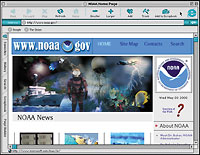 | Internet Explorer 5.0 for the Mac, which is a little faster and more stable than earlier releases, looks quite different from the Microsoft Windows version. |
The search is on
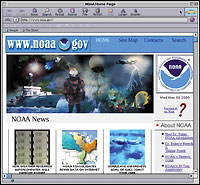 | Users of older Macs might prefer iCab's small footprint. At $29, it is a full-featured browser but takes up only 3.2M of hard drive space. Small means fast in this case. |
www.stocks.com
Stable force
Welcome additions
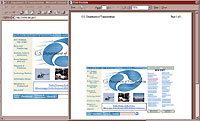 | Internet Explorer 5.5 for Windows has a print preview feature, but it should automatically print wide pages in landscape mode. |
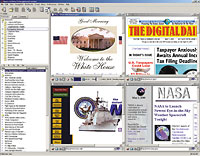 | Opera 4.0 provides fast Web browsing and keeps multiple sites open under a single window so the Windows taskbar isn't overwhelmed. Some fonts and tables give it trouble. |
Sounds uncluttered
Web on the mix
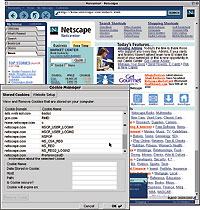 | Launching Netscape 6 brings up a cluttered window on virtually any operating system. But it provides good control over cookies and an editable list of options. |
Short on Java
Joel Sparks, a free-lance reviewer in Silver Spring, Md., has been a government lawyer and database programmer.
| Mac users enjoy the best browsing experience'with Microsoft | ||||||||
 | iCab iCab Co. Braunschweig, Germany www.icab.de | Internet Explorer Microsoft Corp. Redmond, Wash. 425-882-8080 www.microsoft.com/ie | Netscape Netscape Communications Corp. Mountain View, Calif. 650-254-1900 www.netscape.com/browsers/6 | Opera Opera Software Oslo, Norway 47 23 23 48 68 www.opera.com | ||||
| Operating system Browser version | Mac OS 2.0 preview | Mac OS 5.0 | Windows 5.5 beta 1 | Linux 6 preview 1 | Mac OS 6 preview 1 | Windows 6 preview 1 | Windows 4.0 beta 3 | |
| System requirements | Mac OS 7.5, Power PC or 68000 processor, 12M of RAM, 4M of free storage | Mac OS 7.6.1, Power PC or 68000 processor, Quick- Time 3.0,12M of RAM, 15M of free storage | Win9x, NT or Win2000, Pentium II or faster, 64M of RAM, 20M of free storage | Linux 2.2 or later with glibc 2.1, 200-MHz Pentium or faster processor, 64M of RAM, 15M of free storage | Mac OS 8.5 or later, 200-MHz Power PC 604 or faster, 32M of RAM, 26M of free storage | Win9x, NT or Win- 2000 Pentium II or faster, 64M of RAM, 20M of free storage | Win9x, NT or Win- 2000, 200-MHz Pentium or faster, 32M of RAM, 10M of free storage | |
| Pros | + Small storage and memory needs; good for older systems + Extremely customizable and user-friendly | + Slight improvements in speed and stability + Uncluttered appearance | + Print preview feature + More Dynamic HTML support | + Looks pretty much the same regardless of operating platform + Good control of cookies | + Looks pretty much the same regardless of operating platform + Good control of cookies | + Looks pretty much the same regardless of operating platform + Good control of cookies | + Small footprint + Fast, no-nonsense | |
| Cons | ' Not free ' Not yet compatible with some advanced Web content | ' Installation hard to follow ' Cookies hard to control | ' Not much new ' Print preview still lacks needed features | ' Complex installation, shell commands ' Extremely cluttered interface | ' Extremely cluttered interface ' Can't remove My Sidebar component | ' Extremely cluttered interface ' Can't remove My Sidebar component | ' Can't handle some content ' Not free | |
| Price | $29 | Free | Free | Free | Free | Free | $35 | |
| Overall grade |  |  |  |  |  |  | |  |