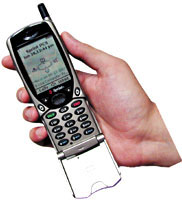
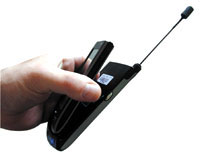
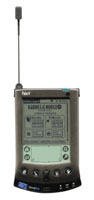
By Carlos A. Soto andMichael CheekGCN StaffTurn on, tune in and unplug. It's no digital-age promise from a Timothy Leary clone. The wireless Web is coming, but it's not quite here yet.The GCN Lab examined three wireless Web devices'two telephones plus a modem for the Palm V handheld computer from Palm Inc. of Santa Clara, Calif.'and experienced the promise of a future without wires. But that promise doesn't yet translate into a terrific user experience.The Sprint PCS NeoPoint 1000 phone worked very well. The OmniSky Corp. wireless modem for the Palm V and the Mitsubishi MobileAccess T250 Internet phone from AT&T Wireless Services were less useful and more difficult to use.Some handheld peripherals such as phones, beepers and personal digital assistants use the Wireless Application Protocol to securely access the Internet and gather information. Is WAP good enough to make handheld portable devices the preferred way to surf the Internet, and will it eventually replace desktop and notebook computers?Maybe so. With highly competitive service plans through the Federal Technology Service and commercial carriers, WAP phones and Palm OS devices are almost as affordable as home phones and versatile enough to keep users mobile even during work hours.But finding a good WAP phone is nothing like finding a good cell phone. What's good and what isn't?If you're looking for a WAP phone that delivers more than just phone calls and text-based Internet sites, look no further than the NeoPoint 1000 from NeoPoint Inc. The $299 NeoPoint resembles a cell phone, but there's more inside the plastic case than a wireless modem for Internet and e-mail connections. The NeoPoint acts as an organizer that can synchronize with Microsoft Outlook, Lotus Organizer and Act from Symantec Corp. of Cupertino, Calif.The NeoPoint took about 20 seconds on average to sync with Outlook and download a to-do list, calendar, contacts and reminders. Even though NeoPoint does not claim compatibility with Microsoft Windows 2000, the NeoPoint 1000 synched just fine with Outlook 2000 under Win 2000. The same synching cable can connect to notebooks for Internet access.The NeoPoint incorporates an excellent idea that ought to become a standard feature: a call timer that shows how many minutes remain on your monthly plan and how much longer until a higher rate kicks in. Even standard cell phones often leave you wondering how many minutes you have left.The NeoPoint can execute some commands by voice recognition, including logging on to the Internet. You say either 'Internet' or 'Browse' into the receiver after placing the phone in the proper mode.You can program it to call your contacts by voice commands, too, and it works well even if there's a lot of ambient noise.You can customize the phone to bring up your favorite Web sites automatically at log-on. The NeoPoint uses the UP.browser from Phone.Com Inc. of Redwood City, Calif., a lightweight browser that accesses Web sites specially designed for the small screens on handheld devices. It filters unneeded content from unoptimized Web sites. This function, called Web clipping, is something you're going to hear more about as wireless browsing becomes more popular.Built into the NeoPoint is a database that recognizes what you type and provides samples of common words. To type, you press the number key that has the proper letter on it'2 for A, B or C; 8 for T, U or V and so on.Press 8, and the letter T appears. If you then press 4, the phone correctly assumes that the first letter, G, is not going to spell a word and skips right to the H. On other phones, you must press the 2 key three times with the proper timing to get a C, for example.The NeoPoint arrangement is capable of learning and eventually reproduces by itself unusual combinations that you enter frequently, such as the name Arne.The best part about the phone isn't the utilities but how easy it is to use. When you turn on the phone, the home screen shows the NeoPoint's phone number, date, time and four application icons for direct access. You can customize the icons to what you use most often.The menu section is logical and fast to figure out. You select icons much as you would on a standard keyboard, by moving the arrow keys.The phone measures 5.5 by 2.1 by 1.0 inches'bulky but light at only 6.4 ounces. The large lithium-ion battery yields 2.5 hours of talk time and 40 hours of standby. The screen is the largest we've seen on a phone. The 11-line LCD can show up to 18 characters on a line depending on the font size.The icons and characters are easy to read and see. The graphics look like a Nintendo Gameboy; the only thing missing on this machine is Tetris.Classifying the NeoPoint 1000 as a cell phone is like calling a computer a typewriter. Like other multifunction devices that are highly intuitive, the NeoPoint 1000 will help change the wireless industry and the way we access the Internet.For travelers, AT&T Wireless Services is a more far-flung provider, but if you tend to stay in one area, Sprint gives you more free minutes. Like Sprint, AT&T has many diverse plans. One, for example, costs $60 a month for 300 minutes plus 200 extra minutes for the first six months and no roaming or domestic long-distance charges. Visit for the full array of service plans.Sprint PCS, the NeoPoint 1000's service provider, has a plan that includes 500 free minutes per month for daytime use plus another 500 minutes free for nights and weekends. The fixed 1,000 free minutes include free Internet browsing for the first six months.The $199 Mitsubishi MobileAccess T250 from AT&T Wireless Services has similar features but works differently and does not perform as well.It looks and feels smaller than the NeoPoint, more like a regular cell phone, but it's a little larger and heavier.It weighs 7.1 ounces and measures 5.5 by 2.2 by 1.06 inches.From the instant you turn it on, the Mitsubishi T250 has a mind of its own. It automatically connects you to the start-up page and won't let you make a call unless you cancel the connection.Instead of icons, it presents a great deal of text on a significantly smaller screen'inbox, calendar, contacts, Web sites, favorites, Excite Mobile, a to-do list and phone options.It would be less overwhelming if you could customize the features and spread them out more'and if you could get rid of the beep that scolds you whenever you make a mistake.The main menu shows all the settings as on a regular cell phone. But a uniform resource locator command option annoyingly bumps you back to the start-up page even if you only want to back up one step.Like the NeoPoint, the T250 has a database and the UP.browser. There is no voice recognition option, however.The T250's buttons are awkward to use. The center button acts in five ways. You navigate by pressing the four edges'up, down, left or right. Pushing the center selects things as a keyboard Enter key does. Sometimes when navigating, you might press a little too hard and, boom, you're somewhere you did not want to be.That leads to the button used most often: the Back button. It returns to the previous page, as in a Web browser.The On-off button is the most important button on the phone: the mode choice of wireless Internet or digital phone. So how do you turn off the phone if it's the same button? Hold it down for a few seconds. This function stumped a few people we invited to try the phone.To sync with Outlook, which requires a tether cord that is sold separately, you will pay $15 a month more.The T250's nickel-metal hydride battery can support up to 120 hours of digital standby and two hours of talk time. The battery should be drained before you recharge it, unlike the NeoPoint's lithium-ion battery that you can recharge whenever you get the chance.The Mitsubishi T250 is really a cell phone with some Internet features. It lacks the NeoPoint's stronger, integrated design but works fine as a phone.To add the Web to a Palm V handheld organizer, the most popular choice is the wireless modem and service combination from OmniSky.OmniSky's modem, the Minstrel from Novatel Wireless Inc. of San Diego, operates at 19.2 Kbps. It exactly doubles the Palm V's 4.6-ounce weight and more than doubles its size. It snaps easily onto the back of the unit.To install the software, you must have 1.4M free. But the Palm V has only 2M of storage space, so the OmniSky software would be better suited to the Palm Vx, which has 8M.After the laborious 1.4M installation, OmniSky throws in 29 additional applets and databases that take up almost 1M of space.Most of that was wasted. For example, some of the files were for specific sites such as a bookseller, a discount brokerage and MovieFone. A yellow- and white-page directory service took up 126K. These memory-hungry features are not optional.Other applets duplicated'at much greater heft'features already on the Palm, such as e-mail. Rather than integrate with it, OmniSky added its own 244K e-mail software.We haven't yet managed to remove all the applets.Although OmniSky promises users the ability to browse the entire Web, that's not quite accurate. The Web clipping feature cannot specify filtering some sites' content for display on the Palm.The OmniSky software tried to download huge graphical files that wouldn't fit on the Palm display. Even sites that use few graphics such as couldn't be downloaded.As long as we stuck to the preselected group of Web pages and portals designed for handheld devices, our Web experience was good.But as soon as we ventured outward, we hit roadblocks.The rechargeable Minstrel modem costs $299. OmniSky offers only one service plan: unlimited access at $39.95 a month.If you bought a new Palm VII with wireless access already built in, it would cost $449. Yes, that's more money, but the Palm VII features wireless applications that are much smaller and more integrated.Moreover, Palm Computing's Palm.Net wireless service offers several levels of access. It starts at $9.99.For someone who requires only basice-mail and Net access, it would be economical to buy a new Palm VII with a lower level of access than to buy the OmniSky package.OmniSky ought to integrate 2M of flash memory into the modem. That way, the Palm wouldn't lose so much of its memory to the OmniSky software, especially when the modem isn't in use.That extra memory would make the OmniSky service more valuable and worth the higher price.







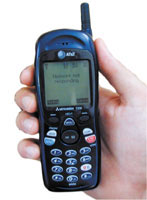

 Mitsubishi
 OmniSky