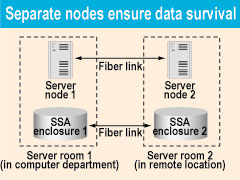
Mirrored nodes protect data

At the Alaska Native Medical Center in Anchorage, the largest such center of the Indian Health Service, technical managers recently set out to ensure reliable access to the applications and data that thousands of users rely on daily.

By Alan McColloughSpecial to GCNAt the Alaska Native Medical Center in Anchorage, the largest such center of the Indian Health Service, technical managers recently set out to ensure reliable access to the applications and data that thousands of users rely on daily.Their goals were high availability during system failures as well as data survival in case of earthquakes, fires or other disasters.Bill Barnes, the Unix system administrator, had already seen an electrical transformer failure put the server room on a countdown under battery backup. After a mad scramble to shut down nonessential servers and run extension cords to separate electrical circuits, he'd restored power with barely 10 minutes of battery life remaining.'The idea of a hot backup computer room came out of my analysis of single points of failure as part of our deployment of a high-availability computer cluster,' Barnes said. 'As long as all of our computing assets were housed in a single computer room, the hospital systems would be vulnerable.'In fact, not long after the cluster was installed, the main transformer feeding the computer room failed. Electricians had to do rapid bypass wiring while the uninterruptible power system still functioned.Barnes began wondering what would happen if another power failure kept the computing facility down for several days or weeks.'It didn't take much selling to management' to get funds to modify an unused wiring closet for a backup computer room, he said.The small, separate room would house a redundant set of servers in a cluster working in conjunction with the primary servers. Connectivity between the two rooms would be a combination of 100Base-TX Ethernet and optical fiber.To ensure high availability of networking components between the two server rooms, the center installed additional switching equipment.'Part of what made a second computer room possible was the use of SecureFast virtual LAN software [from Cabletron Systems Inc. of Rochester, N.H.] on the core network switches,' chief information officer Keith Creiglow said.The software lets the Cabletron switches run a meshed network using rudimentary open-shortest-path-first routing to bypass downed switches. All the center's computer closets are connected to both computer rooms for redundancy on the network side as well as on the server side.About the same time, the author decided that he would take a crack at building a test server cluster from two spare 166-MHz Gateway Inc. Pentium systems. Within a week, the test server cluster was working, and the go-ahead was given to modernize the Gateway ALR 9200 server cluster and find each node of the cluster in a separate server room.After a complete reinstallation of Microsoft Windows NT 4.0 Enterprise Edition with Microsoft Cluster Services, two 200-MHz Pentium Pro processors were added to each node, bringing each server up to four processors.Each node also got an IBM SerialRAID/X Adapter card for access to the IBM Corp. Serial Storage Architecture (SSA) drive pool.One node of the Cluster Services cluster runs Microsoft Internet Information Server and ColdFusion, an application server from Allaire Corp. of Cambridge, Mass. The other node provides database access via Microsoft SQL Server 7.0. If one node fails, the other node can provide both Web and SQL Server services until repairs are made.A server cluster needs common access to a shared drive array so that if one node dies, the other node can continue to provide service. Most cluster servers are built into a rack and connect to a common RAID array with SCSI cables. That was how the original Gateway 9200 cluster was configured.Barnes, however, was already using IBM's SSA extended technology for some of the AIX servers on the center's campus. SSA can link up to 96 hard drives in a loop configuration, unlike SCSI's straight-line configuration. SSA drives mount in special cabinets, which connect to the host computer's SSA controller card. Connections between SSA devices can be either copper or fiber cables, but fiber makes it possible to locate SSA devices up to 10 kilometers apart.Now a new idea came to light: combining the failover capability of clustered servers with SSA's remote location capabilities. The staff built a server cluster with each node physically isolated from the other, and with a mirrored set of data stored separately.Exhaustive research and planning resulted in a disaster-resistant, high-availability configuration. Using IBM SSA Disk Administration tools, the staff configured the disk resources so that a mirrored set of data resided in each server room. Should one room be destroyed, a complete set of data and servers would still exist in the other.A software update to the SSA disk configuration tools made it easier to configure the drive arrays so that a mirrored set of data was available in each location.A few reinstallations produced the desired remote mirrored array. To test it, the staff disabled the fiber connections between the two rooms and shut down the remote SQL Server node and the SSA drive array in the remote room. The Web server node in the main server room successfully took over providing both Web and SQL services, using the available SSA drive array.Both Windows and AIX operating systems are now running on various server clusters. Microsoft Cluster Services operates on those running NT 4.0, and IBM High Availability Cluster Multi-Processing operates on the AIX servers. IBM's SSA technology provides sharing on the drive arrays used by the cluster server nodes.The unique ultra-high-availability server clusters maintain crucial hospital services such as the Resource Patient Management System, Microsoft Exchange e-mail, intranet business applications and online medical research libraries.'The thought of having all our eggs in one basket was truly scary,' Creiglow said. 'Having our clustered servers split between two computer rooms gives redundancy not found in most configurations. This certainly makes it easier for me to sleep at night.'
Alaska center's IT team creates a unique high-availability backup cluster


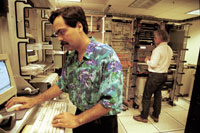
Bill Barnes, right, transformed a closet at the Alaska Native Medical Center into a backup computer room. The author, Alan McCollough, left, is Web programmer.


Extra switches


The Alaska Native Medical Center built an ultra-high-availability cluster to guarantee uptime during system failures, fires or other disasters.


OS harmony


Alan McCollough is a Web programmer and certified ColdFusion developer at the Alaska Native Medical Center.
NEXT STORY: POWER USER

X
This website uses cookies to enhance user experience and to analyze performance and traffic on our website. We also share information about your use of our site with our social media, advertising and analytics partners. Learn More / Do Not Sell My Personal Information
Accept Cookies
X
Cookie Preferences Cookie List

Do Not Sell My Personal Information

When you visit our website, we store cookies on your browser to collect information. The information collected might relate to you, your preferences or your device, and is mostly used to make the site work as you expect it to and to provide a more personalized web experience. However, you can choose not to allow certain types of cookies, which may impact your experience of the site and the services we are able to offer. Click on the different category headings to find out more and change our default settings according to your preference. You cannot opt-out of our First Party Strictly Necessary Cookies as they are deployed in order to ensure the proper functioning of our website (such as prompting the cookie banner and remembering your settings, to log into your account, to redirect you when you log out, etc.). For more information about the First and Third Party Cookies used please follow this link.

Allow All Cookies

Manage Consent Preferences

Strictly Necessary Cookies - Always Active

We do not allow you to opt-out of our certain cookies, as they are necessary to ensure the proper functioning of our website (such as prompting our cookie banner and remembering your privacy choices) and/or to monitor site performance. These cookies are not used in a way that constitutes a “sale” of your data under the CCPA. You can set your browser to block or alert you about these cookies, but some parts of the site will not work as intended if you do so. You can usually find these settings in the Options or Preferences menu of your browser. Visit www.allaboutcookies.org to learn more.

Sale of Personal Data, Targeting & Social Media Cookies

Under the California Consumer Privacy Act, you have the right to opt-out of the sale of your personal information to third parties. These cookies collect information for analytics and to personalize your experience with targeted ads. You may exercise your right to opt out of the sale of personal information by using this toggle switch. If you opt out we will not be able to offer you personalised ads and will not hand over your personal information to any third parties. Additionally, you may contact our legal department for further clarification about your rights as a California consumer by using this Exercise My Rights link

If you have enabled privacy controls on your browser (such as a plugin), we have to take that as a valid request to opt-out. Therefore we would not be able to track your activity through the web. This may affect our ability to personalize ads according to your preferences.

Targeting cookies may be set through our site by our advertising partners. They may be used by those companies to build a profile of your interests and show you relevant adverts on other sites. They do not store directly personal information, but are based on uniquely identifying your browser and internet device. If you do not allow these cookies, you will experience less targeted advertising.

Social media cookies are set by a range of social media services that we have added to the site to enable you to share our content with your friends and networks. They are capable of tracking your browser across other sites and building up a profile of your interests. This may impact the content and messages you see on other websites you visit. If you do not allow these cookies you may not be able to use or see these sharing tools.

If you want to opt out of all of our lead reports and lists, please submit a privacy request at our Do Not Sell page.

Save Settings
Cookie Preferences Cookie List

Cookie List

A cookie is a small piece of data (text file) that a website – when visited by a user – asks your browser to store on your device in order to remember information about you, such as your language preference or login information. Those cookies are set by us and called first-party cookies. We also use third-party cookies – which are cookies from a domain different than the domain of the website you are visiting – for our advertising and marketing efforts. More specifically, we use cookies and other tracking technologies for the following purposes:

Strictly Necessary Cookies

We do not allow you to opt-out of our certain cookies, as they are necessary to ensure the proper functioning of our website (such as prompting our cookie banner and remembering your privacy choices) and/or to monitor site performance. These cookies are not used in a way that constitutes a “sale” of your data under the CCPA. You can set your browser to block or alert you about these cookies, but some parts of the site will not work as intended if you do so. You can usually find these settings in the Options or Preferences menu of your browser. Visit www.allaboutcookies.org to learn more.

Functional Cookies

We do not allow you to opt-out of our certain cookies, as they are necessary to ensure the proper functioning of our website (such as prompting our cookie banner and remembering your privacy choices) and/or to monitor site performance. These cookies are not used in a way that constitutes a “sale” of your data under the CCPA. You can set your browser to block or alert you about these cookies, but some parts of the site will not work as intended if you do so. You can usually find these settings in the Options or Preferences menu of your browser. Visit www.allaboutcookies.org to learn more.

Performance Cookies

We do not allow you to opt-out of our certain cookies, as they are necessary to ensure the proper functioning of our website (such as prompting our cookie banner and remembering your privacy choices) and/or to monitor site performance. These cookies are not used in a way that constitutes a “sale” of your data under the CCPA. You can set your browser to block or alert you about these cookies, but some parts of the site will not work as intended if you do so. You can usually find these settings in the Options or Preferences menu of your browser. Visit www.allaboutcookies.org to learn more.

Sale of Personal Data

We also use cookies to personalize your experience on our websites, including by determining the most relevant content and advertisements to show you, and to monitor site traffic and performance, so that we may improve our websites and your experience. You may opt out of our use of such cookies (and the associated “sale” of your Personal Information) by using this toggle switch. You will still see some advertising, regardless of your selection. Because we do not track you across different devices, browsers and GEMG properties, your selection will take effect only on this browser, this device and this website.

Social Media Cookies

We also use cookies to personalize your experience on our websites, including by determining the most relevant content and advertisements to show you, and to monitor site traffic and performance, so that we may improve our websites and your experience. You may opt out of our use of such cookies (and the associated “sale” of your Personal Information) by using this toggle switch. You will still see some advertising, regardless of your selection. Because we do not track you across different devices, browsers and GEMG properties, your selection will take effect only on this browser, this device and this website.

Targeting Cookies

We also use cookies to personalize your experience on our websites, including by determining the most relevant content and advertisements to show you, and to monitor site traffic and performance, so that we may improve our websites and your experience. You may opt out of our use of such cookies (and the associated “sale” of your Personal Information) by using this toggle switch. You will still see some advertising, regardless of your selection. Because we do not track you across different devices, browsers and GEMG properties, your selection will take effect only on this browser, this device and this website.