
Fingerprint access isn't yet handy enough





Get ready to replace passwords with patience if you plan on moving to biometric log-ons.
By Carlos A. SotoGCN StaffGet ready to replace passwords with patience if you plan on moving to biometric log-ons.The relief of no longer having to remember passwords gives way to the angst of having to trust a machine to verify that you're you. Biometric access to systems and networks more often than not takes several tries.Of the six or seven dozen companies that produce biometric software and hardware, many focus on fingerprint authentication. My tests of four such products indicate that fingerprint recognition still has a long way to go to be satisfactory in mainstream use.Biometric technology as well as biometric products need more time to mature. They're not trustworthy or affordable enough yet.In tests in the GCN Lab, I spent lots of time trying to position my thumb just right so I could be authenticated. Sometimes it took me more than five minutes to log on to a single system. I wound up preferring passwords.For that reason, I did not award a Reviewer's Choice in this review.I did, however, select the U-Match BioLink Mouse for a Bang for the Buck designation. At $130, it authenticates as well as carrying out mouse functions.When I began three months of testing fingerprint recognition devices, I looked forward to freedom from having to type five different passwords to get into four desktop PCs and one notebook each workday.As the months wore on, however, I knew that I'd expected too much. Not only was the device setup often cumbersome, I also encountered too many delays logging on.As I enrolled and re-enrolled my fingerprints over and over on a daily basis, I gradually got used to the devices' quirks and began trusting them more. And, it got a little easier to log on.One thing's for certain: When you're in a hurry or nervous, you'll have to keep reapplying your fingerprint until you calm down. Chances are, you won't get in nearly as fast as you would with a password.The first biometric device I tested, the U-Match BioLink Mouse from BioLink Technologies International Inc., would balk whenever I tried to log on fast.I learned that I had to relax before trying. After re-enrolling my fingerprint countless times, I finally found the print samples that gave me the most reliable access.The BioLink mouse quickly became my favorite biometric device in this comparison for its comparative ease of use and decent security protection. I appreciated the convenience of having a mouse and fingerprint recognition in one device.The U-Match mouse has a comfortable ergonomic structure with a 0.71- by 1.1-inch fingerprint scanner at the natural resting spot of the right thumb.Even though this makes applying the finger easy and comfortable'not awkward as on many print readers'it could cause discomfort to someone with small hands. Most ergonomic mice tend to be large and bulky. Moreover, although I liked the U-Match mouse, it has one serious limitation: It works only for right-handed users. The mouse does not fit the natural contours of a southpaw's hand.The U-Match uses a conventional rollerball, which tends to wear out easily. But it didn't wear out as fast as the rest of the test unit.After several months, the surface of the mouse began eroding at both click points. Also, the thumbprint optical reader was made of a plastic that deteriorated with use. Even so, it continued to work. I just had to be more careful about finger placement.Optical sensor chips take an image of a fingerprint, whereas silicon sensor chips scan the print digitally. Essential features of the fingerprint are then extracted, software-encrypted and stored.In the case of the U-Match mouse, a 24-MHz processor uses an algorithm to capture 100 feature points of an optically scanned thumbprint.The points are then turned into a binary template and stored on the target computer's hard drive. Where the fingerprint storage occurs depends on the particular version of the U-Match software you use.Installing the mouse and software took me less than a minute. I connected the device as I would a regular mouse, then plugged the additional RS-232 connector at the back of the mouse into the PC's COM 1 or COM 2 port. After loading the software, I immediately began enrolling my thumbprint.With the other biometric devices I tested, something generally would go wrong during installation. Even so, the other three devices scanned and authorized my fingerprint somewhat better than the BioLink mouse.The other devices were dedicated fingerprint readers with authentication software. The BioLink was the only two-in-one mouse and reader.The optical sensor chip in the BioMouse Plus from American Biometric Co. consistently gave the best overall performance and was the one I trusted the most.The name needs changing, however, because the device is not a mouse but rather a 2.9- by 2.7- by 4.8-inch rectangle that weighs about 4 ounces. It has a smart card option for higher security.Installing and setting up the BioMouse Plus was relatively easy. I had some problems initiating the biometrics feature, and it turned out I was looking in the wrong places.After installation, the Trinity biometrics software divided itself into enrollment and administration sections. They were accessible via icons on the desktop or on the Microsoft Windows Start menu, but another icon in the Windows Control Panel managed their properties.At first I wasn't aware of this icon. Eventually I discovered that I had to change the default log-on from Password to Biometrics in order to use the BioMouse for its stated purpose.The $200 BioMouse Plus worked more simply than the other biometrics products tested. It merely scanned my fingerprint and transferred the captured information into an algorithm, which was then encrypted and stored on the hard drive.Each time I logged on, the information was decrypted and matched before I could gain computer access.I also tested two silicon sensor devices.The $200 Precise 100 SC from Precise Biometrics was the most professional-looking and best-designed device of the four, with a sleek, thin 3.6- by 2.5- by 0.5-inch body.The 100 SC came with a smart card for high-level security and was in fact the better of the two silicon chip devices tested and the most secure of all four fingerprint authentication products.Silicon sensor chips in general and the Precise 100 SC in particular read not just fingerprints but also electrical pulses and body temperature. To fool them, you need more than just the correct fingerprint image.The Precise 100 SC stores the selected information from your fingerprint, along with your password, in the Security Account Manager database of the Windows NT 4.0 Server or Workstation operating system.In addition to the smart card capability, this integration with Windows NT 4.0 should make the Precise 100 SC the strongest product at doing what it's supposed to do, which is stop an unauthorized user from getting into your computer.So why didn't it get the highest grade?Besides its incompatibility with any OS except NT 4.0, it was by far the least user-friendly device. I kept getting error messages saying that no fingerprint reader could be detected. It turned out that the failure had to do with the specific NT service pack I was running.Although it was an inherent NT problem, I did not experience the same failure with the BioMouse on the same system. The biometric software should be smart enough to alert the user to an incompatibility with an installed service pack.Also, the Precise 100 SC needed more documentation. At times I felt helpless trying to make the device work in the temperamental and never-forgiving Windows NT environment.The Precise 100 SC was good at its job after I got all the kinks worked out, but it is too technically complex for the typical user to administer.I do, however, foresee Precise Biometrics moving ahead in the fingerprint metrics industry. Its product was well-built and tightly secure.The Touchstone Pro from Mytec Technologies Inc., also a silicon sensor device, was so secure that I could hardly use it.It works with all Windows OSes except Windows 2000. I wish more biometric devices were ready for Win 2000.The Touchstone installed rather easily through either the COM 1 or COM 2 port. Its problem lay in the complexity of registering a fingerprint.After enrollment, you must pass a test of three successive scans or be forced to re-enroll. I seldom passed two test scans and never three in a row. I spent a good portion of a day trying to enroll the perfect set of registered fingerprints.The Touchstone Pro was the most trying of the four devices and the most expensive at $300. It also was the most complex to understand.The digital signal processor on its silicon chip, made by Infineon Technologies AG of San Jose, Calif., uses Triple Data Encryption Standard encryption for its Bioscrypt.The Bioscrypt consists of a fingerprint and a password stored on the hard drive. The fact that the Bioscrypt resides on the drive and not in NT's SAM database like the Precise 100 SC data is what makes this silicon chip device work with platforms other than NT. I found it worked just as well with Windows 98.Despite optical sensors' apparently better performance, silicon sensors have the security advantage and probably will prevail in the future. They're faster, safer and smaller'small enough, for example, to interface with wireless phones or handheld computers.The drawback to silicon sensors is fragility. Static electricity on a fingertip could fry a chip. So could slight taps on the fingerprint reader. Optical chips are more durable.The Touchstone Pro's silicon chip even got warm enough to notice under the reader.It will take time for both the technology and the price of silicon sensor fingerprint devices to improve. High-security government installations are using more sophisticated and costly forms of biometric authentication security for members of groups. But for individual user authentication, the devices now available are still untrustworthy.That's changing for fingerprint recognition, the most common form of biometric authentication. At the moment, however, I don't see the justification for investing in high-maintenance biometric devices to replace passwords. Individual devices cannot yet equal passwords in convenience or accuracy.
Keep your memory sharp'devices designed to replace passwords aren't ready for mainstream use

The right, not left, stuff
Wrong direction
A little testy
More OS flexibility
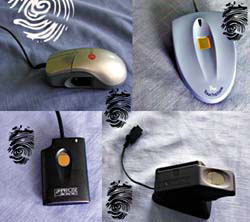 | Clockwise from top left: The U-Match mouse is rather bulky and suitable only for right-handed users. The Touchstone Pro was the most difficult of the four readers to get working properly. The BioMouse Plus, despite its name, does not perform mouse functions. The Precise 100 SC is the best-designed of the four fingerprint authentication devices tested. |
The right, not left, stuff
Wrong direction
A little testy
More OS flexibility
| Four fingerprint readers prove to be slow learners | ||||
 | BioMouse Plus American Biometric Co. Ottawa 613-736-5100 www.biomouse.com | U-Match BioLink Mouse BioLink Technologies International Inc. Miramar, Fla. 954-450-7061 www.biolinkusa.com | Touchstone Pro Mytec Technologies Inc. Toronto 416-467-3328 www.mytec.com | Precise 100 SC Precise Biometrics Vienna, Va. 703-848-9226 www.precisebiometrics.com |
| Price | $200 | $130 | $300 | $200 |
| OS | NT 4.0 | Win9x and NT 4.0 | Win9x and NT 4.0 | NT 4.0 |
| Sensor type | Optical | Optical | Silicon | Silicon |
| Connection | Parallel | PS/2 mouse | COM 1 or COM 2 | Parallel and mouse |
| Pros | + Usually authenticates on first try + Easy configuration | + Simplest to set up, administer and use + Convenient form factor | + Beeps when hardware is installed properly + Supports multiple OSes | + Best external design + Reliable silicon sensor |
| Cons | - Bulky and flimsy - Does not work with Win9x or Win 2000 | - Slowest at scanning fingerprint - Ergonomic mouse wears out quickly | - Device heats up - Expensive | - Most complex setup - Does not work with Win9x or Win 2000 |
| Overall grade |  |   |  |  |