MyCD does a slow burn'but well

Affordable CD-RW drives are quickly taking the place of floppy-disk drives.

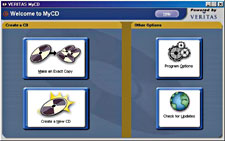
Although it can manipulate files and folders on the host drive, it's difficult to use. There is no recording wizard, and the program does not walk you through CD production or even list your options.In contrast, MyCD supports 74 burners from 19 CD-RW makers'ranging from Acer America Corp. of San Jose, Calif., to Yamaha Electronics Corp. of Buena Park, Calif. Recently, Hewlett-Packard Co. began shipping MyCD with its CD burners.MyCD walks you through every step of making or copying a disk and is easier to use than other CD software I've tried.It's not perfect. Sometimes it took longer to make a disk than the Adaptec software did. It also proved more confining in terms of what I could do with the data afterward.I spent two minutes installing and loading MyCD, about the same time as for Adaptec's DirectCD. Subsequently, MyCD's friendly wizard helped me through the procedures of making a disk. I was burning data within a minute.With the Adaptec software, you are forced to give it a go on your own or read the user manuals first. DirectCD took me about 15 minutes to figure out; other users have told me it's taken them as long as an hour to understand the burning process.In contrast, the MyCD wizard is so thorough it even ejects the holder for you when it's time to put in a disk.And though MyCD took longer than DirectCD to burn data, that isn't necessarily a bad thing.Most burning programs let you either directly copy a CD or create a new one from multiple data sources such as a PC hard drive. You have to puzzle out how.MyCD, however, pops up a window partitioned in two, with four simple options.At the left side, you can choose either Make an Exact Copy or Create a New CD.On the right, you can choose either Check for Upgrades or Program Options.If you choose to create a CD, you next choose to burn either data or music from a CD-ROM or a hard drive.MyCD searches the hard drive and lets you pick the files by highlighting and then dragging and dropping them to another window.If the data is already on CD, MyCD scans the information you want to burn and places it on your hard drive, then burns it to the CD-RW drive.Even though this intermediate step slows you down by at least two minutes, the data stays secure, and the burn is more reliable than with DirectCD, which writes data directly from the source.When copying from one CD to another, MyCD creates a 20M buffer on the hard drive to support the data transfer. This also takes up more time but boosts reliability. Most burning programs don't buffer while copying from CD to CD, which frequently causes loss of data.MyCD's interface is less versatile than those of other programs and has fewer burning options. It also doesn't let you erase rewritable CDs but only append them if room is available.But if you're just getting the hang of CD burning, MyCD is the best and most reliable novice tool around.

By Carlos A. Soto

GCN Staff

Affordable CD-RW drives are quickly taking the place of floppy-disk drives.

Why? A CD-RW is the network administrator's best friend for backing up 650M of data on a single disk, way more than the 1.4M you can fit on a floppy.

The software you use to manage your writing to CD can make a big difference.

If you are burning CDs for the first time, try MyCD from Veritas Software Corp. Although it might not come bundled with your drive, it's worth buying separately.

Many CD-RW drive makers bundle DirectCD from Adaptec Inc. of Milpitas, Calif. [GCN, July 10, Page 40]. It's a decent program with a familiar feel, rather like Microsoft Windows Explorer.


MyCD's extremely simple interface walks the user through every step of making and copying CDs, adding up to the best and most reliable program for novice CD burners.


Box Score

MyCD 2.0

CD recording software


Veritas Software Corp.; Mountain View,

Calif; tel. 805-782-4400

www.veritas.com

Price: $40


+ Easy to install and use

+ Reliable and inexpensive

- Long burning time


Real-life requirements:

Win9x, NT 4.0 or Windows Millennium Edition; 166-MHz or faster processor; 10M of free storage; CD-RW drive


Thorough wizard


Slower yet secure


X
This website uses cookies to enhance user experience and to analyze performance and traffic on our website. We also share information about your use of our site with our social media, advertising and analytics partners. Learn More / Do Not Sell My Personal Information
Accept Cookies
X
Cookie Preferences Cookie List

Do Not Sell My Personal Information

When you visit our website, we store cookies on your browser to collect information. The information collected might relate to you, your preferences or your device, and is mostly used to make the site work as you expect it to and to provide a more personalized web experience. However, you can choose not to allow certain types of cookies, which may impact your experience of the site and the services we are able to offer. Click on the different category headings to find out more and change our default settings according to your preference. You cannot opt-out of our First Party Strictly Necessary Cookies as they are deployed in order to ensure the proper functioning of our website (such as prompting the cookie banner and remembering your settings, to log into your account, to redirect you when you log out, etc.). For more information about the First and Third Party Cookies used please follow this link.

Allow All Cookies

Manage Consent Preferences

Strictly Necessary Cookies - Always Active

We do not allow you to opt-out of our certain cookies, as they are necessary to ensure the proper functioning of our website (such as prompting our cookie banner and remembering your privacy choices) and/or to monitor site performance. These cookies are not used in a way that constitutes a “sale” of your data under the CCPA. You can set your browser to block or alert you about these cookies, but some parts of the site will not work as intended if you do so. You can usually find these settings in the Options or Preferences menu of your browser. Visit www.allaboutcookies.org to learn more.

Sale of Personal Data, Targeting & Social Media Cookies

Under the California Consumer Privacy Act, you have the right to opt-out of the sale of your personal information to third parties. These cookies collect information for analytics and to personalize your experience with targeted ads. You may exercise your right to opt out of the sale of personal information by using this toggle switch. If you opt out we will not be able to offer you personalised ads and will not hand over your personal information to any third parties. Additionally, you may contact our legal department for further clarification about your rights as a California consumer by using this Exercise My Rights link

If you have enabled privacy controls on your browser (such as a plugin), we have to take that as a valid request to opt-out. Therefore we would not be able to track your activity through the web. This may affect our ability to personalize ads according to your preferences.

Targeting cookies may be set through our site by our advertising partners. They may be used by those companies to build a profile of your interests and show you relevant adverts on other sites. They do not store directly personal information, but are based on uniquely identifying your browser and internet device. If you do not allow these cookies, you will experience less targeted advertising.

Social media cookies are set by a range of social media services that we have added to the site to enable you to share our content with your friends and networks. They are capable of tracking your browser across other sites and building up a profile of your interests. This may impact the content and messages you see on other websites you visit. If you do not allow these cookies you may not be able to use or see these sharing tools.

If you want to opt out of all of our lead reports and lists, please submit a privacy request at our Do Not Sell page.

Save Settings
Cookie Preferences Cookie List

Cookie List

A cookie is a small piece of data (text file) that a website – when visited by a user – asks your browser to store on your device in order to remember information about you, such as your language preference or login information. Those cookies are set by us and called first-party cookies. We also use third-party cookies – which are cookies from a domain different than the domain of the website you are visiting – for our advertising and marketing efforts. More specifically, we use cookies and other tracking technologies for the following purposes:

Strictly Necessary Cookies

We do not allow you to opt-out of our certain cookies, as they are necessary to ensure the proper functioning of our website (such as prompting our cookie banner and remembering your privacy choices) and/or to monitor site performance. These cookies are not used in a way that constitutes a “sale” of your data under the CCPA. You can set your browser to block or alert you about these cookies, but some parts of the site will not work as intended if you do so. You can usually find these settings in the Options or Preferences menu of your browser. Visit www.allaboutcookies.org to learn more.

Functional Cookies

We do not allow you to opt-out of our certain cookies, as they are necessary to ensure the proper functioning of our website (such as prompting our cookie banner and remembering your privacy choices) and/or to monitor site performance. These cookies are not used in a way that constitutes a “sale” of your data under the CCPA. You can set your browser to block or alert you about these cookies, but some parts of the site will not work as intended if you do so. You can usually find these settings in the Options or Preferences menu of your browser. Visit www.allaboutcookies.org to learn more.

Performance Cookies

We do not allow you to opt-out of our certain cookies, as they are necessary to ensure the proper functioning of our website (such as prompting our cookie banner and remembering your privacy choices) and/or to monitor site performance. These cookies are not used in a way that constitutes a “sale” of your data under the CCPA. You can set your browser to block or alert you about these cookies, but some parts of the site will not work as intended if you do so. You can usually find these settings in the Options or Preferences menu of your browser. Visit www.allaboutcookies.org to learn more.

Sale of Personal Data

We also use cookies to personalize your experience on our websites, including by determining the most relevant content and advertisements to show you, and to monitor site traffic and performance, so that we may improve our websites and your experience. You may opt out of our use of such cookies (and the associated “sale” of your Personal Information) by using this toggle switch. You will still see some advertising, regardless of your selection. Because we do not track you across different devices, browsers and GEMG properties, your selection will take effect only on this browser, this device and this website.

Social Media Cookies

We also use cookies to personalize your experience on our websites, including by determining the most relevant content and advertisements to show you, and to monitor site traffic and performance, so that we may improve our websites and your experience. You may opt out of our use of such cookies (and the associated “sale” of your Personal Information) by using this toggle switch. You will still see some advertising, regardless of your selection. Because we do not track you across different devices, browsers and GEMG properties, your selection will take effect only on this browser, this device and this website.

Targeting Cookies

We also use cookies to personalize your experience on our websites, including by determining the most relevant content and advertisements to show you, and to monitor site traffic and performance, so that we may improve our websites and your experience. You may opt out of our use of such cookies (and the associated “sale” of your Personal Information) by using this toggle switch. You will still see some advertising, regardless of your selection. Because we do not track you across different devices, browsers and GEMG properties, your selection will take effect only on this browser, this device and this website.