
Biometric devices improve but still need more work





Call me paranoid, but I have some good company.
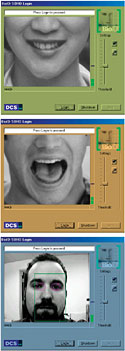
| GCN STAFFCall me paranoid, but I have some good company.Most biometric security programs store the user's unique physical characteristics on a hard drive, and Robert Flores, the CIA's chief technology officer, says it's easy to defeat them by hacking into the middleware [see story at ].When I quoted Flores' statement to the five biometric vendors in this review, they either changed the subject or essentially said, 'Well, nothing is foolproof''except for one company.Net Nanny Software Inc.'s representative not only agreed with Flores but also said that middleware vulnerability is what makes the company's BioPassword effective.BioPassword is the first behavioral biometric product I've tested that is not for password replacement but rather for password security enhancement. It compares a user's log-in attempt against the user's typing template in Microsoft Windows NT's SAM database on the primary domain controller.Most other biometric products, such as fingerprint or voice readers, give the option of defaulting to a password instead of a biometric log-in. This is a failsafe way to admit users in case of device malfunction or finger injury or laryngitis. A hacker wouldn't have to worry about the biometric portion of the log-in so long as the user name and password were known.But say the hacker breaks into the BioPassword code and learns the user name and password. How does the hacker then reproduce the typing pattern? It's next to impossible.On the downside, there's no BioPassword for standalone computers, and the version for Microsoft Windows 2000 just came out. You pretty much need an NT network with a talented administrator to install and run it.Although the idea behind BioPassword is simple, the application is not. During the boot process, the software redirects the computer from the native NT log-in script to the BioPassword log-in script. If the program is uninstalled, the computer goes back to the NT script.BioPassword works only with the NT File System, however. It doesn't work with a 16- or 32-bit File Allocation Table, so there will never be a BioPassword for Windows 9x.BioPassword requires no additional hardware, and the software is low-cost, ranging from $20 to $90 a seat. Even though it receives the Reviewer's Choice designation as one of the most effective products reviewed, it gets an A', not an A, because the technology is still in its infancy.Relying on another product, BioID SOHO 1.0 from D.C.S. AG of Germany, to ward off intruders is like expecting a golden retriever puppy to serve as a guard dog. In other words, this product doesn't work.When GCN Lab assistant Art Moser stood in front of my PC and identified himself as 'Carlos,' BioID greeted him, 'Welcome, Mr. Soto.'Shocked, I asked two other people, neither of whom resembled me in any way, to log in as Carlos. No matter how many times I reinstalled the software and re-enrolled myself, and no matter how many changes I made to the configuration parameters, BioID recognized everyone as Mr. Soto. It would even let people log in as me by holding up my photograph to the PC.The only time the product performed correctly was when Moser tried to log in by making loud monkey noises instead of speaking my name.When I informed D.C.S. AG that the $99 biometric product didn't work properly for face, mouth and voice recognition, I was told I needed to tweak certain parameters. Apparently, the default settings are ineffective for fewer than five enrolled users.After my tweaking, it still didn't work well. It became a bit more discerning but would let unauthorized users in from time to time.Who wants a biometric device that doesn't work without at least five registered users or that needs reconfiguration not described in the installation guide?The software has other problems. The only way to access the SOHO software manager to which the D.C.S. AG representative directed me is by starting the enrollment wizard, double-clicking on the desktop icon and then cancelling the program just initiated.BioID gets the first and only F grade I have given.Because it gives a false appearance of working, it's worse than a product that doesn't work at all.Fingerprint authentication is still the most popular form of biometrics. Of the four fingerprint products I reviewed last year [], two were back for this review: the Precise 100 SC client from the Swedish company Precise Biometrics, and the U-Match BioLink Mouse from BioLink Technologies International.Few biometric companies make silicon-chip instead of optical fingerprint readers, mostly because silicon deteriorates over time from static and accidental damage. Furthermore, silicon-chip devices generally cost more and are harder to set up and administer.Precise Biometrics' Precise 100 SC client has a Universal Serial Bus connection for use with newer operating systems such as Windows 2000. Priced affordably, it earned a higher grade than last year's: B+ instead of B'.The $129 and soon-to-be USB-connected U-Match BioLink Mouse no longer delivers the most bang for the buck, but it does have some improvements that moved it up half a grade from a B to a B+.For one thing, oxidation caused by fingertip moisture no longer chips the paint on the mouse. Also, the optical-chip sensor and the software processing seem to work a little faster than before.Both products are good alternatives to passwords. They're not as secure as BioPassword, but they do increase deterrence.The two other optical-chip products I reviewed use software from Identix Inc.The BioTouch PC Card Fingerprint Reader and the Datawise MT Digit with BioLogon Client 2.03 are by far the finest fingerprint devices I have used. The software is logical and the enrollment fast and pleasant.The Identix software converts a behavioral or physical attribute into coded templates for storage on a local or a networked drive.The Identix products are the Rolls-Royces of this market, only a lot cheaper. So why didn't they get A grades? I found the optical-chip technology somewhat faulty.Unlike silicon-chip devices, which require a fingerprint with a pulse, a natural electric discharge and a body temperature, optical chips merely need an image. Theoretically, someone could hack an optical-chip biometric device by pointing a flashlight at the reader from the right angle.Wouldn't it be great to have a fingerprint device that's as reliable as an optical chip but as secure as a silicon chip? Ethentica Inc.'s Ethenticator MS 3000 PC Card has a tactile sensor chip that blends optical and silicon sensing.A polymer synthetic top layer adds ruggedness, while the silicon chip only processes rather than captures the fingerprint image. Most silicon devices use the silicon to pick up as well as process the print. That requires larger amounts of fragile, exposed semiconductor material.The third layer of the tactile chip device is the software that translates the image it captures into a stored template.The MS 3000 uses the fingertip's natural electricity to generate an image for the silicon chip to process. This heightens the level of security and durability, but it takes longer to authenticate a user.Although the $230 MS 3000 card offers a viable alternative to silicon or optical devices, its blended technology is still new.
There are many ways to defeat these devices, so you need to consider their weak points
BY CARLOS A. SOTO
www.gcn.com/vol1_no1/daily-updates/3618-1.html
Password flaw
GCN, Sept. 11, 2000, Page 29
Silicon folly
Potential flaw
BY CARLOS A. SOTO
www.gcn.com/vol1_no1/daily-updates/3618-1.html
Password flaw
GCN, Sept. 11, 2000, Page 29
Silicon folly
Potential flaw
 | BioPassword | Bio Touch PC Card | MT Digit with BioLogon 2.03 | Precise 100 SC | U-Match Mouse | MS 3000 | BioID SOHO 1.0 | |||
| Vendor | Net Nanny Software Inc. Toronto tel. 800-881-7256 www.netnanny.com | Identix Inc. Sunnyvale, Calif. tel. 408-731-2000 www.identix.com | Datawise/SmartDisk Ltd. Berkshire, U.K. tel. 44 0118 977 9703 www.datawise-online.com | Precise Biometrics Vienna, Va. tel. 703-848-9266 www.precise.com | BioLink Technologies Inc. Miramar, Fla. tel. 800-611-1555 www.biolinkusa.com | Ethentica Inc. Aliso Viejo, Calif. tel. 949-389-1850 www.ethentica.com | D.C.S. AG Raleigh, N.C. tel. 866-462-4643 www.bioid.com | |||
| Pros and Cons | + Highest level of security + No additional hardware needed +Inexpensive ' Technology in infancy 'Difficult to set up and use | + Fastest optical chip + Best fingerprint software + Inexpensive ' Security not fully reliable ' Bulky PC Card | + Sturdy desktop reader + Fastest optical chip + Inexpensive ' Security not fully reliable ' No USB connection | + USB connection + Good external design + Reliable silicon sensor ' Expensive ' Only for NT, Win 2000 | + Well-designed ergonomic mouse + Fast optical chip + Inexpensive + Durable ' Security not fully reliable | + Tactile sensor + Easy installation and enrollment + Excellent log-in manager ' Slow chip ' Expensive | + Inexpensive ' Did not work reliably ' Software illogical and confusing ' Security inadequate ' SOHO manager confusing to initiate | |||
| Sensor Type | Not applicable | Optical | Optical | Silicon | Optical | Tactile sensor | Not applicable | |||
| Operating System | Windows NT 4.0 | Win9x, NT Workstation 4.0 | Win9x and NT 4.0 | NT 4.0, Win 2000 | Win9x | Win9x, Win ME, NT | Win9x, Win 2000, NT 4.0 | |||
| Price | $20 to $90 | $130 | $100 | $200 | $129 | $230 | $100 | |||
| Overall Grade |  |  | | | | |  | |  |  |