Handle work from afar

Remote-access software, originally conceived as a simple means of controlling operations or file transfers between two cabled-together computers, has adapted with the development of large networks, the Internet and wireless technologies.

| SPECIAL TO GCNRemote-access software, originally conceived as a simple means of controlling operations or file transfers between two cabled-together computers, has adapted with the development of large networks, the Internet and wireless technologies.It also supports many activities that are important to government agencies, including telecommuting, remote-control of servers, distance learning and technical support.Using remote-access software is just like being there. From your local, or client, machine you access a remote, or host, machine. The connection can be made in practically any way that two computers can communicate. Once the connection is made, you can run applications on the remote machine, move data between the machines, or communicate with the remote location via text chat or voice chat. The accompanying chart lists only products that include remote control.You can connect the local and remote machines in several ways: A cable connects the two computers through serial ports, parallel ports, or, most recently, Universal Serial Bus ports. Direct connection is the most reliable, and potentially the fastest, means of communication. But it requires that the computers be physically near each other. In this method, the client calls the host over ordinary phone lines. Both computers need modems and telephone access. Speed is limited to modem speed. Both computers are part of the same network. Speed is limited to network speed. Clients can access the host computer using standard Internet protocols. Both computers must have Internet access, and speed is limited to the speed of the slowest connection. Expertcity Inc.'s GoToMyPC operates completely as a Web-based service.Connection methods can be combined. For example, a client computer may use a modem to access a network with the host computer.With remote control, file transfer and chat capabilities, the uses for remote access are limited only by your imagination. The key is that it is simpler for a user to access the remote computer than to travel to it. Common uses include: A user at home connects with a computer at the office to run applications and access data. A proprietary application may only run on a single machine, but other machines can access that machine remotely. Systems administrators can access remote servers to perform, for example, system administration and e-mail maintenance remotely from home as required. Tech support personnel can control your computer from theirs to diagnose or fix problems without a face-to-face visit. The teacher can access student machines to demonstrate tasks, or students can access the teacher's machine to try new applications. Administrators can ensure that remote workers have the files and applications they need by making identical copies of approved systems. This doesn't require remote control. Users can exchange information via chat, share files and access each other's machines as needed.Before you buy a remote-access system, consider these factors:Wireless devices and Internet services will transform remote access yet again. Just as users want to check e-mail from personal digital assistants and other wireless devices, they will want to access their computers remotely.It's likely that remote access via the Internet will change from a product to a service, as is already true with GoToMyPC.This type of access has its pros and cons: Internet functions are inherently more platform-independent than off-the-shelf products, so security will be a greater concern.But remote-access software has always been adaptable to changing technologies.XXXSPLITXXX-
Remote-access software gives you control for telecommuting, maintenance and file transfers

BY EDMUND X. DEJESUS


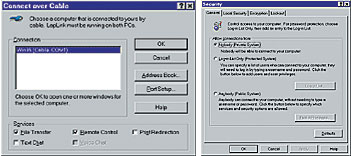
LapLink.com Inc.'s LapLink Gold includes cables to connect two computers directly. The product must be installed and configured on client and host computers before making any connections. LapLink offers wizards to simplify selecting ports to support connections, after which you can simply select from a list the remote computer to which you are connecting.


Direct connection.


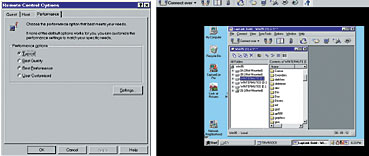
LapLink gives you many options for level of performance and security. During remote control sessions, it displays the screen of the controlled computer.
Modem.

Network.

Internet.


The Lowdown

' What does remote-access software do? Remote-access software allows you to control one computer from another to run applications, perform system maintenance, transfer files and use text or voice chat.


' How would I use this? For telecommuting, accessing applications that only run on one machine, maintaining servers and systems remotely, diagnosing and fixing computers remotely, distance-learning workgroups and collaboration, and for file transfer and synchronization.


' What are the most important factors in choosing a product? First, make sure it supports the computer platforms you use. Second, be sure that it can use the type of connections between computers that you prefer.


' What is the most important consideration about using remote-access products? Security. Unless properly secured with passwords, encryption and whatever else the product offers, remote access could leave a security hole for hackers to exploit.


' What's next? Accessing computers from wireless devices, and using Internet services to access computers from anywhere.


Telecommuting:

Application access:

Maintenance:

Technical support:

Distance learning:

File synchronization and cloning:

Workgroups and collaboration:


  • Platform. Choose a product appropriate to your platforms. David Scott, product manager with Symantec Corp., said that Symantec still offers free versions of pcAnywhere for MS-DOS and Microsoft Windows 3.1 systems. One freeware product, PalmVNC, even allows remote access from Palm OS devices.


  • Connection type. Choose a product that supports your infrastructure.


  • Security. Remote control of your computers is precisely what you don't want hackers to get. Security includes ensuring that only certain people can access host machines, as well as encrypting part or all of a remote session. Encryption can slow performance, but it's worth it. Symantec has an edge here because their main business is security. Its pcAnywhere, for example, requires passwords; other products make passwords optional.


  • Compatibility. Some of your applications, especially proprietary ones, might not operate perfectly by remote. You should test a remote-access product first to find out how it performs.


Edmund X. DeJesus is a free-lance writer in Norwood, Mass. E-mail him at dejesus@compuserve.com.


Company Product Platforms Connections Features Price
Compaq Computer Corp.

Houston

781-551-1000

www.compaq.com
Carbon Copy 5.5 MS-DOS; Windows network, direct Internet, modem, voice chat Remote control, file transfer $100
Expertcity Inc.

Santa Barbara, Calif.

805-964-0383

www.gotomypc.com
GotoMyPC Windows Internet Remote control, file transfer $20 per month
Harakan Software

Web site only

www.harakan.btinternet.co.uk
PalmVNC Palm OS Internet Remote control, file transfer Free
LapLink.com Inc.

Bothell, Wash.

425-483-8088

www.laplink.com
LapLink Gold Win 9x, NT, Win 2000, Win ME Internet, modem, network, direct Remote control, file transfer, voice chat, free cables $125
Netopia Inc.

Alameda, Calif.

510-814-5100

www.netopia.com
Timbuktu Mac OS; Win 9x, NT, Win 2000 Internet, modem, network, direct Remote control, file transfer, voice chat $100
Spartacom Technologies Inc.

Tucson, Ariz.

520-670-7100

www.spartacom.com
CoSession 2000 Win 9x, NT, Win 2000 Internet, modem, voice chat, network, direct Remote control, file transfer $50
Symantec Corp.

Cupertino, Calif.

408-517-8000

www.symantec.com
pcAnywhere Win 9x, NT, Win 2000, Win ME Internet, modem, network, direct Remote control, file transfer $160

NEXT STORY: PDA accessories come of age

X
This website uses cookies to enhance user experience and to analyze performance and traffic on our website. We also share information about your use of our site with our social media, advertising and analytics partners. Learn More / Do Not Sell My Personal Information
Accept Cookies
X
Cookie Preferences Cookie List

Do Not Sell My Personal Information

When you visit our website, we store cookies on your browser to collect information. The information collected might relate to you, your preferences or your device, and is mostly used to make the site work as you expect it to and to provide a more personalized web experience. However, you can choose not to allow certain types of cookies, which may impact your experience of the site and the services we are able to offer. Click on the different category headings to find out more and change our default settings according to your preference. You cannot opt-out of our First Party Strictly Necessary Cookies as they are deployed in order to ensure the proper functioning of our website (such as prompting the cookie banner and remembering your settings, to log into your account, to redirect you when you log out, etc.). For more information about the First and Third Party Cookies used please follow this link.

Allow All Cookies

Manage Consent Preferences

Strictly Necessary Cookies - Always Active

We do not allow you to opt-out of our certain cookies, as they are necessary to ensure the proper functioning of our website (such as prompting our cookie banner and remembering your privacy choices) and/or to monitor site performance. These cookies are not used in a way that constitutes a “sale” of your data under the CCPA. You can set your browser to block or alert you about these cookies, but some parts of the site will not work as intended if you do so. You can usually find these settings in the Options or Preferences menu of your browser. Visit www.allaboutcookies.org to learn more.

Sale of Personal Data, Targeting & Social Media Cookies

Under the California Consumer Privacy Act, you have the right to opt-out of the sale of your personal information to third parties. These cookies collect information for analytics and to personalize your experience with targeted ads. You may exercise your right to opt out of the sale of personal information by using this toggle switch. If you opt out we will not be able to offer you personalised ads and will not hand over your personal information to any third parties. Additionally, you may contact our legal department for further clarification about your rights as a California consumer by using this Exercise My Rights link

If you have enabled privacy controls on your browser (such as a plugin), we have to take that as a valid request to opt-out. Therefore we would not be able to track your activity through the web. This may affect our ability to personalize ads according to your preferences.

Targeting cookies may be set through our site by our advertising partners. They may be used by those companies to build a profile of your interests and show you relevant adverts on other sites. They do not store directly personal information, but are based on uniquely identifying your browser and internet device. If you do not allow these cookies, you will experience less targeted advertising.

Social media cookies are set by a range of social media services that we have added to the site to enable you to share our content with your friends and networks. They are capable of tracking your browser across other sites and building up a profile of your interests. This may impact the content and messages you see on other websites you visit. If you do not allow these cookies you may not be able to use or see these sharing tools.

If you want to opt out of all of our lead reports and lists, please submit a privacy request at our Do Not Sell page.

Save Settings
Cookie Preferences Cookie List

Cookie List

A cookie is a small piece of data (text file) that a website – when visited by a user – asks your browser to store on your device in order to remember information about you, such as your language preference or login information. Those cookies are set by us and called first-party cookies. We also use third-party cookies – which are cookies from a domain different than the domain of the website you are visiting – for our advertising and marketing efforts. More specifically, we use cookies and other tracking technologies for the following purposes:

Strictly Necessary Cookies

We do not allow you to opt-out of our certain cookies, as they are necessary to ensure the proper functioning of our website (such as prompting our cookie banner and remembering your privacy choices) and/or to monitor site performance. These cookies are not used in a way that constitutes a “sale” of your data under the CCPA. You can set your browser to block or alert you about these cookies, but some parts of the site will not work as intended if you do so. You can usually find these settings in the Options or Preferences menu of your browser. Visit www.allaboutcookies.org to learn more.

Functional Cookies

We do not allow you to opt-out of our certain cookies, as they are necessary to ensure the proper functioning of our website (such as prompting our cookie banner and remembering your privacy choices) and/or to monitor site performance. These cookies are not used in a way that constitutes a “sale” of your data under the CCPA. You can set your browser to block or alert you about these cookies, but some parts of the site will not work as intended if you do so. You can usually find these settings in the Options or Preferences menu of your browser. Visit www.allaboutcookies.org to learn more.

Performance Cookies

We do not allow you to opt-out of our certain cookies, as they are necessary to ensure the proper functioning of our website (such as prompting our cookie banner and remembering your privacy choices) and/or to monitor site performance. These cookies are not used in a way that constitutes a “sale” of your data under the CCPA. You can set your browser to block or alert you about these cookies, but some parts of the site will not work as intended if you do so. You can usually find these settings in the Options or Preferences menu of your browser. Visit www.allaboutcookies.org to learn more.

Sale of Personal Data

We also use cookies to personalize your experience on our websites, including by determining the most relevant content and advertisements to show you, and to monitor site traffic and performance, so that we may improve our websites and your experience. You may opt out of our use of such cookies (and the associated “sale” of your Personal Information) by using this toggle switch. You will still see some advertising, regardless of your selection. Because we do not track you across different devices, browsers and GEMG properties, your selection will take effect only on this browser, this device and this website.

Social Media Cookies

We also use cookies to personalize your experience on our websites, including by determining the most relevant content and advertisements to show you, and to monitor site traffic and performance, so that we may improve our websites and your experience. You may opt out of our use of such cookies (and the associated “sale” of your Personal Information) by using this toggle switch. You will still see some advertising, regardless of your selection. Because we do not track you across different devices, browsers and GEMG properties, your selection will take effect only on this browser, this device and this website.

Targeting Cookies

We also use cookies to personalize your experience on our websites, including by determining the most relevant content and advertisements to show you, and to monitor site traffic and performance, so that we may improve our websites and your experience. You may opt out of our use of such cookies (and the associated “sale” of your Personal Information) by using this toggle switch. You will still see some advertising, regardless of your selection. Because we do not track you across different devices, browsers and GEMG properties, your selection will take effect only on this browser, this device and this website.