
Get the lowdown on loading Linux apps





'No one really buys operating systems. They choose an application, and they choose the operating system to run that application.'
By Michael CheekGCN Staff'No one really buys operating systems. They choose an application, and they choose the operating system to run that application.'That's a comment from Red Hat Inc. co-founder Robert Young. Taking this sentiment to heart, I decided to begin checking out applications running under Linux.Not too long ago, I wrote about my odyssey getting Red Hat Linux 6.1 installed on a PC in the GCN Lab []. As with the OS installation, I'm examining Linux applications as a sort of everyuser.That means I won't try to run some bulletproof Web server but instead will look at typical desktop apps. In this review, I detail the process of getting apps installed under the OS. In coming months, the lab will review apps created for Linux.Many of the e-mail messages the lab received after the first review suggested that my installation problems stemmed, at least in part, from not tuning my hardware for Linux. So this time I used a Dell Latitude CPx notebook PC specifically tuned for Linux (see Test Drive, Page 1).The good news: Linux applications are inexpensive and as plentiful as penguins in the arctic, to use a metaphor inspired by the OS' roly-poly logo. Many of the applications are available as shareware, and some come for free with Red Hat Linux.The bad news: Because it's an open-source OS, Linux lacks discipline on how and, more importantly, where applications are installed on a system.First, let me go over a couple of basics.Linux has two graphical user interfaces, GNOME and KDE. Red Hat defaults to GNOME, which stands for GNU Network Model Environment. The GNU Project at the Freedom Software Foundation in Boston began developing GNOME in 1997 for Red Hat. For more information, visit the project's Web site, at .GNOME works with a package called Enlightenment, and both operate under the X Window System to create the GUI seen in Red Hat and some other flavors of Linux.Enlightenment makes the user interface customizable and attractive, with personal choices of colors and patterns. Visit to learn more about it. Two programmers who now work for VA Linux Systems Inc. of Sunnyvale, Calif., developed Enlightenment.As for a basic explanation, X Window talks to the graphics adapter hardware. Enlightenment is closer to the user, accepting mouse movement and clicks as well as keystrokes. GNOME is somewhere between the two.For simplicity's sake, users commonly refer to GNOME as the overall GUI.GNOME looks a lot like the Microsoft Windows GUI, with a taskbar along the bottom of the screen. On the left side of the taskbar, GNOME includes a button with a footprint on it. Press that button and, just as with the Windows Start menu, a list pops up.The list includes much of the default load of Linux plus a lot of repetition. Going through all the items listed takes more than a few minutes.A second basic characteristic of Linux is that applications are distributed under packaging schemes. The most common method is called TAR, which stands for Tape Archive.TAR works sort of like a .zip file program. It packages files and folders into a single file, but TAR doesn't compress files. Sometimes an additional compression program will condense a file, resulting in a long filename that ends with .tar.z or .tar.gz, for example. Linux doesn't restrict the file extensions to a dot and three letters.Some applications include an installation routine, but many do not. Instead, users often must review a document with a long list of instructions about where to deposit files.Because the .tar files generally don't know where to deposit things, Red Hat developed its own method to distribute software using the Red Hat Package Manager, known as RPM, and often with an .rpm filename.While the user is logged on as root, RPM makes sure applications install properly, depositing files where they belong. Notice I said the user must be root. The word root has several meanings under Linux: It can refer to a directory, a file structure and what Unix calls a superuser. A superuser is roughly the equivalent of a Windows systems administrator.I found it annoying that I had to log on as the superuser to install applications. But there's a basic logic here: Because Linux also perceives root as a reference to directories, the superuser has access to the root directories.When you start a GNOME session under root, the OS warns you about your powers: 'You are running the GNOME File Manager as root. As root, you can damage your system and the File Manager will not stop you.'That sounded pretty dangerous to me. But, under other accounts, if you attempt to install an .rpm file, nothing happens.A special application, known as Gnome RPM, works like the Add/Remove Programs icon in the Windows Control Panel. It acts as a central repository for information about installed apps.Gnome RPM looks a lot like Windows' File Manager. In the left windowpane are folders that organize the application packages. The right pane shows files and subdirectories. Along the top are several feature buttons, including Install, Unselect, Uninstall, Query, Verify, Find and Web Find.Generally, if you find any .rpm file'whether it's under Gnome RPM or GNOME'you can right-click on it and a pop-up menu will appear. Most of the time, selecting Install will accomplish the installation task.Sometimes nothing happens. Other times a message pops up that says the installation failed. The message won't give you any explanation for the failure or any hints on how to resolve the problem.After an application has been installed, the first question is, where did it end up?For the applications I tested, most failed to appear in what's essentially the equivalent of the Windows Start menu. I checked after installing each app.Among the applications I use often under Windows is CompuPic from Photodex Corp. of Austin, Texas. A Linux version on a CD-ROM came packaged with Red Hat Linux 6.1, so I installed it.After the installation, it took some time to find where Linux had stowed CompuPic.Luckily, I discovered a handy trick. If you right-click any .rpm file and select Show Info, a window displays information about where an application's files were deposited. That helps in finding the binary executable file. I found the CompuPic file under /usr/local/compupic/.That's somewhat logical. But most applications I installed did not end up in comparably named directories or even in the same area. Imagine trying to find files in the /usr/bin/ folder where I noticed more than 1,850 binary executables.Executable files in GNOME look like an oversized engine piston or a baby's rattle.After I located the CompuPic executable, I double-clicked on it, but nothing happened.The first installation didn't take. I uninstalled CompuPic using Gnome RPM. After a reboot'even under Linux this helps'a second attempt was successful.Speaking of reboots, I did crash Linux. (No doubt, some of the Linux faithful will take me to task for this.) Perhaps the underlying kernel of the OS didn't choke, but GNOME certainly locked up.During my testing, I installed several apps'some small, some large. In general, Gnome RPM works well, although it doesn't have quite the same ease of use as Windows. If only Gnome RPM politely deposited shortcuts to applications in GNOME's menu.Gnome RPM organizes packages into handy folders such as amusements, applications, base, development, documentation, networking, system environment, user interface, utilities and X11.Hold it. X11? Basically, X11 stands for the X Window System.Gnome RPM also includes some handy features that Windows lacks. For example, select any installed package and click on the Query button; Gnome RPM displays the same basic information found in the Show Info box. Then click on Verify to make certain all the files installed still reside where they belong.Many applications include an Upgrade button, and this feature makes installing updates or new versions easy. Gnome RPM also includes a Check Sig feature to verify digitally signed applications.Interestingly enough, an entire directory can be queried or verified. And a user can go through and select multiple packages. Unlike Windows, selections are sticky without having to use the Ctrl or Alt key to choose multiple items.Unfortunately, if the verification feature turns up problems, Gnome RPM has no Fix button. Making repairs requires uninstalling a package and then reinstalling it.Gnome RPM can be extremely powerful. But for the most part, loading Linux apps is not an automatic process.One major exception was StarOffice 5.1. The Sun Microsystems Inc. office suite installed as easily as a Windows app. And I did not have to be logged in as root to install it. StarOffice's wizard stepped me through installation even as a regular user named 'michael.'And because I was running Linux, I did not have to reboot to start using the suite's programs.On the flip side, an icon never showed up in any of the OS menus. I had to go searching. I found the suite under /home/michael/office51/bin/. The file was named soffice.Not all flavors of Linux adopt the Gnome RPM approach. Debian Linux from Software in the Public Interest Inc. of Tracy, Calif., offers its own packaging scheme, DEB. Corel Corp. also uses the DEB management tool for Corel Linux.Despite Red Hat's efforts with Gnome RPM, Linux is not that easy to use for the everyuser. But it is powerful. And there's the trade-off.
Inexpensive and free programs are plentiful, but learning how to load them requires trial and error

GCN, Nov. 22, 1999, Page 25
Back to basics
www.gnu.org
www.enlightenment.org
Show-and-tell
Automatic star
GCN, Nov. 22, 1999, Page 25
Back to basics
 |
www.gnu.org
www.enlightenment.org
Show-and-tell
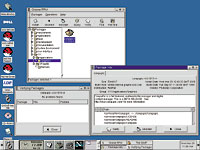 | Gnome RPM eases the installing and uninstalling of applications under Linux. |
Automatic star
Box Score  |
Red Hat Package Manager and Gnome RPM Application installer and uninstaller included with Red Hat Linux 6.1 Red Hat Inc.; Durham, N.C.; tel. 919-547-0012 www.redhat.com + Powerful package manager ' Doesn't add shortcuts to menus ' Only works under root log-on |
NEXT STORY: Senators check up on ITMRA progress