
Three personal firewalls repel the invaders





Broadband is a two-edged sword for network administrators who must keep field offices, industry partners and telecommuters connected to agency headquarters LANs.
| SPECIAL TO GCNBroadband is a two-edged sword for network administrators who must keep field offices, industry partners and telecommuters connected to agency headquarters LANs.Digital subscriber line and other always-on connections, combined with virtual private networking software, are relatively easy and cheap to set up. At the same time, they expose the remote systems to attacks that internal networks are better equipped to resist.It isn't practical for administrators to try to construct a firewall for every temporary office and telecommuter. Fortunately, a new generation of desktop security software makes it possible to protect such systems on an individual basis.Personal firewalls are cost-effective. Even for a fair-sized office, their license fees probably would run less than a dedicated firewall appliance.I tested three of the latest products: Sygate Technologies' Personal Firewall 2.1, Network Ice's BlackIce Defender 2.1 and Symantec's Desktop Firewall 2.0.All three can control or block any network traffic coming into or leaving a PC, but they're most secure when used in conjunction with antivirus software and a generous dose of common sense.Although each of the tested products could thwart the various port scans and Trojan attacks I threw at them, Sygate Personal Firewall turned out to be the best overall choice for administrators looking to deploy a flexible yet centrally controllable security product. It received the Reviewer's Choice designation.Symantec Desktop Firewall would make a good standalone choice, and BlackIce Defender also was a solid product but with some interface flaws. Its unique security approach might inspire more paranoia among users than necessary.My test platform for the review was a 200-MHz Gateway E3200 Managed PC with 64M of RAM and Microsoft Windows 2000 Professional, representative of the desktop power in an average small office.The Sygate entry, formerly known as Sybergen Secure Desktop, could provide tight security in a relatively small footprint. Its resource requirements were modest: Microsoft Windows 9x, Windows Millennium Edition, NT 4.0 with Service Pack 3 through 6a, or Windows 2000; 10M of free storage; and an installed TCP/IP stack.Sitting on top of the TCP/IP stack, Sygate Personal Firewall can work with dial-up modems, Integrated Services Digital Network modems or network interface cards'or all of the above at the same time. The software is downloadable for free, unlimited personal use or a 30-day business trial.Build 245, the one I tested, didn't support the Internet connection-sharing feature of Windows 98 Second Edition, Win Me or Win 2000. Sygate recommended against enabling the connection-sharing feature and also discouraged use on servers running Win 2000 or NT. One advantage of Personal Firewall in telecommuting or a small office setting is remote administration. The software will work with Sygate Management Server 1.0 for remote installation, central administration, report generation and consolidated logging.It took me only a few minutes to install Sygate Personal Firewall. The program had five user-configurable security levels, ranging from fully off to ultra-high, which locked down all network access to the PC.Each level between the extremes could have its own trusted IP addresses and advanced port settings for TCP, User Datagram Protocol and Internet Control Message Protocol traffic. Trust settings at higher security levels rolled over to lower ones. The software could also be set to launch in background at startup.The ultra-high security setting should be used only when no Internet access is required. High security blocked all protocol connections from untrusted sources; my attempts to ping the test system's IP address from an untrusted address failed at the high level, although they succeeded at the medium and low levels.Medium security let local Internet applications communicate with the Net. Low security accepted nearly all inbound Internet requests, which would be necessary for a system acting as a file server or Web server.Sygate Personal Firewall's scheduling feature could maximize the security level during a specified time of day. It would be valuable for users who leave their systems on at night for maintenance or who must be away from their desks for an extended period.A simple graphical interface with slider bar set the security level, and buttons brought up configuration dialogs and security logs. Another button linked to Sygate's security test site, which remotely scanned the security settings and generated reports about firewall effectiveness.To prevent attacks by Trojan programs that maintain an open network connection or access Internet data without the user's knowledge, Personal Firewall permits only trusted applications to make network protocol calls. It consults a list of executable programs to determine whether an application is trusted or not. The user can manually write a list, or the software can learn which applications to trust as they become active and try to use the network.At higher security settings, Personal Firewall also blocks TCP network ports numbered higher than 1,000. Such ports are seldom used by ordinary apps but can be exploited by Trojans to make back doors. This feature could cause trouble for users of apps such as instant messaging.If a PC will share files with other computers on a LAN without VPN software, the trusted IP addresses must be entered in Personal Firewall's security settings. Otherwise it will block access to network log-in services and network browsing. Be sure to tweak the installation to your needs.The problem with this way of blocking Trojan attacks is that it doesn't prevent malicious software from masquerading as a trusted application. For example, a Trojan program named netscape.exe or iexplore.exe could sneak by and gain unfettered access to the Internet. This short-coming is almost universal among personal firewalls, which is why they should be used in conjunction with antivirus software.I didn't think much of Personal Firewall's logging capabilities. It failed to log any of my attempted probes from untrusted addresses, a ping flood attack I mounted, or any of the port scans by Sygate's own testing site. The log proved useful only for recording outbound requests.BlackIce Defender stood at the other end of the logging spectrum. It logged so much that it could make any user paranoid.Instead of a firewall per se, BlackIce Defender is an intrusion detection and prevention product that doesn't interfere with normal operations or unthreatening activities such as port scans and probes. Instead, it monitors incoming network packets to determine whether an attack is in progress. It then moves to block hostile activity dynamically but lets the user choose to receive some or all unsolicited network requests.Security was at four levels: Trusting, which merely monitored traffic and let all packets flow through; Cautious, which blocked some unsolicited requests; Nervous, which blocked most unsolicited requests; and, of course, Paranoid. That one blocked all unsolicited requests.BlackIce at first seemed less intrusive than Sygate's product. Unlike Personal Firewall, BlackIce didn't prevent apps from accessing the network before they were recognized as trustworthy. Instead, it monitored for network activity like that of common Trojans. Regular updates from the Network Ice Web site added new blocking functions as threats came up. I could also designate network addresses to trust or to block.BlackIce assigned a severity level to incoming packets, terming them normal, suspicious, serious or critical. Anything suspicious or worse was logged and could be automatically blocked. I could set thresholds for visible and audible alerts.Attacks could be recorded in evidence files viewable in a network analyzer software package'but not by any client software that the average user would have. It might prove helpful to network administrators, but only for forensic purposes.In the hands of a true paranoid, BlackIce becomes intrusive to the point of obsession. If the user chooses to be alerted to all suspicious activity and happens to have DSL or another always-on broadband connection without an intervening firewall, even TCP port scans and port probes will be recorded as suspicious activity.In one 90-minute period, the program recorded more than 300 such 'attacks' on my test system. The BlackIce documentation said false positives could result from any number of chatty or nosy Internet applications, such as Web crawlers and the like. Uninformed or overly suspicious users who believed in the false positives might soon cease to be productive, instead spending their time trying to block the perceived attacks.The interface had some interesting quirks. The tabs for Attacks and Intruders kept updating each new perceived assault, and it took concentration and good hand-eye coordination to catch any of the tab listings long enough to block their addresses.Also, there were minor glitches in the build I was testing. The scale on the History tab, which showed an electrocardiogram-like chart of network traffic, changed from minutes to hours to days, but the legend never did. That's a minor detail that reveals the lack of developer attention unfortunately so common in this era of instant Net distribution of patches and fixes.BlackIce Defender is a personal version of the BlackIce Agent included in Network Ice's Icepac Security Suite. The suite has an administrative console, IceCap, which lets the administrator remotely configure systems and view consolidated data about attacks.Defender had an interface tab for IceCap, but it wasn't enabled in the build I tested. Remote installation of BlackIce Agent, the Icepac version, was possible only via network disk sharing, impractical for a remote user.Symantec Desktop Firewall, like Sygate's product, clamps down on Internet connections by default and learns which ones are permissible through user interaction. The user can create a rules base that drives what applications can use which TCP ports.Symantec's user interface wasn't as simple as Sygate's. I had to drill down deeper and go through many dialog boxes to do what was possible in one or two steps with Sygate Personal Firewall. But Symantec's interface gave finer control over access rules, even letting me edit rules interactively.Desktop Firewall also had privacy protection. It could block Web cookies, pop-ups, Java applets and ActiveX controls, and prevent transfer of personal information to unsecure Web sites.Desktop Firewall's logging was well-organized and comprehensive. It logged every allowed connection, all firewall activity, every action taken by the privacy and content filters, and every site I visited.Its weakness was lack of support for remote configuration and management. It had Symantec's LiveUpdate service to keep the software current, but no built-in mechanism for remote configuration. That would make it hard to enforce a consistent security policy across all remote systems.Any of these products, though affordable and fairly easy to use, will have several problems to resolve. They should be used to access secure networks only in conjunction with antivirus and VPN software. A version of the Symantec product under the Norton Internet Security 2001 label includes virus protection.Remote users should do any local networking'including file and printer sharing'with a protocol other than TCP/IP, preferably NetBEUI or IPX. NetBEUI, a nonroutable protocol, works best in an all-Windows environment and can support file sharing via VPN.Using TCP as an Internet protocol only'and blocking NetBIOS traffic for file sharing and print sharing via TCP'ensures that the personal firewall software will adequately protect remote systems.
Broadband provides more access for field offices and telecommuters, but also requires multipronged security plan
BY SEAN GALLAGHER

Team players
Custom settings
Less intrusive
Sean Gallagher is an independent industry analyst in Baltimore. His e-mail address is sean@dendro.com.
BY SEAN GALLAGHER
Team players
Custom settings
Less intrusive
Sean Gallagher is an independent industry analyst in Baltimore. His e-mail address is sean@dendro.com.
| Three software firewalls help protect remote offices at a low price | ||||||
 | Sygate Personal Firewall 2.1 | BlackIce Defender 2.1 | Symantec Desktop Firewall 2.0 | |||
| Vendor | Sygate Technologies Inc. Fremont, Calif. tel 510-742-2600 www.sygate.com | Network Ice Corp. San mateo, Calif. tel 650-532-4100 www.networkice.com | Symantec Corp. Cupertino, Calif. tel 408-253-9600 www.symantec.com | |||
| Pros | + Tight protection against Trojan and other attacks + Remote management + Learns which aps are trusted | + Dynamic protection + Thorough logging and reporting + Checks for and downloads latest fixes | + Flexible, rules-based security with filtering and privacy protection + Symantec's LiveUpdate keeps up with new Trojan programs | |||
| Cons | - Inadequate logging - Intrusive learning process | - Awkward user interface - Many false positives - Not compatible with IceCap for enterprise management | - No remote administration, only remote installation - Complex to configure for some users | |||
| Platforms; requirements | Win9x, WinME, NT, Win 2000; 16M of RAM, 10M of storage | Win9x, NT 4.0 with Service Pack 3 or higher, Win 2000 with Service Pack 1; 16M of RAM, 10M of storage | Win 9x, NT 4.0 with Service Pack 3 or higher; 32M of RAM, 35M of storage | |||
| Price | $30 per copy; $10 more with upgrade protection | $40 | Starts around $33 GSA for site license | Overall Grade |  |  |  |  |
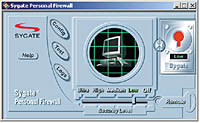 | size="2" color="#FF0000">Sygate Personal Firewall | 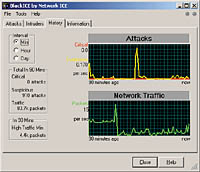 | size="2" color="#FF0000">BlackIce Defender | 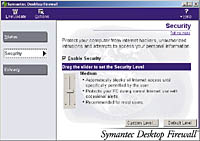 | size="2" color="#FF0000">Symantec Desktop Firewall |
NEXT STORY: Evolving standards expand wireless reach